GR-DVM5
Dear Customer
It is recommended that you
Connection to the mains supply in the United Kingdom
Some DO’S and DON’TS on the Safe USE of Equipment
This unit is produced to comply with Standard IEC Publ
Safety Precautions
Sub-Code Area
Video Area Audio Area
ITI Insert and Tracking Information Area
VIDEO/AUDIO cable
DC cord
Grip/Hand strap
RCA plug 4 RCA plug Ø3.5 mini-plug 4RCA plug Video cable
Lithium battery CR2025
RM-V712U Min DVM-30
DV30ME
Charging The Battery Pack
Insert Charged Battery
Installing The Battery Pack
Open Battery Cover
Close Battery Cover
Using The Battery Holder
Indoor Use
Input Date and Time
Date/Time Settings
Select Operation Mode
LCD monitor
INSERT/REMOVE Tape
Loading/Unloading a Cassette
Open Cassette Cover
To protect valuable recordings
Set depending on your preference
Recording Mode Setting
SET Recording Mode
Select Dial
Attach Grip Strap to Hand Strap Eyelet
Adjust Length
Grip Strap Attachment
Attach Grip Strap to SUB Hand Strap Eyelet
Tripod Mounting
Dioptre Adjustment
Adjust Dioptre
Turn on Camcorder
Pull OUT Battery Holder
Remote Control Unit
Installing The Battery
Insert Battery in Holder
Self-Timer Playback Play
Operation Mode
Power Dial Position
Function
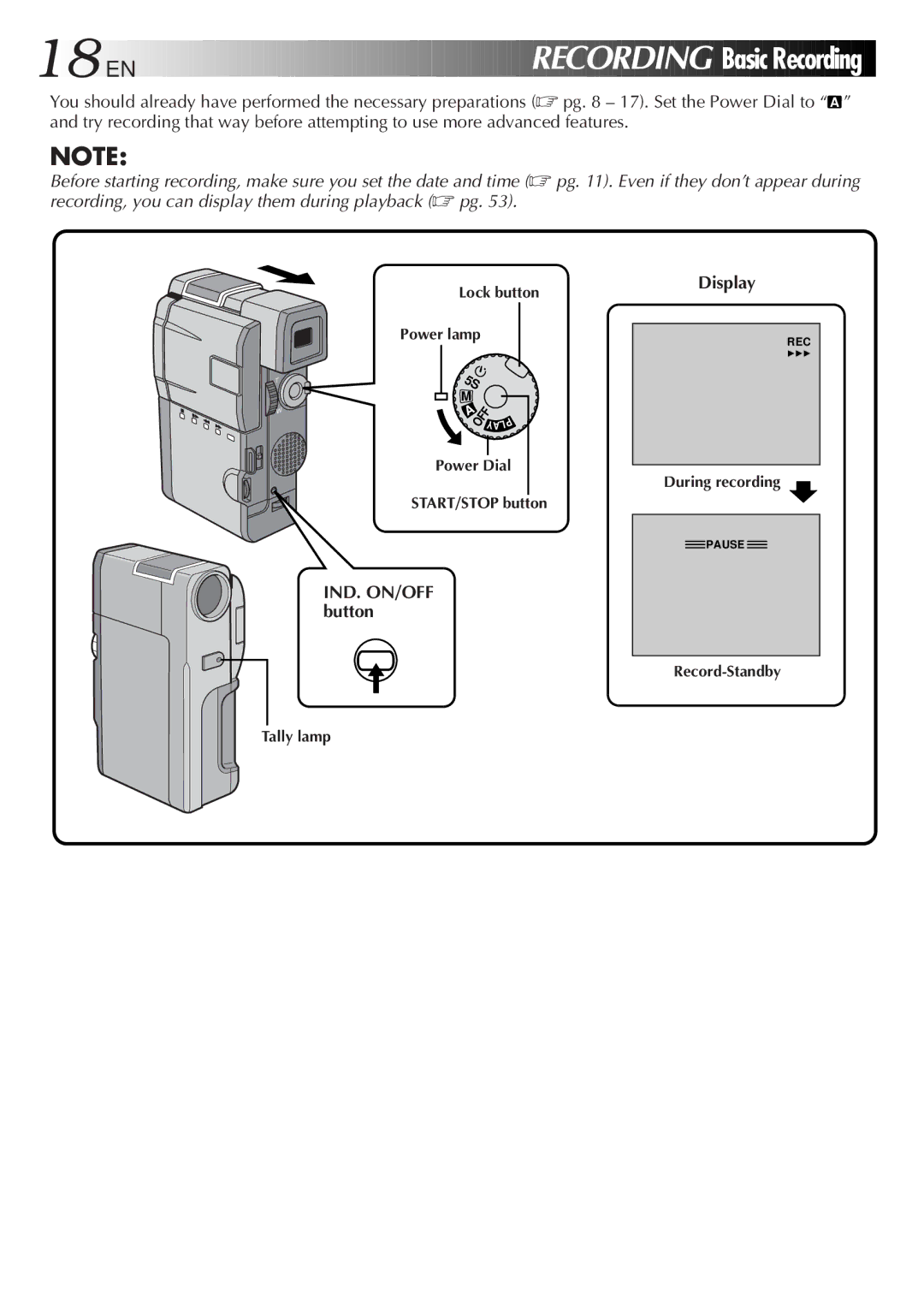
EN Recording
IND. ON/OFF button Display
Start Recording
Record-Standby mode is engaged
Pull OUT Viewfinder or Open LCD Monitor
Stop Recording
Recording From The Middle Of a Tape
Engage Still Mode
Power lamp comes on
Start Search
Proper recording
When blank portion is recorded on a tape
Time Code
During shooting
Brightness Control
Tape Remaining Indicator
Adjust Brightness
LCD Monitor/Viewfinder Indications
Open LCD Monitor
Journalistic shooting
Interface Shooting
Tilt LCD Monitor
EN Recording
Zoom
Displaying The Date And Time During Recording
Select Function
Menu button IND. ON/OFF button Select Dial
Engage 5S Mode
END 5-SECOND Mode Recording
Scene 5-second recording
Stop SELF-TIMER Recording
Self-Timer
Engage SELF-TIMER Mode
END SELF-TIMER Recording
Snapshot
Access System Menu
Select Snapshot Mode
Take Snapshot
Motor Drive mode
Snapshot mode Pin-Up mode With frame
Recording Menu allows you to set these functions
Menus
Close Recording Menu
Please refer to pages 31, 32 for details
REC Mode Recording mode
Wide Mode
Zoom Zoom magnification
DIS Digital Image Stabilizer
System Menu
Close System Menu
Photo Mode
See pages 28
To Cancel FADE/WIPE Effects
Accessmenu Manual Mode Item
Access FADER/WIPE Menu
FADE/WIPE Effects
Example Wipe Scroll
Fades and Wipes
Example WH Fader White
WH , BK , , B W
Picture Wipe/Dissolve
Resume Recording
P and P of the Fader/Wipe Menu
Random Variations
Fade in or out with a full-screen mosaic effect
Fade in or out with a white screen
Fade in or out with a black screen
Fade out from colour to black and white
Fader and Wipe Menu
Disable P.AE/EFFECT
AE/Effects
Press START/STOP. The image begins with the selected effect
Slow Slow Shutter
Adjust Focus
Manual Focus Adjustment
Access Manual Focus
To Change To Auto Focus
Brightness control of the display
Adjust Exposure
Exposure Control
To Return To Automatic Exposure Control
To Return To Automatic Iris Control
After , adjust the exposure rotating
Iris Lock
Iris
Closement White Balance Adjust
White Balance Adjustment
Accessment White Balance Adjust
To Return To Automatic White Balance
Manual White Balance Operation
Enter Setting
Exit Manual White Balance Adjustment
To Change The Tint For Recording
Viewing Recording
Volume switch
Rewind Tape
END Playback
To Perform High-Speed Search
Press 2 or 3after pressing 6/4. The tape
High-Speed Search. This is not a malfunction
Locatescene Portion of Magnified
Playback Zoom
Activate Zoom
END Zoom
Accessmenu Playback Effect Select
Playback Effects
Close Menu
Access Playback Menu
Playback Menu
Playback Menu allows you to set the following functions
Playback Sound
Displaying the Date During Playback
Displaying The Time Code During Playback
VCR/TV Connection when connecting directly to the camcorder
Turn on Power
Select TV’S Video Mode
VCR/TV Connection using AC Charger Station
Attach and Lock
VCR/TV connection using the AC Charger Station
Basic Connections
Connect AC Charger Station to TV or VCR
Connect as shown in the illustration 1, 2 or 3 pg
To DV
Connection To a Video Unit Equipped With a DV Connector
Connector
Digital Printer
Attach Camcorder to AC Charger Station
Supply Power
Plug the AC Charger Station’s power cord into an AC outlet
While pressing down the lock
Pause Recording
Dubbing
Make Connections Start Playback
Recording deck
Digital Dubbing
Make Connections
Remote control, you must set the VCR brand
Brand Setting
Pg 65, or control the VCR using
Operate VCR
Random Assemble Editing
Execute FADE/WIPE in if Necessary
SET EDIT-IN Point
SET EDIT-OUT Point
USE P.AE/EFFECT if Necessary
Engagemode Vcrs RECORD-PAUSE
Start Editing
Stop Editing
Choose a Scene
For More Accurate Editing
Prepare for R.A. Edit Play Back Dubbed Scene
Random Assemble Editing Menu appears
Adjustment of VCR‘s against Camcorder Timing
Input Correction Data
Begin Dubbing
Audio Dubbing
Find EDIT-IN Point
Pause During Dubbing
Recording Sound Display Output Sound
Troubleshooting
Selected Mode pg
Snapshot mode cannot be used Digital Zoom doesn’t work
Video mode
Mode recording Pg , there is a delay
Troubleshooting
Angle of the LCD monitor
LCD monitor. When This happens, the displayed
When the LCD monitors Fluorescent light reaches
Whitish
Two or three times
LCD monitor Certain FADE/WIPE, P.AE Indications blink
LCD monitor or Camcorder’s functions
Please consult your nearest
Cleaning The Camcorder
Camcorder
Zoom switch T/W pg
Power dial pg
Volume switch Volume pg
Viewfinder pg
AC Charger Station
LCD Monitor/Viewfinder Indications During Recording
Function
LCD Monitor/Viewfinder Indications During Playback
Indications Function
During use
To prolong service life
To avoid hazard
Store cassettes
Dirty heads can cause the following problems
For safety, do not
Avoid using the unit
Do not leave the unit
General
Video
Audio
Video
Connectors
Output power
Audio
Auto focus
Colour temperature
AC Charger Station
On-screen display
Pg , 42
Pg , 54
Pg 35, 41, 51
Iris Iris Lock LCD monitor/Viewfinder Indications
GR-DVM5


 EN
EN


 RECORDING
 Basic
Basic
 Recording


 PAUSE
PAUSE