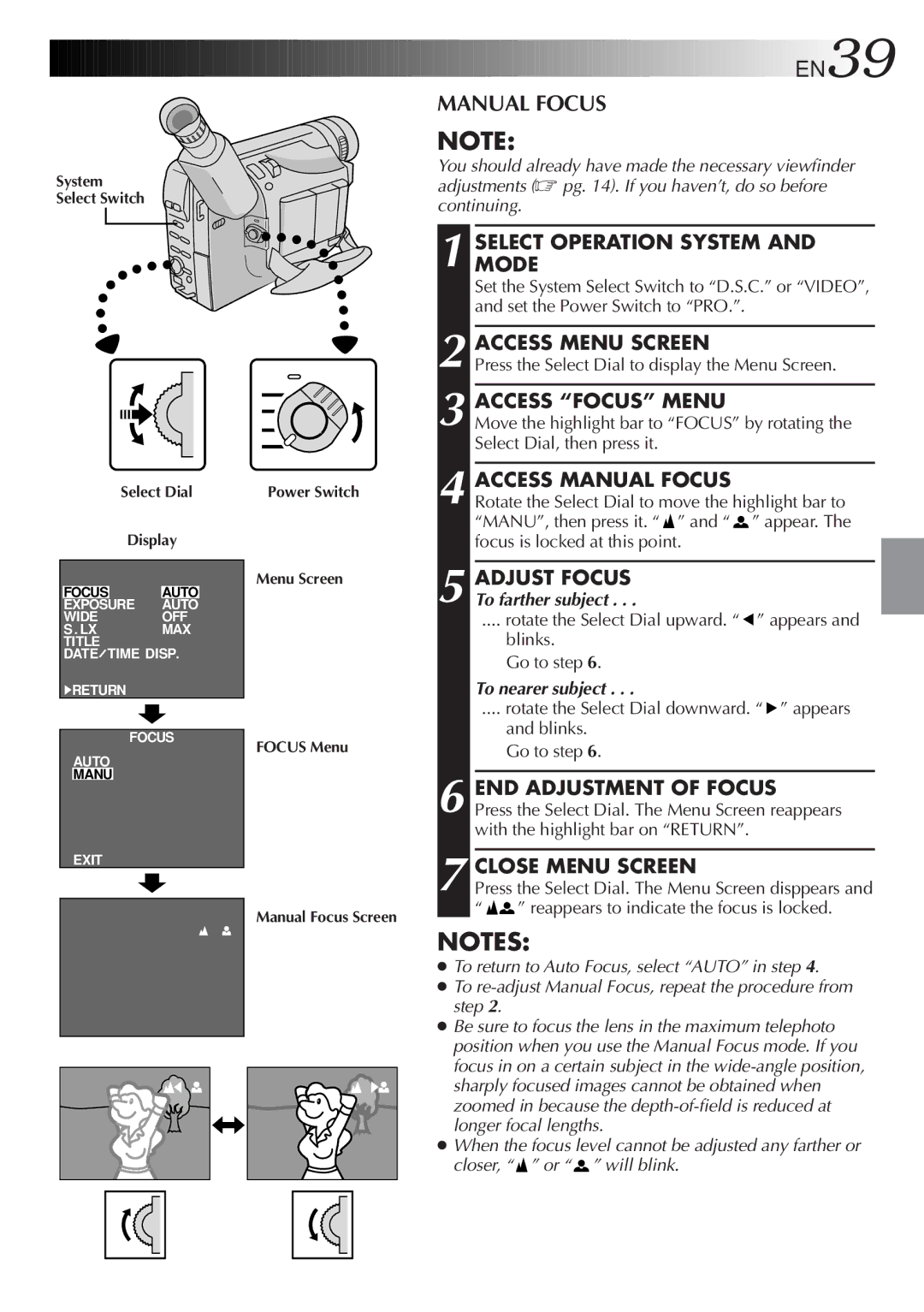
System
Select Switch
Select Dial
Display
FOCUS AUTO
EXPOSURE AUTO
WIDEOFF
S . LXMAX TITLE
DATE TIME DISP.
4RETURN
FOCUS
AUTO
MANU
EXIT
Power Switch
Menu Screen
FOCUS Menu
Manual Focus Screen


 EN39

MANUAL FOCUS
NOTE:
You should already have made the necessary viewfinder adjustments (☞ pg. 14). If you haven’t, do so before continuing.
1 SELECTMODE OPERATION SYSTEM AND
Set the System Select Switch to “D.S.C.” or “VIDEO”, and set the Power Switch to “PRO.”.
2 ACCESS MENU SCREEN
Press the Select Dial to display the Menu Screen.
3 ACCESS “FOCUS” MENU
Move the highlight bar to “FOCUS” by rotating the Select Dial, then press it.
4 ACCESS MANUAL FOCUS
Rotate the Select Dial to move the highlight bar to “MANU”, then press it. “ ” and “
 ” appear. The focus is locked at this point.
5 ADJUST FOCUS To farther subject . . .
.... rotate the Select Dial upward. “ ” appears and
blinks.
Go to step 6.
To nearer subject . . .
.... rotate the Select Dial downward. “ ” appears
and blinks. Go to step 6.
6 END ADJUSTMENT OF FOCUS
Press the Select Dial. The Menu Screen reappears with the highlight bar on “RETURN”.
7 CLOSE MENU SCREEN
Press the Select Dial. The Menu Screen disppears and “
 ” reappears to indicate the focus is locked.
NOTES:
●To return to Auto Focus, select “AUTO” in step 4.
●To
●Be sure to focus the lens in the maximum telephoto position when you use the Manual Focus mode. If you focus in on a certain subject in the
●When the focus level cannot be adjusted any farther or closer, “ ” or “
 ” will blink.