Language
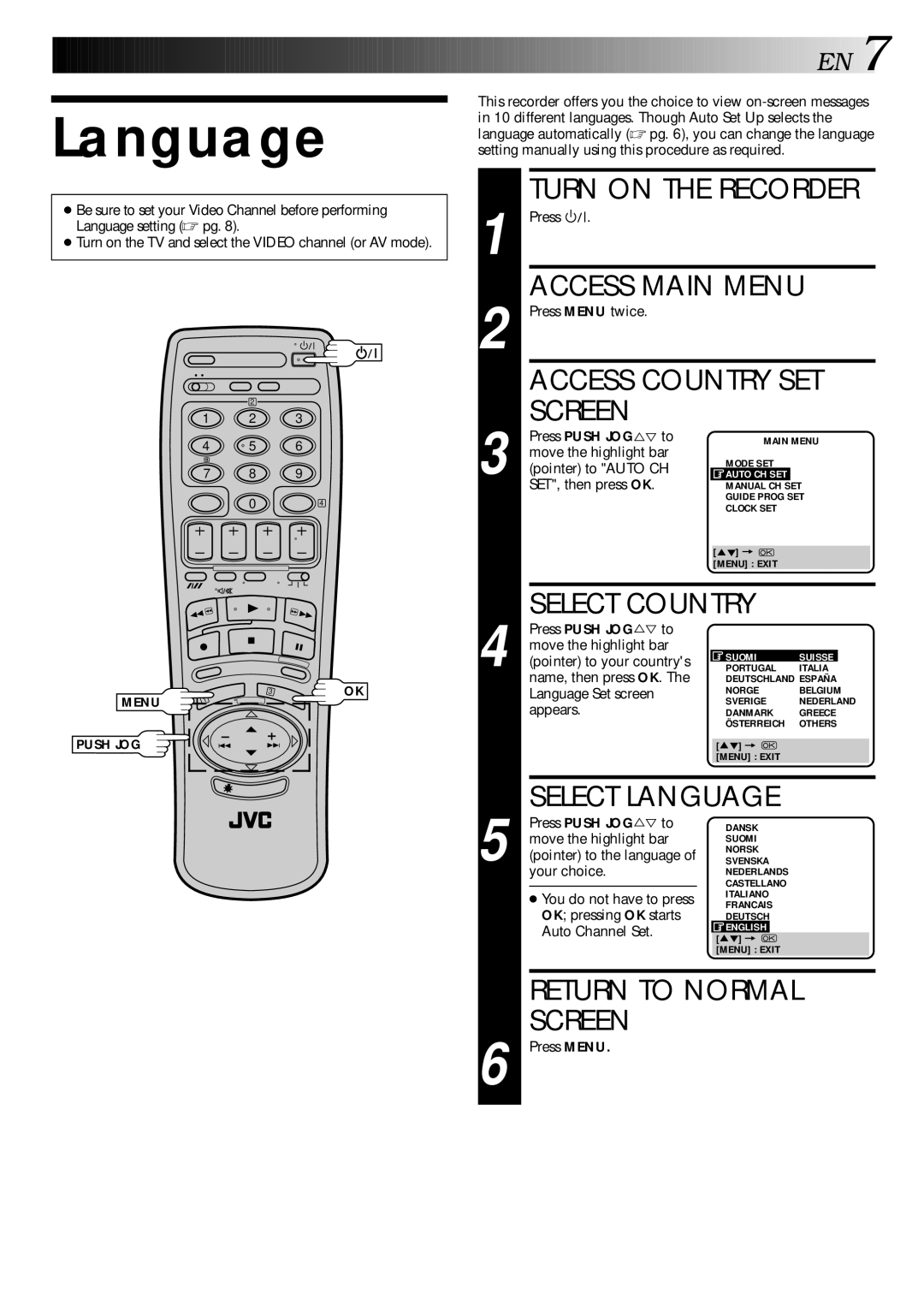
●Be sure to set your Video Channel before performing Language setting (☞ pg. 8).
●Turn on the TV and select the VIDEO channel (or AV mode).
2
1 2 3
4 | 5 | 6 |
7 8 9
04
3 | OK |
MENU | 1 |
PUSH JOG


 EN
EN
 7
7
This recorder offers you the choice to view
TURN ON THE RECORDER
1 Press |
|
|
| . |
|
|
|
| |
|
|
|
|
|
| ||||
| ACCESS MAIN MENU | ||||||||
2 Press MENU twice. |
|
|
|
| |||||
| ACCESS COUNTRY SET | ||||||||
| SCREEN |
|
|
|
| ||||
| Press PUSH JOG to |
| MAIN MENU | ||||||
%Þ |
| ||||||||
move the highlight bar |
| MODE SET |
|
| |||||
3 (pointer) to "AUTO CH |
|
|
| ||||||
| AUTO CH SET |
|
| ||||||
SET", then press OK. |
| MANUAL CH SET | |||||||
|
|
|
|
|
|
| GUIDE PROG SETT | ||
|
|
|
|
|
|
| CLOCK SET |
|
|
|
|
|
|
|
|
|
|
|
|
|
|
|
|
|
| [5°] = |
|
| |
|
|
|
|
|
|
| [MENU] : EXIT |
|
|
|
|
|
|
|
|
|
|
|
|
| SELECT COUNTRY |
|
| ||||||
| Press PUSH JOG%Þ to |
|
|
|
| ||||
move the highlight bar |
| SUOMI | SUISSE | ||||||
4 (pointer) to your country's |
| ||||||||
| PORTUGAL | ITALIA | |||||||
name, then press OK. The |
| DEUTSCHLAND ESPAÑA | |||||||
Language Set screen |
| NORGE | BELGIUM | ||||||
appears. |
| SVERIGE | NEDERLAND | ||||||
| DANMARK | GREECE | |||||||
|
|
|
|
|
|
| ÖSTERREICH | OTHERS | |
|
|
|
|
|
|
|
|
|
|
|
|
|
|
|
| [5°] = |
|
| |
|
|
|
|
|
|
| [MENU] : EXIT |
|
|
|
|
|
|
|
|
|
|
|
|
| SELECT LANGUAGE |
|
| ||||||
| Press PUSH JOG%Þ to |
| DANSK |
|
| ||||
move the highlight bar |
| SUOMI |
|
| |||||
(pointer) to the language of |
| NORSK |
|
| |||||
| SVENSKA |
|
| ||||||
5 your choice. |
| NEDERLANDS |
|
| |||||
|
|
|
|
|
|
| CASTELLANO |
|
|
| ● You do not have to press |
| ITALIANO |
|
| ||||
|
| FRANCAIS |
|
| |||||
| OK; pressing OK starts |
| DEUTSCH |
|
| ||||
| Auto Channel Set. |
| ENGLISH |
|
| ||||
|
| [5°] = |
|
| |||||
|
|
|
|
|
|
|
|
| |
|
|
|
|
|
|
| [MENU] : EXIT |
|
|
|
|
|
|
|
|
|
|
|
|
| RETURN TO NORMAL | ||||||||
| SCREEN |
|
|
|
| ||||
6 Press MENU. |
|
|
|
| |||||