10.Attach the panel assembly to the door by reinstalling the three screws on each side; do not tighten completely. This will hold the panel assembly in place on the door frame.
 3 screws
11.Align the top edge of the
12.Drill four 1/8" pilot holes 1/2" (13 mm) deep, into the
NOTE: These dimensions are for frameless custom panel models with a
|
| ||
|
| ||
|
|
|
3/4"
(19.1 mm)
1/8" (3.2 cm)
custom panel dimensions
1/8" (3.2 cm)
13. Install the four
inner panel
 align top edges
drill through these holes
*This dimension is for 4" (10.2 cm) toe kick. If the installation needs a higher toe kick, adjust the height of the wood panel accordingly. Not recommended for toe kicks greater than 6" (15.2 cm).
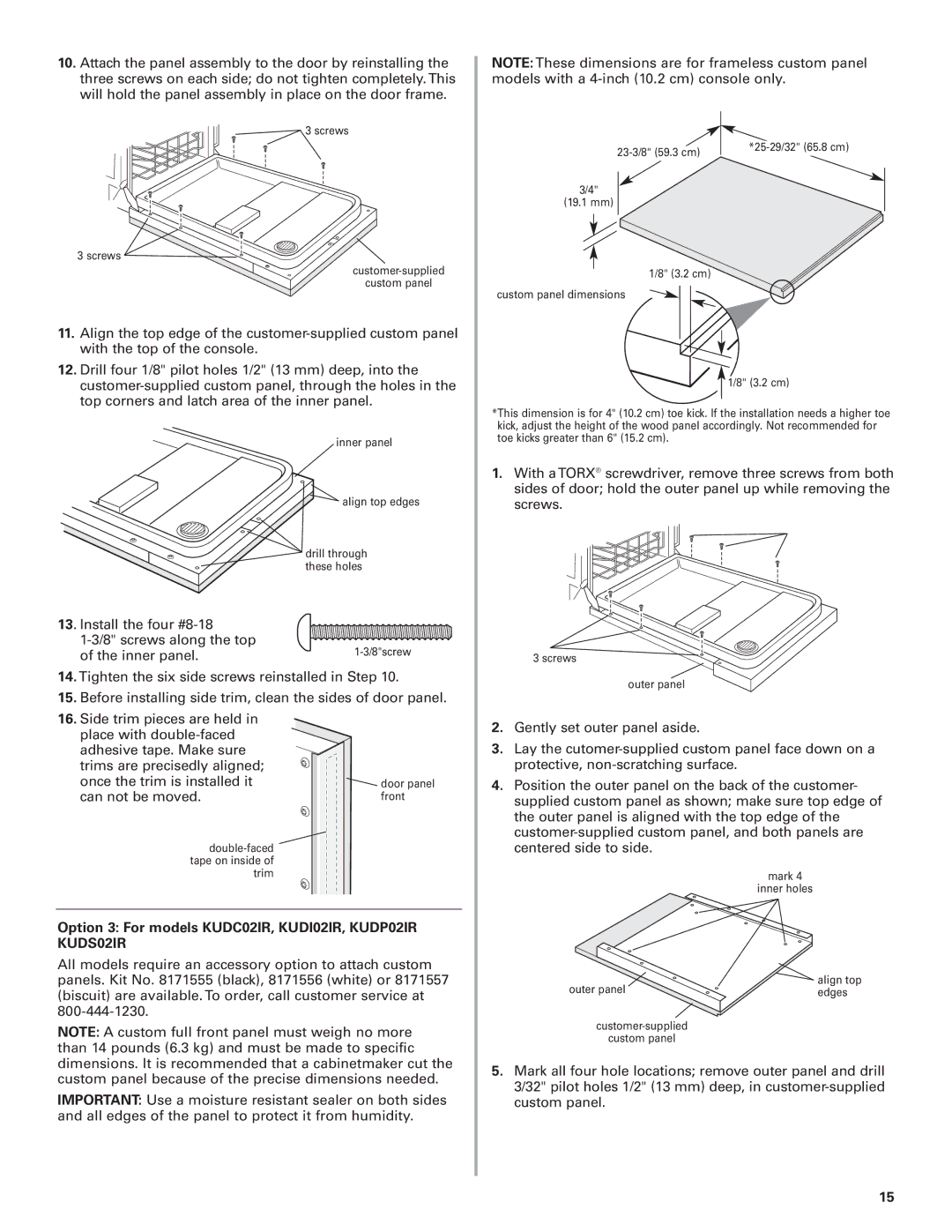
1.With a TORX® screwdriver, remove three screws from both sides of door; hold the outer panel up while removing the screws.
3 screws
14.Tighten the six side screws reinstalled in Step 10.
15.Before installing side trim, clean the sides of door panel.
16.Side trim pieces are held in
place with |
|
adhesive tape. Make sure |
|
trims are precisedly aligned; |
|
once the trim is installed it | door panel |
can not be moved. | front |
Option 3: For models KUDC02IR, KUDI02IR, KUDP02IR KUDS02IR
All models require an accessory option to attach custom panels. Kit No. 8171555 (black), 8171556 (white) or 8171557 (biscuit) are available. To order, call customer service at
NOTE: A custom full front panel must weigh no more than 14 pounds (6.3 kg) and must be made to specific dimensions. It is recommended that a cabinetmaker cut the custom panel because of the precise dimensions needed.
IMPORTANT: Use a moisture resistant sealer on both sides and all edges of the panel to protect it from humidity.
outer panel
2.Gently set outer panel aside.
3.Lay the
4.Position the outer panel on the back of the customer- supplied custom panel as shown; make sure top edge of the outer panel is aligned with the top edge of the
mark 4
inner holes
outer panel | align top |
edges |
custom panel
5.Mark all four hole locations; remove outer panel and drill 3/32" pilot holes 1/2" (13 mm) deep, in
15