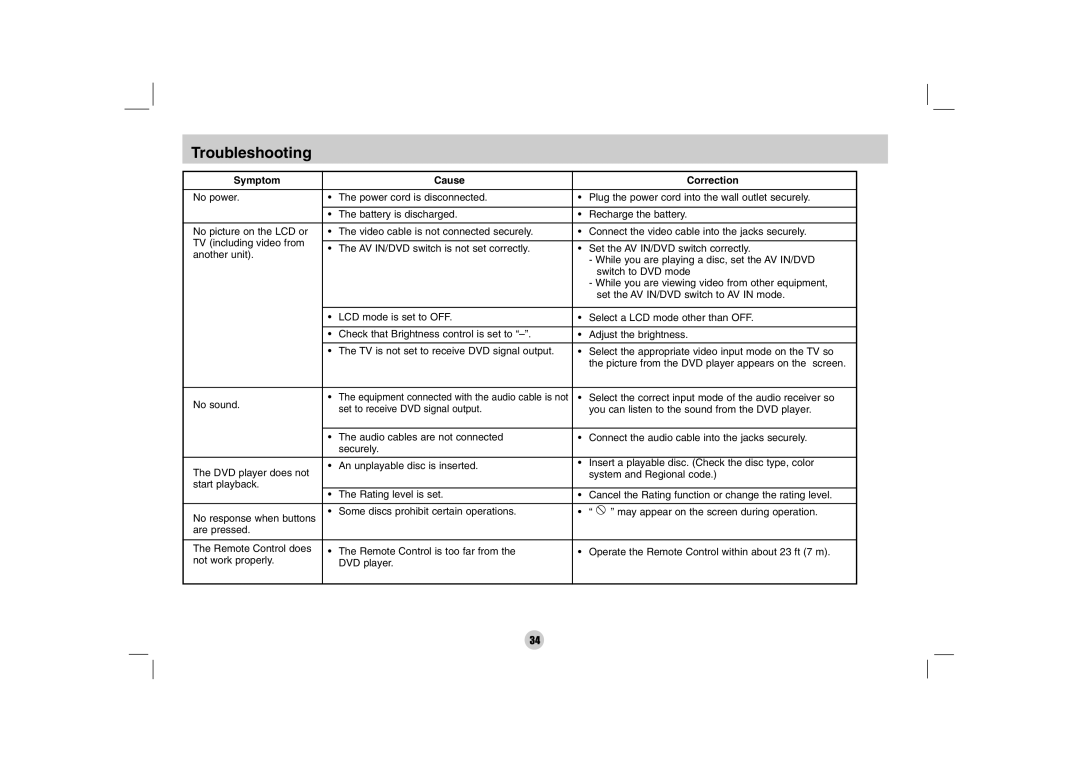
Troubleshooting
Symptom |
| Cause |
| Correction | |
No power. | • | The power cord is disconnected. | • Plug the power cord into the wall outlet securely. | ||
|
|
|
| ||
| • The battery is discharged. | • | Recharge the battery. | ||
|
|
|
| ||
No picture on the LCD or | • | The video cable is not connected securely. | • Connect the video cable into the jacks securely. | ||
TV (including video from |
|
|
|
| |
• The AV IN/DVD switch is not set correctly. | • Set the AV IN/DVD switch correctly. | ||||
another unit). | |||||
|
|
| - While you are playing a disc, set the AV IN/DVD | ||
|
|
|
| ||
|
|
|
| switch to DVD mode | |
|
|
|
| - While you are viewing video from other equipment, | |
|
|
|
| set the AV IN/DVD switch to AV IN mode. | |
|
|
|
|
| |
| • | LCD mode is set to OFF. | • | Select a LCD mode other than OFF. | |
|
|
|
| ||
| • Check that Brightness control is set to | • | Adjust the brightness. | ||
•The TV is not set to receive DVD signal output. • Select the appropriate video input mode on the TV so the picture from the DVD player appears on the screen.
No sound. | • The equipment connected with the audio cable is not | • Select the correct input mode of the audio receiver so | ||
set to receive DVD signal output. | you can listen to the sound from the DVD player. | |||
| ||||
|
|
| ||
| • The audio cables are not connected | • Connect the audio cable into the jacks securely. | ||
| securely. |
|
| |
|
|
| ||
The DVD player does not | • An unplayable disc is inserted. | • Insert a playable disc. (Check the disc type, color | ||
| system and Regional code.) | |||
start playback. |
|
|
| |
| • The Rating level is set. | • Cancel the Rating function or change the rating level. | ||
|
|
|
| |
No response when buttons | • Some discs prohibit certain operations. | • “ | ” may appear on the screen during operation. | |
|
|
| ||
are pressed. |
|
|
| |
|
|
| ||
The Remote Control does | • The Remote Control is too far from the | • Operate the Remote Control within about 23 ft (7 m). | ||
not work properly. | DVD player. |
|
| |
34