Page
FCC Industry Canada Notice
About ADD-ON Applications for Your Nokia
Contents
Receive MMS and e-mail settings
Predictive text input-Dictionary
Calendar
Send data using a Bluetooth connection
Receive data using a Bluetooth connection
103
For your safety
Network services
About your device
Enhancements, batteries, and chargers
Set tones
Personalise your phone
Voice mailbox, and press
Transfer content from another phone
Offline profile
Change the look of your phone
Active standby mode
Scroll to an application or event, and press
Put on the wrist strap
Clock settings
Your phone
Clock
File manager
World clock
View memory consumption
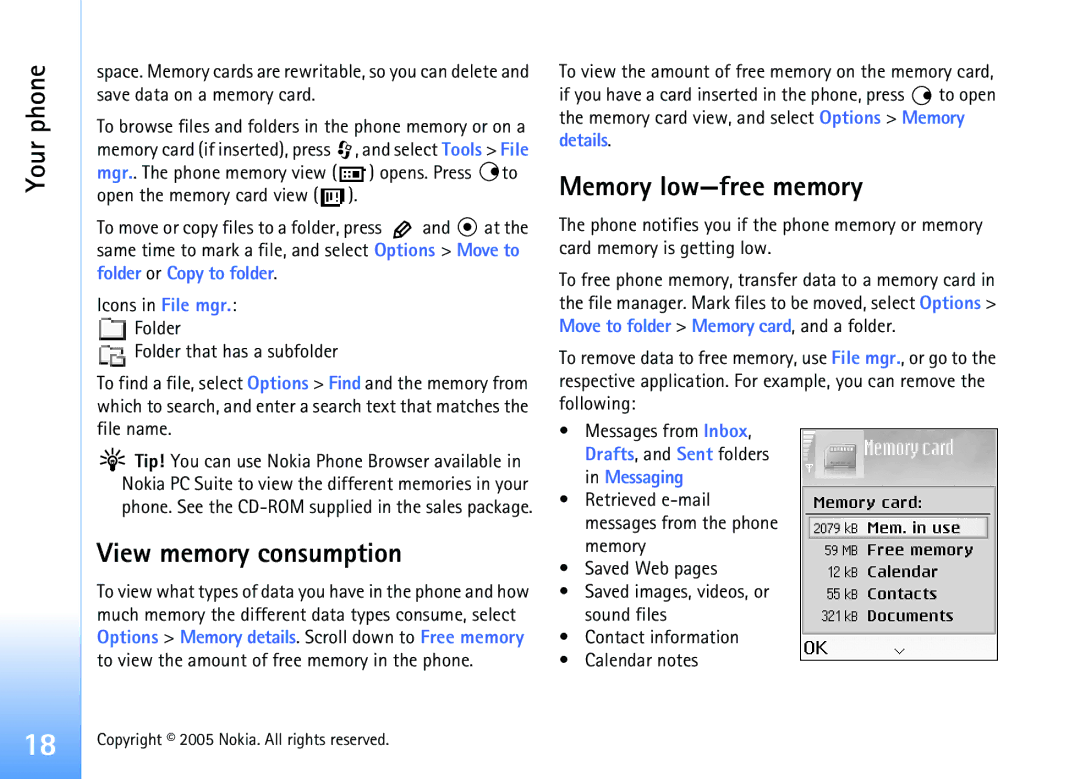
Memory low-free memory
Memory card tool
Format a memory card
Memory card name
Your phone
Speed dial a phone number
Make calls
Call
Make a conference call
Call waiting network service
Answer or reject a call
Call duration
Calls Options during a call
Recent calls
Select Options End all calls
Packet data
Monitor all communication events
Icons in Log Incoming Outgoing Missed communication events
Make calls
Save names and numbers
Default numbers and addresses
Contacts Phonebook
Contacts
Default number or address is underlined in the contact card
Copy contacts
Contacts Phonebook
Voice dialling
Add a voice tag
Make a call with a voice tag
Contacts, press to open the groups list
Create contact groups
Remove members from a group
Select Options New group
Camera
Camera indicators show the following
Camera and Gallery
Camera and Gallery
Press To adjust brightness To adjust contrast
Night mode indicator Shows that the night mode is active
Self-timer indicator
To send the image via Bluetooth, via e-mail, or Via
Camera and Gallery Take pictures in a sequence
You in the picture-self-timer
Adjust colour and lighting
Flash
Scroll to the setting you want to change
Adjust camera settings
Select Options Settings Image
Record videos
Adjust video recorder settings
To send the video via Bluetooth, via e-mail, or Via
After a video clip has been recorded
Gallery
View images
Open the Images folder in Gallery to start the image
Camera and Gallery
Edit video, sound, and transitions
Imaging
Video editor
Imaging
A multimedia message, appears
Image manager
Image print
Folders. Press to view an image
Printer selection
Print settings
RealPlayer
Print preview
Stream content over the air
Receive RealPlayer settings
Play video or sound clips
Network settings
Change the RealPlayer settings
Proxy settings
Proxy port number-Enter the port number of the proxy server
Messaging
Messaging
Packet data connection may prevent cell broadcast reception
Write text
Traditional text input
Hold If the next letter is located on the same key as
Predictive text input-Dictionary
Tips on predictive text input
Twice quickly
Turn predictive text input off
Copy text to clipboard
Write compound words
Complete the compound word, press to add a space
Write and send messages
Sound is added, is shown in the navigation bar
For example, 10 2 means that you can still add
Receive MMS and e-mail settings
Enter the MMS settings manually
See also ‘Multimedia messages’, p
Multimedia messages
Data and settings
Data received through a Bluetooth connection
Inbox icons
Web service messages
My folders
Mailbox
Messaging Open the mailbox
Retrieve e-mail messages
Delete e-mail messages
Disconnect from the mailbox
Select Messaging Options Settings Text message
Messaging settings
View e-mail messages when offline
View messages on a SIM card
Select Messaging Options Settings Multimedia message
Add a new text message centre
Select Message centres Options New msg. centre
Tip! You may also obtain the multimedia and e-mail
Mailbox settings
Mail
Mailbox name-Enter a descriptive name for the mailbox
User settings
Cell broadcast
Other settings
Select Messaging Options Settings Other
Automatic retrieval
Messaging
Create calendar entries
Calendar
Calendar
Special dates. Anniversary entries are repeated every year
Calendar views
Set a calendar alarm
Calendar settings
Remove calendar entries
Enter the settings manually
Access the Web
Receive browser settings
Web
Add bookmarks manually
Bookmarks view
Make a connection
Send bookmarks
Press to start to download
Browse
Connection security
To save a bookmark, select Options Save as bookmark
To the beginning of a
View saved pages
Shortcut Use
View. In the saved pages view, press to open a saved
Empty the cache
Web settings
End a connection
Select Options Advanced options Disconnect, or
Security warnings-To hide or show security notifications
Office
Office
CalculatorConverter
Calculate percentages
To-do
Create a task list
Recorder
Wallet
My own
Go to-add shortcuts
Delete a shortcut
Create a wallet code
Store personal card details
Create personal notes
View ticket details
Wallet settings
Create a wallet profile
User info card-Select a card from the list
Reset the wallet and wallet code
IM-Instant messaging chat
Receive IM settings
Modify your IM settings
Connect to an IM server
IM-Instant messaging chat
Join and leave an IM group
Chat
Allow messages from-To allow messages from all, select All
View and start conversations
Record chats
IM contacts
To create a new contact, select Options New IM contact
Administrate an IM group
Manage IM groups
Create a new IM group
Chat server settings
Add and remove group members
Bluetooth-Set to On or Off
Bluetooth connection
Bluetooth connection settings
Connectivity
Connectivity Send data using a Bluetooth connection
Pair devices
Receive data using a Bluetooth connection
Check the status of the Bluetooth connection
Headset Other
Connection manager
Switch off Bluetooth connectivity
PC connections
Your phone as a modem
Remote synchronisation
View data connection details
Synchronise data
Create a new synchronisation profile
Contact your service provider for the correct settings
Server profile settings
To cancel synchronisation before it finishes, press Cancel
Session mode- Select Bluetooth or Web
Tools
Settings
Phone settings
Tools
Call settings
Display
Hold in the standby mode
Connection settings
Data connections and access points
Packet data connections in GSM networks
Receive access point settings
Access points
47, ‘E-mail’, p , and ‘Access the Web’, p
Configurations
Authentication-SelectNormal or Secure
Packet data
Date and time
Security
Phone and SIM
Glossary of PIN and lock codes
Certificate management
View certificate details-check authenticity
Call barring network service
Change the trust settings
Call diverting
Add a voice command to an application
Voice commands
Enhancement settings
You can have only one voice command per application
Install applications and software
Select Options Add voice command. See ‘Add a voice tag’, p
Application manager
Select Options Install
Remove applications and software
Application settings
To view which keys are not in use at the moment Not
Bluetooth connectivity
Troubleshooting
Troubleshooting
Multimedia messaging
Messaging
Browser services
Access codes
Camera
Phone display
Memory low
Messaging
Battery information
Battery information
Charging and discharging
Care and maintenance
Care and maintenance
Additional safety information
Additional safety
Emergency calls
Additional safety information
Potentially explosive environments
To make an emergency call
Certification information SAR
SAR limit for mobile devices used by the public is
Index
Display Setting in camera 31 Cache clearing
Setting in camera 31, 34 copying
Index
Activating 17 turning off
Settings
Erasing contents 25 filtering
Fast forward 40 file formats 39 mute sound 40 rewind
Via Bluetooth or USB cable 82 PC Suite
109
Access points, see access points
A contact card

 , and select Tools > File mgr.. The phone memory view (
  ) opens. Press
  to open the memory card view (
  ).
). and
and  at the same time to mark a file, and select Options > Move to folder or Copy to folder.
 Folder
 Folder that has a subfolder
 Tip! You can use Nokia Phone Browser available in Nokia PC Suite to view the different memories in your phone. See the
  to open the memory card view, and select Options > Memory details.