User Guide
Volume keys Display screen
Power key Earpiece Scroll key
Talk key
Number keys Scroll key Star key
Quick guide to functions
Or Answer
Legal Information
Page
Contents
Enter text and numbers
Use advanced calling features
Send and receive e-mail messages
Minibrowser
Snake II Space Impact Link5 Pairs II
Frequently Asked Questions FAQ 22 Technical Information
For your safety
Qualified Service
Accessories and Batteries
Connecting to Other Devices
WATER-RESISTANCE
Welcome
Register Your Phone
Learn about Accessibility Solutions
Accessible features
Newsletters
LPS-3 Mobile Inductive Loopset
Visit Nokia on the WEB Contact Nokia
Installing the Battery
Prepare your phone for use
Remove the Battery
Remove the battery by lifting it from the finger grip
Slide the back cover into its place
With the back of the phone facing
Charge the Battery
Get to know your phone
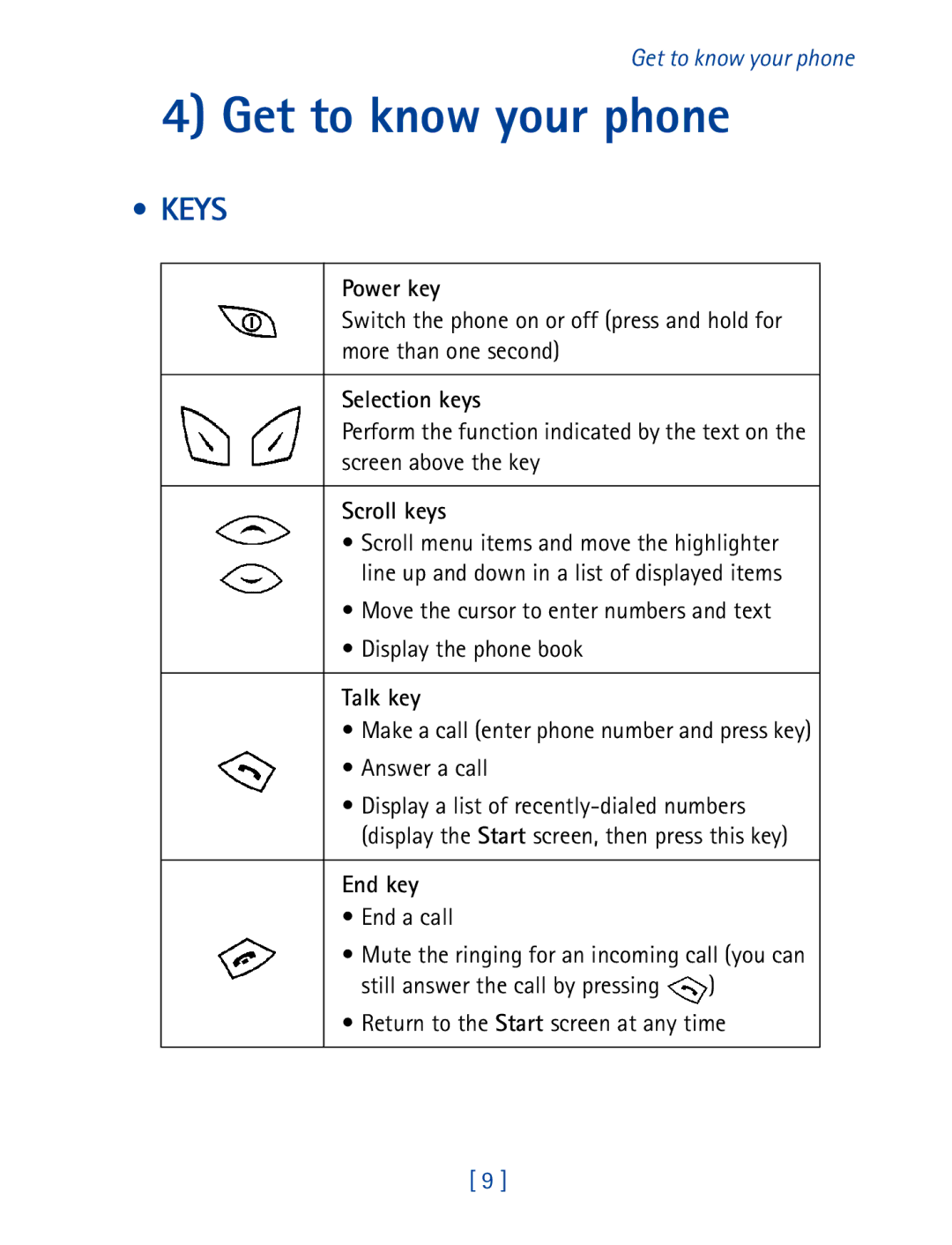
Keys
Pound key
Switch on your phone
Number keys
Start screen
Navigation Keys
Selection keys
Right selection key is below
Indicators and Icons
Indicators
Scroll keys
Scroll bar
Icons
Reminder Meeting You have a calendar reminder of a meeting
Make and answer calls
Make a Call
END a Call
Answer a call
Redial the last-dialed number
Adjust the earpiece volume
Get a strong signal
Keep calls private
Scroll to On, then press OK
Use phone menus
Navigate Menus
Scroll through menus
Use a shortcut
Seconds
List of Menu Shortcuts
2, press Menu
System
Enter text and numbers
Enter Characters Except in a Phone Number Field
Control when the touch tones are sent
Enter a space
Enter special characters
To enter a space, press
Use the phone book
USE Phone Book Menus
Change views
Select a scrolling view
ADD Names and Numbers
Name list
Change a Stored Phone Number
Recall and Redial Numbers
Erase Stored Names and Numbers
Erase the Entire Phone Book
Check Memory Status
SET UP Your Voice Mailbox
You will be notified when a voice message is received
Use voice mail
Retrieve a Message
Listen to Your Voice Messages
Voice message notification
Automate Your Voice Mailbox with Codes
Special Dialing Codes
Edit number Allows you to edit the number on the screen
Call log
View Information about Recent Calls
Clear the Recent Calls List
Press Menu 2 4 Call log Clear call lists
Clear Reset the Call Timer
SHOW/HIDE the Current Call Timer
Call Timer
Life Timer
Menu Allows you to access the Menu Mute
Names Allows you to access the phone book
SET IN-CALL Options
Already muted, Mute will change to End mute
USE Network Feature Codes
Store network feature codes
Activate network features
Caller ID Menu 4 4
USE Caller ID
Deactivate network features
USE Call Waiting
Make a Conference Call
USE Call Forwarding
Call with both parties, press
Second party is placed on hold
Cancel call forwarding Cancels call forwarding Press Select
Redial Automatically
USE a Calling Card
Determine the dialing sequence for your card
Press Menu 4 1 3 Settings Call settings Calling card
Store calling card information in your phone
Choose a calling card to use
Make a calling card call
Choose to Block Caller ID
While roaming, you may not be able to block caller ID
Select a Phone Number
Followed by the phone number that you’re calling Then press
Select the phone number
SET Touch Tones
Set manual touch tones
Set touch tone length
Send a Touch Tone String
Store touch tone sequences strings
Store Touch Tone Strings with Phone Numbers
Customize your phone
Understand Profiles
Select a Profile
Silent Meeting Outdoor Pager
Customize a Profile
Set ringing options
Silent The phone makes no sound
Set the ringing volume
Set the ringing tone
Set a vibrating alert
Set keypad tones
Set warning and game tones
Scroll to the profile you want to change, and press Options
Set the message alert tone
Activate and Customize Screen Saver
Activate screen saver
Scroll to Warning and game tones, then press Select
Adjust Timeout Setting
To adjust this setting
Adjust Maximum Time
Customize screen saver
View and save downloaded animations
Set your phone to answer automatically
View Downloaded Animations
Save Downloaded Animations
Rename Profiles
Restore Factory Settings
Set the lights
Press Menu 4 2 5 Settings Phone Settings Language
Press Menu 4 2 1 Settings Phone settings Clock
Choose a Display Language
SET and Display the Clock
Allow the network to set the clock
Manually set the clock
Display or hide the clock
Customize Welcome Screen
Use Logo as Welcome Screen
Use Note as Welcome Screen
USE ONE-TOUCH Dialing
Assign a name or number to a one-touch dial key
Change one-touch dialing numbers
Erase one-touch dialing numbers
Scroll to Custom tone, and press Select
Identify Callers by Custom Ringing Tones
Press ANY KEY to Answer a Call
Protect Your Phone with Phone Lock
Security
Change Your Security Code
Lock and unlock your phone
Store an unlocked phone number
Call an unlocked phone number
Enter the lock code, and press OK
Answer a call while the phone is locked
Change your lock code
USE Keyguard to Lock the Keypad
Activate keyguard
Restrict Calls
Deactivate keyguard
Answer a call while keyguard is active
Press Menu 4 3 1 Settings Security settings Restrict calls
Restrict outgoing calls
Restrict incoming calls
Then pressing
System choices
Select System
Roaming
Send and receive text messages
Press Menu 01 1 1 Messages Text messages Write new
Write a new message
Enter text into a message
Activate predictive text mode
Deactivate predictive text mode
Change the text input method
Working with Predictive Text Input
Write with Predictive Text Input Enter words
Add words to the dictionary
Change the dictionary language
Writing compound words
Deleting characters
Changing letter case modes
Entering numbers
Receive a Mobile Message
Inserting special characters
Templates
When you’ve seen the last new message, the icon disappears
Message Options
If necessary, scroll to read the entire message
Or press , then Save
Message Storage
Create a Text Message
Address a text message
You must be editing the message that you want to address
Appear No e-mail address found or No numbers found
Send a Message
Message delivery notification
Press Menu 0 1 1 1 Messages Text messages Write new
Urgent mobile messages
Send a number-only message
Resend a message
Erase Messages
Erase the current message
Erase multiple messages
Reply to a Message
All saved Erases all messages in the Saved folder
Forward a Message
Send and receive e-mail messages
Save E-MAIL Addresses
Save an e-mail address for an existing name
Add a new e-mail address
Edit an e-mail address
Send AN E-MAIL Message
Reply to or Forward AN E-MAIL Message
Enter the e-mail address, or press Search
Minibrowser
About the Minibrowser
Launching the Minibrowser
Minibrowser Menu
Browsing may incur charges. Continue? Yes No
Home News Yahoo Weather Finance Web site
About web page content
Scroll Through the Menus and Contents of a
Navigating in the Minibrowser
GO Back Previous
Links
Bookmarks
Activate AN Item for EXAMPLE, a Link
Selection Keys
Receiving Messages VIA the Minibrowser
Ending the Minibrowser Session
SET a Bookmark
Go to the page for which you want to set a bookmark
Disable Minibrowser Confirmations
Use your personal assistant
USE the Calendar
View the calendar
Meeting
Message Set alarm for the note? appears
Move from day to day
Create a calendar note
Reminder
Call
Meeting
Birthday
View the day’s notes
View all notes
Erase notes
Erase the Note YOU’RE Viewing
When a calendar alarm goes off
Set the calendar date
Download Ringing Tones
Erase ALL Notes in Your Calendar
If you selected the Silent or Meeting profile or
Alarm Clock
Notification of received ringing tone
Set the alarm clock
Turn off the alarm clock when it rings
Turn off the alarm clock altogether
When the alarm clock rings
Calculator
Calculator adds, subtracts, multiplies, and divides
Press Menu 7 Calculator
Enter the first number in the equation
Games
Snake
Space Impact
Press Menu 6 Games
Corresponding direction. Insert a new tile by pressing
LINK5
Pairs
BATTERY, CHARGERS, and Accessories
Reference information
Important Safety Information Traffic Safety
Remember road safety always comes first
Operating environment
Electronic devices
Other medical devices
Vehicles
Pacemakers
Hearing Aids
Potentially explosive atmospheres
Posted Facilities
Make an emergency call
101
Care and Maintenance
Accessories
Nokia XPRESS-ON Covers
Remove the cover
Replace the cover
Standby and Talk Times
Battery
Charging times
Rapid Travel Charger ACP-8
Chargers and Other Accessories
Rapid Travel Charger ACP-12
Rapid Mobile Charger LCH-9
Loopset LPS-3
Leather Carry Cases CSL-28
Are the same as those for the Rapid Travel Charger ACP-8
Troubleshooting
My call
Through
Certification Information SAR
111
112
Frequently Asked Questions FAQ
How do I unlock the keypad Keyguard?
This mailbox number is valid until your phone number changes
How do I find my phone’s model number?
How do I redial the last-dialed number
How do I assign a key to one-touch dialing?
How do I find out how many memory locations the phone has?
Weight
Technical Information
Size
Frequency Range
Nokia One-Year Limited Warranty
117
118
Melbourne, FL
119
120
121
122
Internet Association To all users of mobile phones
123
124
125
126
Appendix B
127
128
129
130
131
132
Index
Keyguard active 60 phone locked Talk key 9 Automatic redial
Use advanced features 34 Call forwarding
Rapid mobile 108 rapid travel
Keyguard menu
Activate 35 deactivate
Memory status phone book
Navigate 18 scroll 18 shortcut
Personalize your phone 44 Phone book
Phone lock 57 restrict calls
139
140
141
142

 )
)