Getting started
●Playback mode
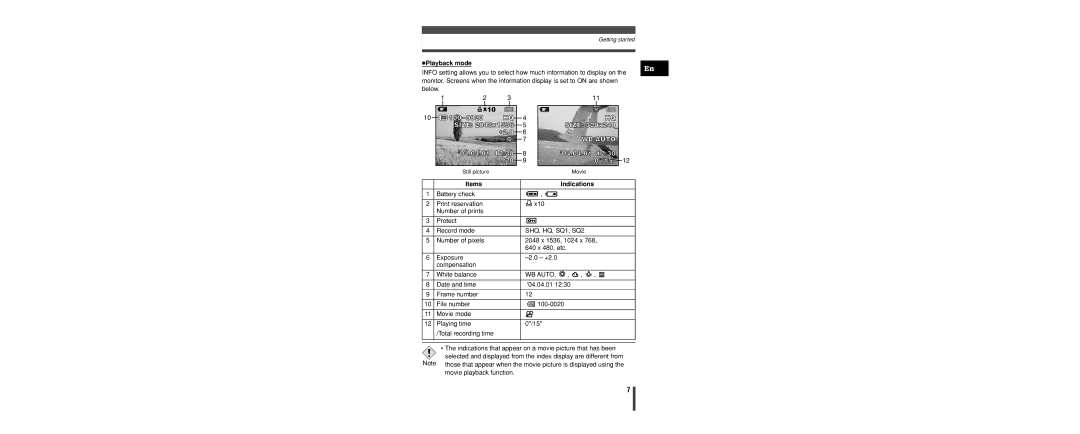
INFO setting allows you to select how much information to display on the monitor. Screens when the information display is set to ON are shown below.
En
10
1 | 2 | 3 |
 x10
’04.04.01 12:30 20
Still picture
4
5
6
7
8
9
11 |
|
HQ |
|
SIZE: 320x240 |
|
WB AUTO |
|
’04.04.01 12:30 |
|
0"/15" | 12 |
Movie
| Items |
|
| Indications |
|
|
| |
|
|
|
|
|
|
|
|
|
1 | Battery check | , |
|
|
|
| ||
|
|
|
|
|
|
|
|
|
2 | Print reservation |
| x10 |
|
|
|
| |
| Number of prints |
|
|
|
|
|
|
|
|
|
|
|
|
|
|
|
|
3 | Protect |
|
|
|
|
|
|
|
|
|
|
|
|
|
| ||
|
|
|
|
|
|
|
|
|
4 | Record mode | SHQ, HQ, SQ1, SQ2 |
|
|
| |||
|
|
|
|
|
|
| ||
5 | Number of pixels | 2048 x 1536, 1024 x 768, | ||||||
|
| 640 x 480, etc. |
|
|
|
| ||
|
|
|
|
|
|
|
|
|
6 | Exposure |
|
|
|
| |||
| compensation |
|
|
|
|
|
|
|
|
|
|
|
|
|
|
|
|
7 | White balance | WB AUTO, , | , | , |
|
| ||
|
| |||||||
|
|
|
|
|
|
|
|
|
8 | Date and time | '04.04.01 12:30 |
|
|
|
| ||
|
|
|
|
|
|
|
|
|
9 | Frame number | 12 |
|
|
|
|
| |
|
|
|
|
|
|
|
|
|
10 | File number |
|
|
|
| |||
|
|
|
|
|
|
|
|
|
11 | Movie mode |
|
|
|
|
|
|
|
|
|
|
|
|
|
|
|
|
12 | Playing time | 0"/15" |
|
|
|
| ||
| /Total recording time |
|
|
|
|
|
|
|
|
|
|
|
|
|
|
|
|
|
|
|
|
|
|
|
|
|
•The indications that appear on a movie picture that has been

 selected and displayed from the index display are different from Note those that appear when the movie picture is displayed using the
movie playback function.
7