URC-7721
Table of Contents
SET UP Codes
Extra Features
TROUBLE-SHOOTING
15/16
Keypad
Batteries
LED
OK key
Menu Key
Exit Key
169 key
How to set-up the ONE for ALL 2 to control your devices
Setting up the ONE for ALL
Direct code set-up
Search method
Example To search for your television code
Quick Code Reference
Code blink out
To find out which code is currently programmed
Extra Features
Mode re-assignment
Volume Punch Through
Colour and Brightness
DVD
VOL
Problem & Solution
Trouble Shooting
Problem Solution
Customer Service
Device
Ireland Australia
South Africa New Zealand
Inhaltsverzeichnis
Abbildung DER ONE for ALL 2 Fernbedienung
Einstellcodes
Extra Funktionen
Batterien
Das Tastenfeld
Richtungstasten
OK Taste
Menu Taste
Exit Taste
Einstellung der ONE for ALL
Direkte Code Einstellung
Wie Sie die ONE for ALL 2 auf Ihre Geräte einstellen
Drücken Sie anschließend die MAGIC-Taste und
Code-Suchlauf
Code auslesen
Persönliche Code-Übersicht
Um heraus zu finden welcher Code aktuell programmiert ist
Damit haben Sie nun den vierstelligen Code ermittelt
Extra Funktionen
Gerätemodus Neuzuordnung
Farbe und Helligkeit
Lautstärke Direktbedienung
Problem Lösung
Problem & Lösung
Nützliche Hinweise
Kundendienst
Table des Matières
Informations sur votre ONE for ALL
Les Piles
Le Clavier
Touche OK
Touche Menu
Touche Exit
Touche169
Installation de vos appareils
Installation directe
Introduisez le code à quatre chiffres de votre
Les divers appareils et leur touches correspondantes
La Méthode de Recherche
Exemple Comment trouver le code de votre téléviseur
Appuyer sur cette touche de très nombreuses
Fois jusqu’à 150, aussi soyez patient
Référence Rapide
Comment lire le code
Pour un appareil déjà programmé
Mode de ré-affectation
Fonctions Complémentaires
Accès direct au volume
Dernière touche appuyée Vous pouvez commander
Comment annuler « l’accès direct au volume » par mode
Pour désactiver l’accès direct au volume
Problème & Solution
Guide de depannage
Appareil
Service clientèle
Au Luxembourg En Suisse
Índice??
Sobre su ONE for ALL
Funciones Adicionales
Consejos Útiles
Instalacion de las Pilas
El Teclado
Tecla OK
Tecla menú
Tecla Exit Salida
Tecla
Cómo configurar el ONE for ALL 2 con sus aparatos
Configuración de sus aparatos
Programación directa de códigos
Método de búsqueda
Ejemplo Búsqueda de códigos para su TV
Referencia de códigos
Lectura de Codigos
Para saber qué código se está utilizando actualmente
Ejemplo
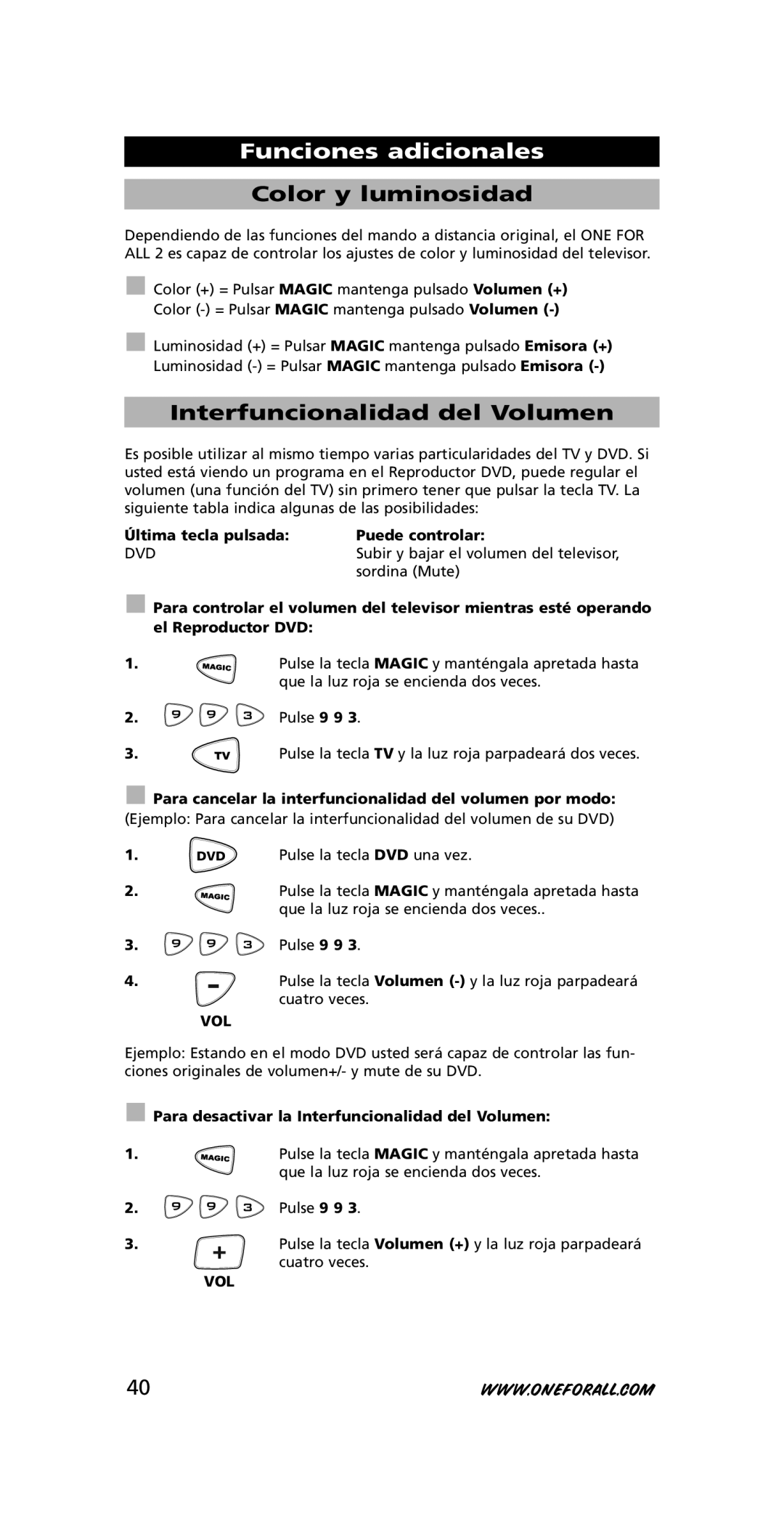
Funciones adicionales
Reinicialización de las teclas de aparatos
Interfuncionalidad del Volumen
Color y luminosidad
Problema Solución
Problemas y Soluciones
Consejos Útiles
Servicio de atención al cliente
Aparato
EM Caso DE Problemas
Conteúdo
Tudo sobre o ONE for ALL
Códigos DE Instalação
Instalação das pilhas
Teclado
Teclas Direccionais
11 OK
Tecla Menu
Tecla Exit
Programar o ONE for ALL
Programação directa
Prima e mantenha pressionada a tecla Magic e
Introduza o código de 4 dígitos da sua TV
Método de busca
Exemplo Para buscar o código da sua televisão
Talvez terá de premir esta tecla muitas vezes
Acima de 150 vezes, assim por favor tenha um
Descobrir o código programado
Anotar os códigos de instalação
Para descobrir qual o código que foi programado
Prima e mantenha pressionada a tecla Magic
Funções avançadas
Alterar as teclas dos aparelhos
Punch-Through do Volume
Cor e Brilho
Problemas & Soluções
Em caso de problemas
Problema Solução
Aparelho
Serviço de apoio ao cliente
Em Portugal
Indice
Informazioni sul ONE for ALL
Inserimento delle batterie
Tastiera
Il tasto OK
Il tasto Menu
Il tasto Exit
Il tasto
Impostazione del ONE for ALL
Impostazione con codice diretto
Come impostare il ONE for ALL
Metodo di Ricerca
Per esempio ricerca del codice per la sua televisione
Dobbiate premere questo tasto molte volte
Riferimento rapido dei codici
Visualizzazione del codice
Per trovare quale codice e impostato attualmente
Funzioni extra
Rassegnazione dei tasti apparecchio
Interfunzionalità del Volume
Colore e Luminosità
Problemi e soluzioni
Eventuali problemi
Problema Soluzione
Servizio Clienti
Apparecchio
Eventuele Problemen
Inhoudsopgave
Over uw ONE for ALL
Afbeelding VAN DE ONE for ALL 2 Afstandsbediening
De batterijen
De Toetsen
De OK toets
De Menu toets
De Exit toets
De 169 toets
Het instellen van de ONE for ALL
Directe code instelling
Het instellen van de ONE for ALL 2 op uw apparaten
Richt nu de ONE for ALL 2 op uw televisie en
De zoekmethode
Het uitlezen van uw instelcode
Achterhalen welke code momenteel ingesteld is
Extra Functies
Omprogrammeren van apparaattoetsen
Kleur en helderheid
Het Volume en Mute van uw televisie
Laatst gedrukte toets Kunt bedienen
Probleem & oplossing
Eventuele problemen
Probleem Oplossing
Apparaat Merk
Klantenservice
Nederland België / En Belgique
Tartalomjegyzék
ONE for ALL 2 távvezérlő
Beállítási Kódok
Extra Funkciók
Elemek
Billentyűzet
OK gomb
Menü gomb
Kilépés Exit gomb
Gomb
Közvetlen kódbeállítás
ONE for ALL 2 beállítása
ONE for ALL 2 beállítása a készülékek vezérlésére
Példa televízió kódjának megkeresése
Kódkeresés
Nyomja meg a 9 9 1 gombokat. a piros LED kettőt villan
Kódlekérés
Beállított kódok táblázata
Az aktuális beprogramozott kód lekérése
Nyomja meg a 9 9 0 gombokat. a piros LED kettőt villan
Extra funkciók
Módok újrakiosztása
Szín és fényerő
Hangforrás-kiterjesztés
Problémák és megoldások
Hibaelhárítás
Probléma Megoldás
Ügyfélszolgálat
017774974
Rozwiązywanie Problemów
Spis treści
Informacje o urządzeniu ONE for ALL
Kody Ustawień
Baterie
Klawiatura
Przycisk OK
Przycisk Menu
Przycisk Wyjście Exit
Przycisk
Ustawianie za pomocą kodów
Ustawianie ONE for ALL
Jak skonfigurować ONE for ALL 2 do sterowania urządzeniami
Metoda wyszukiwania
Szybki kod
Aby sprawdzić, który kod jest obecnie zaprogramowany
Cyfrą jest „0
Dla trzeciej cyfry czterocyfrowego kodu, naciśnij 3
Funkcje dodatkowe
Ponowne przypisywanie trybu
Kolor i jasność
Wybór regulacji głośności
Problem Rozwiązanie
Problem i rozwiązanie
Wykrywanie i usuwanie usterek
Centrum Obsługi Klienta
08003111302
Obsah
Dálkové ovládání ONE for ALL
Klávesnice
11 Tlačítko OK
12 Tlačítko Nabídka Menu
Tlačítko Konec Exit
Tlačítko
Přímé nastavení kódu
Nastavení dálkového ovládání ONE for ALL
ONE for ALL
Metoda vyhledávání
Příklad Postup vyhledání kódu televizního přijímače
Stiskněte tlačítko napájení
Může být nutné stisknout mnohokrát až 150krát
Stručný přehled kódů
Zjištění kódu
Postup zjištění aktuálně naprogramovaného kódu
Další funkce
Změna přiřazení režimu
Barva a jas
Přeprogramování hlasitosti
100
Hlasitost VOL +

 Para controlar el volumen del televisor mientras esté operando el Reproductor DVD:


 Pulse 9 9 3.
 Para cancelar la interfuncionalidad del volumen por modo:
 DVD


 Para desactivar la Interfuncionalidad del Volumen:


 Pulse 9 9 3.