DVD Video Recorder
Contents
@ N
Main unit
Remote control
Control reference guide
Entering titles
Unit’s display
Control reference guide
Disposal of old equipment
For your safety
Displays
Inside of unit
Check that you have the accessories shown
Checking the Accessories
How to replace the Fuse
Dear Customer
Batteries
Remote control
Remote control signal sensor Switch DVD, TV 15 to DVD
Use
Remote control
Television operation
Discs you can use for recording and play
Discs
Discs you can use
Play-only discs
Types of disc for the type of connected
Discs that cannot be played
Audio format logos
Discs
Hint
Connections with Scart leads
Follow the step-by-step guide below
Reference
Connections without Scart leads
Connect the RF Output socket to the TV aerial socket
Connections with S-Video cable
Standby to ensure continuous output of RGB signals
Recording RGB Signals
Signals from the Sky Digital STB
Auto Setup with Q Link Functions
To Set Up this DVD Recorder with a brand-new Q Link TV
Auto Setup with Q Link Functions
Auto Setup without Q Link Functions
To Set Up this DVD Recorder with an existing Q Link TV
To restart Auto Setup
Video Plus+ Codes for Satellite Receivers/Cable TV
Auto Setup without Q Link Functions
Removing Interference
Use 3, 4 10 to select the TV aspect and press Enter
≥43 factory setting ≥169
Selecting TV screen type
To return to the previous screen
Playing discs
When a menu screen appears on the television
Erasing a programme that is being played
Fast forward and rewind-SEARCH
Starting play from where you stopped it Resume Function
Quick View Play t1.3
Slow-motion play
Manual Skip
Skipping
Selecting an amount of time to skip Time Slip
When using DVD-R
Changing audio
Marking places to play again Marker
Using Display menus to mark positions
Marking positions directly
Using menus to play MP3 discs
Using the tree screen to find a group
Recording television programmes
Stop recording
Recording television programmes
EXT Link
To perform Direct TV Recording
To stop play and recording
Playing while you are recording
Simultaneous recording and play
Press Direct Navigator
Checking the recording during recording Time Slip
Using the Functions window
Using the Functions window
Watching the television while recording
Using the Functions window
Functions window icons
Press Video Plus+ 2 button
Timer recording
Using Video Plus+ number to make timer recording
Press the numeric buttons 4 to enter the Video Plus+ number
If - appears under Name after entering a Video Plus+ number
Timer recording
To change the programme
Use 3, 4 10 to make the on indication appear
Manual programming
To change the timer recording programme
To put the unit on recording standby
To put the unit on recording standby Press , Timer
Starting and canceling programmes
To clear a timer recording programme
To check programmes
To select the TV system PAL/NTSC
When connected to the other equipment
Recording from a video cassette player
Use 3, 4 10 to select the TV system and press Enter
Enter Title
Entering titles
About Disc Information
Releasing disc protection
Disc Protection
Disc Information
Erase all programmes
Format
Use 3, 4 10 to select Finalize and press Enter
Finalize Creating DVD-Video
To stop finalizing
To clear the programme list
Using the Direct Navigator
Selecting programmes to play
About the programme list
Erasing programmes
Checking programme contents
Entering and editing programme titles
Padlock mark appears
Protecting programmes
Releasing programme protection
Padlock mark disappears
To erase another part of the same programme
Erasing parts of a programme
Dividing programmes
To change the point to divide
Displaying Play List
Using Play List to edit programmes
About the Play List Scene screen
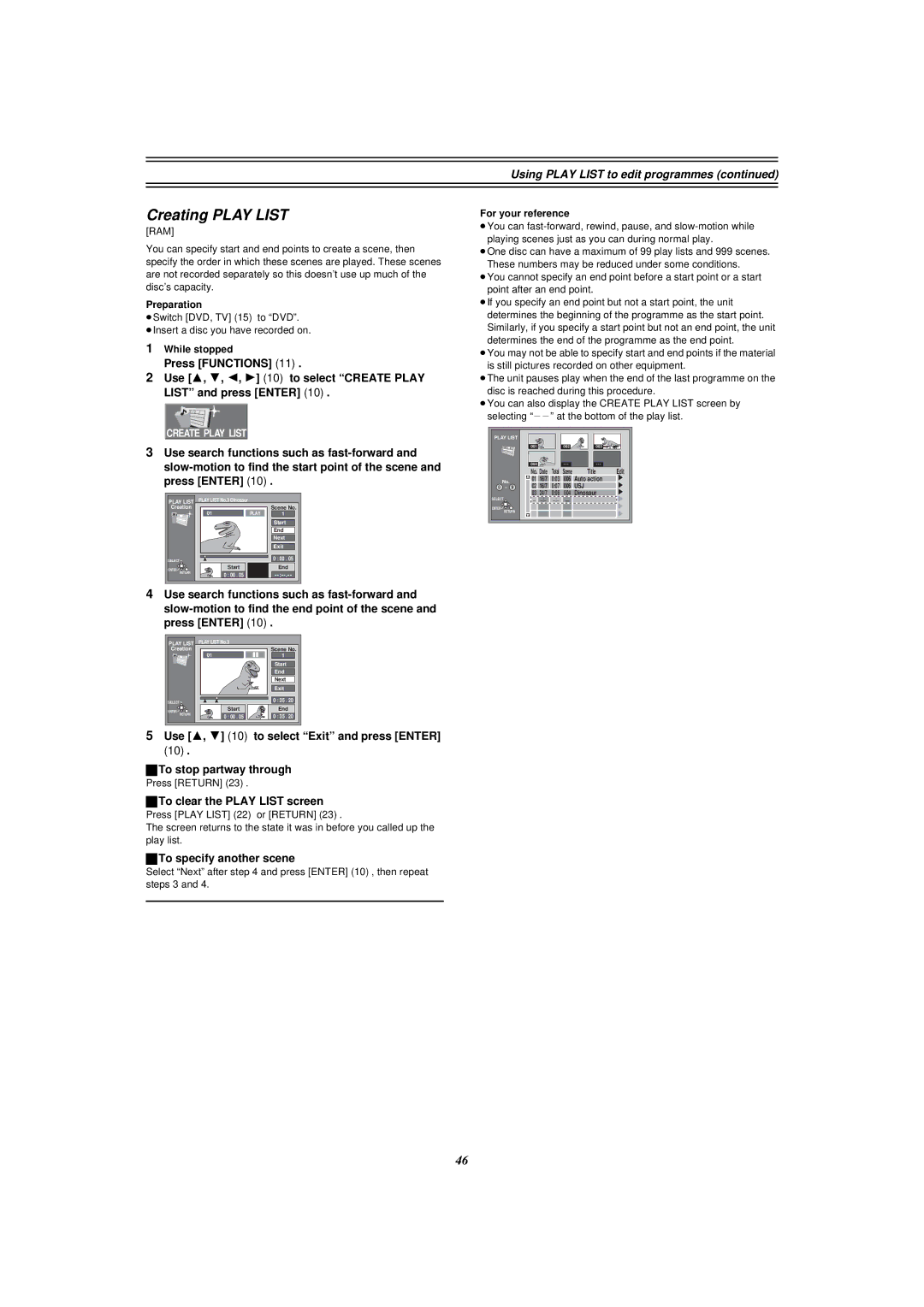
To specify another scene
Using Play List to edit programmes
Creating Play List
Select Next after and press ENTER10, then repeat steps 3
Playing Scenes
Playing Play List
To erase a Play List or a Play List Scene during play
Adding Scenes to a Play List
Moving a Scene
To re-edit a Play List Scene
Erasing a Scene from a Play List
Erasing a Play List
Checking Play LIST’s contents
Copying Play List
Titling Play List
Common procedures
Using Display menus
Disc menu
Picture menu
Using Display menus
Play menu
Sound menu
Use 3, 4
Repeat play
If the Video CD has playback control
Enjoying more powerful sound
Connecting external equipments
To cancel the Child Lock
Child Lock
Connecting external equipments
Connecting a digital amplifier or system component a
Connecting an analog amplifier or system component B
To enjoy Dolby Pro Logic
Connecting a Decoder
Connecting a satellite receiver or digital receiver
Yellow Video White L Red R
Connecting a video cassette recorder
Rear panel of this unit
≥Switch DVD, TV 15 to DVD
Changing the unit’s settings
Press Functions
Settings
Summary of settings
Tuning
Changing the unit’s settings
Picture
Sound
Display
Connection
Entering a password Ratings
Digital output
≥The Setup screen appears
Remote Setting
Use 3, 4 10 to select the Settings tab and press 2 or 1
≥Use 1, the factory set code, under normal circumstances
Manual Clock Setting
Clock Settings
Changing the unit’s settings Auto Clock Setting
Selecting the manual tuning
Channel Settings
Handling the Tuning BOX screen
Auto-Setup Restart, Download
Hold down 7 on the main unit for more than 5 seconds
Changing the Owner ID
Shipping Condition
Use 2, 1 10 to select Yes and press Enter
Display examples
Status displays
Changing the information displayed
Press Status 28 to change the information displayed
Maintenance
Maintenance and Handling
Disc handling
Glossary
Title/Chapter DVD-Video
Glossary
Link
Track
U14
Service Unit status Solutions Number
Self-diagnosis
U99
Error displays
Error messages Causes and solutions
Picture
Troubleshooting guide
Power
Sound
Remote control doesn’t work Cannot operate the television
Troubleshooting guide
Remote control
Play
Recording and timer recording
Specifications
Disc 10, 20, 26
Index
16, 17
Dolby Digital 11, 54, 62