Using the Directories
 Deleting
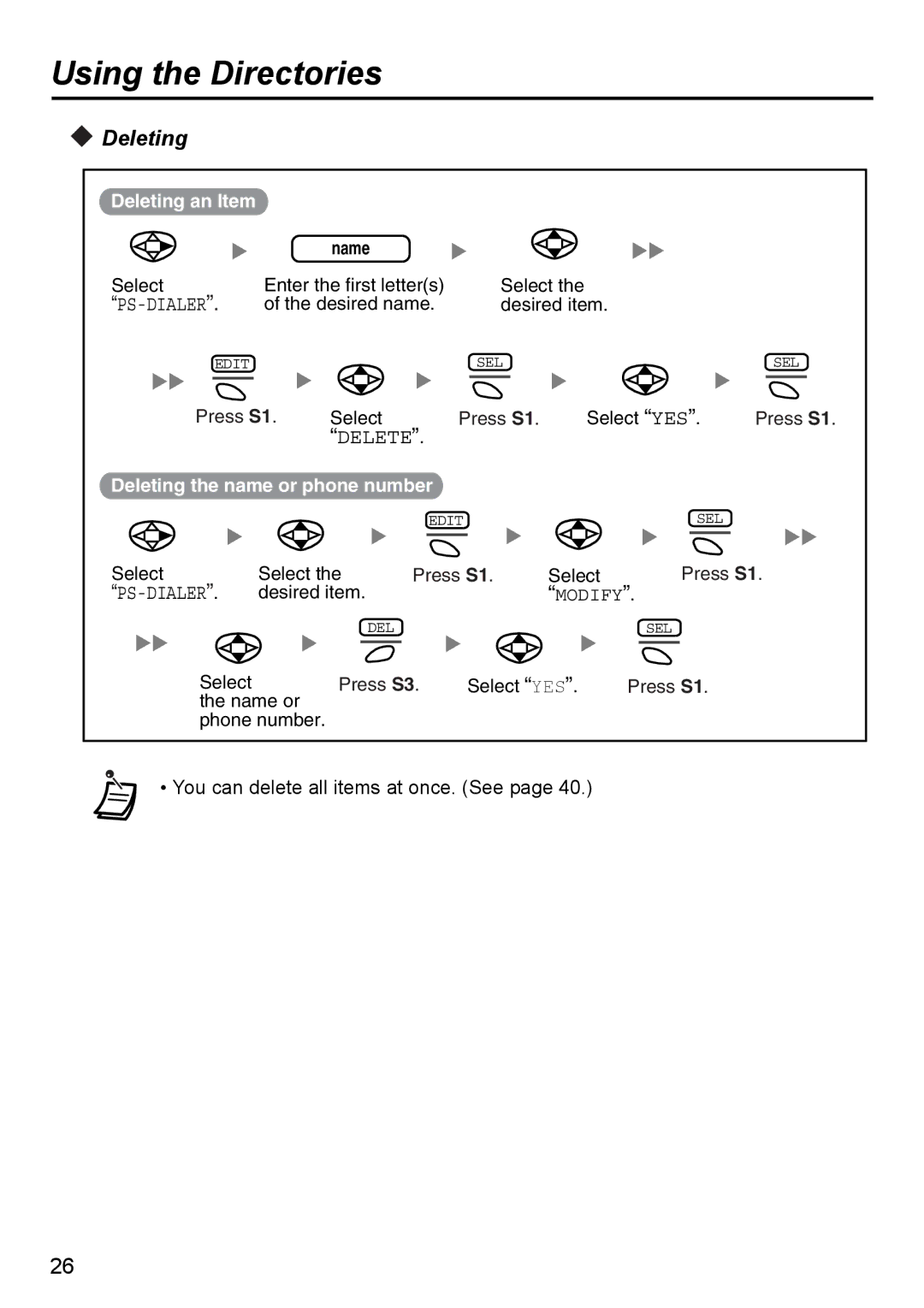
Deleting an Item
name
Select | Enter the first letter(s) | Select the |
|
| |||
| of the desired name. | desired item. |
|
| |||
EDIT |
|
|
| SEL |
|
| SEL |
Press S1. | Select | Press S1. | Select “YES”. | Press S1. | |||
|
| “DELETE”. |
|
|
|
| |
Deleting the name or phone number |
|
|
|
| |||
|
|
| EDIT |
|
| SEL |
|
Select | Select the | Press S1. | Select | Press S1. | |||
| desired item. |
|
| “MODIFY”. |
| ||
|
| DEL |
|
|
| SEL |
|
Select |
| Press S3. | Select “YES”. | Press S1. |
| ||
the name or |
|
|
| ||||
phone number.
• You can delete all items at once. (See page 40.)
26