NNFC area
•Touch with a Near Field Communication (NFC) compatible device to set up Bluetooth connection automatically.
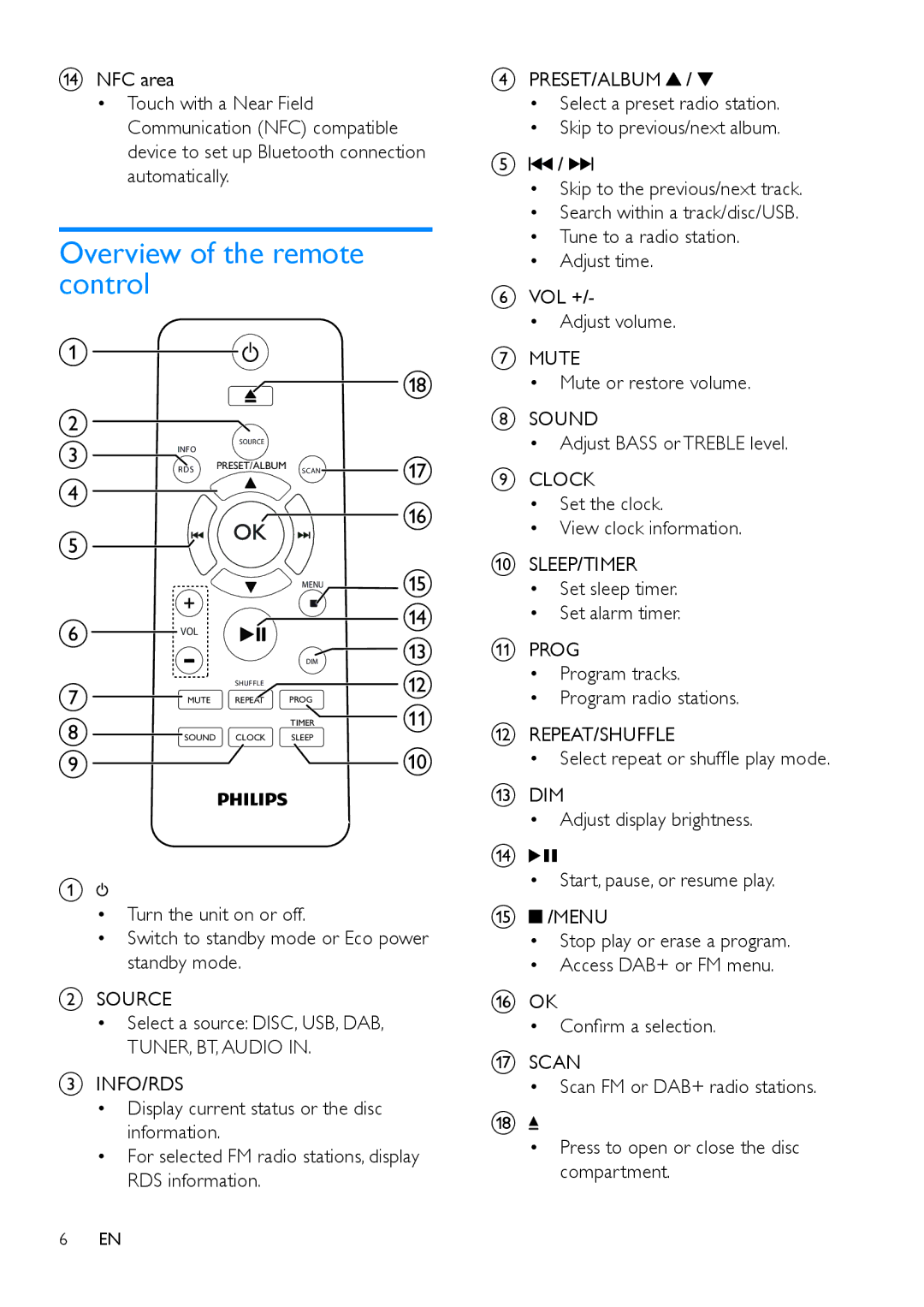
Overview of the remote control
a
 r
r
b
c | INFO | SOURCE |
|
|
|
| q | ||
| RDS | PRESET/ALBUM | SCAN | |
d |
|
|
| p |
|
|
|
| |
e |
|
|
|
|
|
|
| MENU | o |
|
|
|
| |
f | VOL |
|
| n |
|
| m | ||
|
|
| ||
|
|
| DIM | |
g |
| SHUFFLE |
| l |
MUTE | REPEAT | PROG | k | |
h |
|
| TIMER | |
SOUND CLOCK | SLEEP |
| ||
i |
|
|
| j |
A
•Turn the unit on or off.
•Switch to standby mode or Eco power standby mode.
BSOURCE
•Select a source: DISC, USB, DAB,
TUNER, BT, AUDIO IN.
CINFO/RDS
•Display current status or the disc information.
•For selected FM radio stations, display RDS information.
6EN
DPRESET/ALBUM /
/
•Select a preset radio station.
•Skip to previous/next album.
E /
/

•Skip to the previous/next track.
•Search within a track/disc/USB.
•Tune to a radio station.
•Adjust time.
FVOL +/-
•Adjust volume.
GMUTE
•Mute or restore volume.
HSOUND
•Adjust BASS or TREBLE level.
ICLOCK
•Set the clock.
•View clock information.
JSLEEP/TIMER
•Set sleep timer.
•Set alarm timer.
KPROG
•Program tracks.
•Program radio stations.
LREPEAT/SHUFFLE
•Select repeat or shuffle play mode.
MDIM
•Adjust display brightness.
N
•Start, pause, or resume play.
O /MENU
/MENU
•Stop play or erase a program.
•Access DAB+ or FM menu.
POK
•Confirm a selection.
QSCAN
•Scan FM or DAB+ radio stations.
R
•Press to open or close the disc compartment.