|
| Troubleshooting (continued) | |
|
|
|
|
Problem |
| Solution |
|
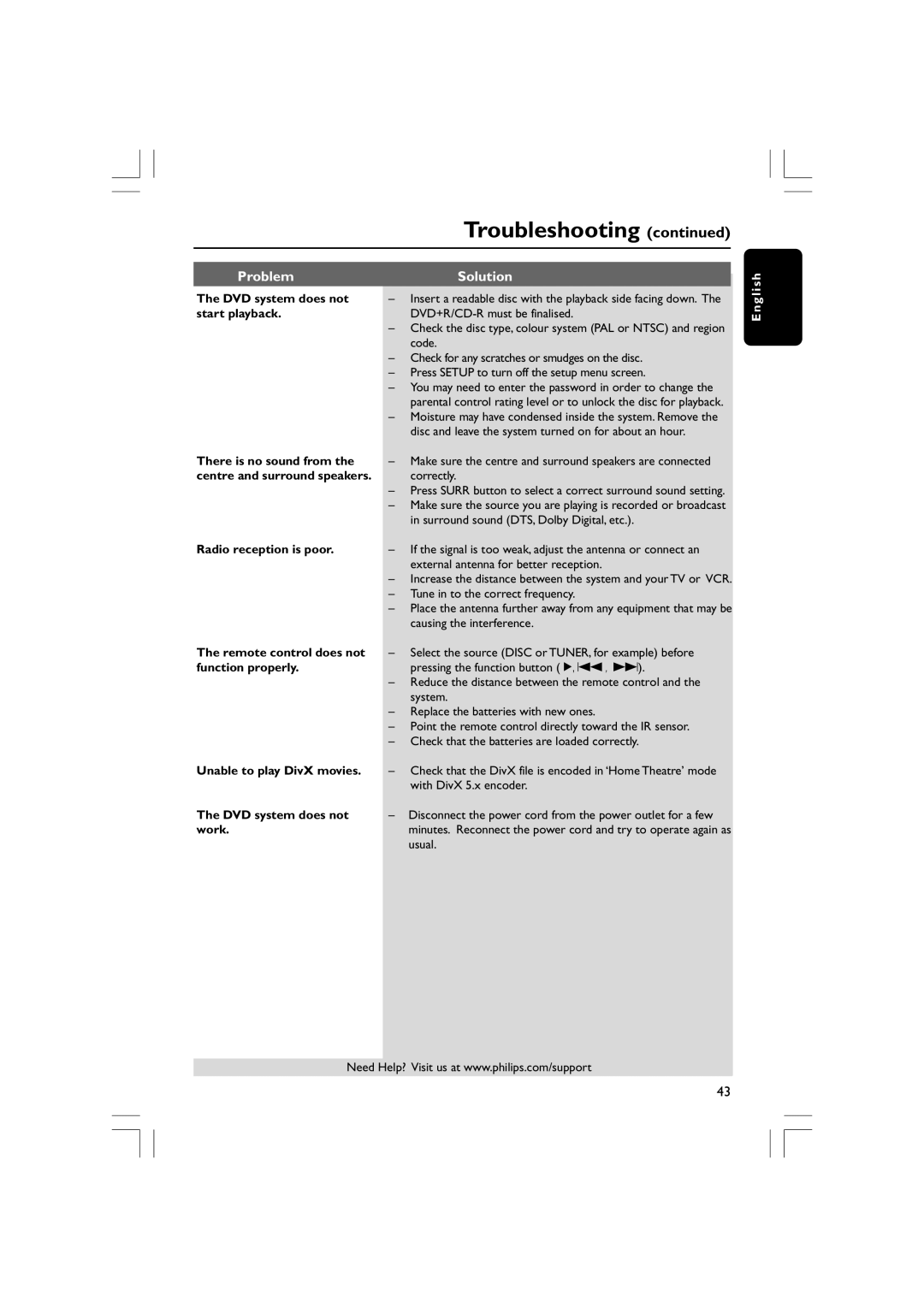
The DVD system does not | – | Insert a readable disc with the playback side facing down. The | |
start playback. |
| ||
| – Check the disc type, colour system (PAL or NTSC) and region | ||
|
| code. | |
| – Check for any scratches or smudges on the disc. | ||
| – Press SETUP to turn off the setup menu screen. | ||
| – You may need to enter the password in order to change the | ||
|
| parental control rating level or to unlock the disc for playback. | |
| – Moisture may have condensed inside the system. Remove the | ||
|
| disc and leave the system turned on for about an hour. | |
There is no sound from the | – | Make sure the centre and surround speakers are connected | |
centre and surround speakers. |
| correctly. | |
| – Press SURR button to select a correct surround sound setting. | ||
| – Make sure the source you are playing is recorded or broadcast | ||
|
| in surround sound (DTS, Dolby Digital, etc.). | |
Radio reception is poor. | – | If the signal is too weak, adjust the antenna or connect an | |
|
| external antenna for better reception. | |
| – | Increase the distance between the system and your TV or VCR. | |
| – Tune in to the correct frequency. | ||
| – Place the antenna further away from any equipment that may be | ||
|
| causing the interference. | |
The remote control does not | – | Select the source (DISC or TUNER, for example) before | |
function properly. |
| pressing the function button (É, S , T). | |
| – Reduce the distance between the remote control and the | ||
|
| system. | |
| – Replace the batteries with new ones. | ||
| – Point the remote control directly toward the IR sensor. | ||
| – Check that the batteries are loaded correctly. | ||
Unable to play DivX movies. | – | Check that the DivX file is encoded in ‘Home Theatre’ mode | |
|
| with DivX 5.x encoder. | |
The DVD system does not | – | Disconnect the power cord from the power outlet for a few | |
work. |
| minutes. Reconnect the power cord and try to operate again as | |
|
| usual. | |
Need Help? Visit us at www.philips.com/support
E n g l i s h
43