24 | ST40 Compass Instrument Owner’s Handbook |
USER CALIBRATION
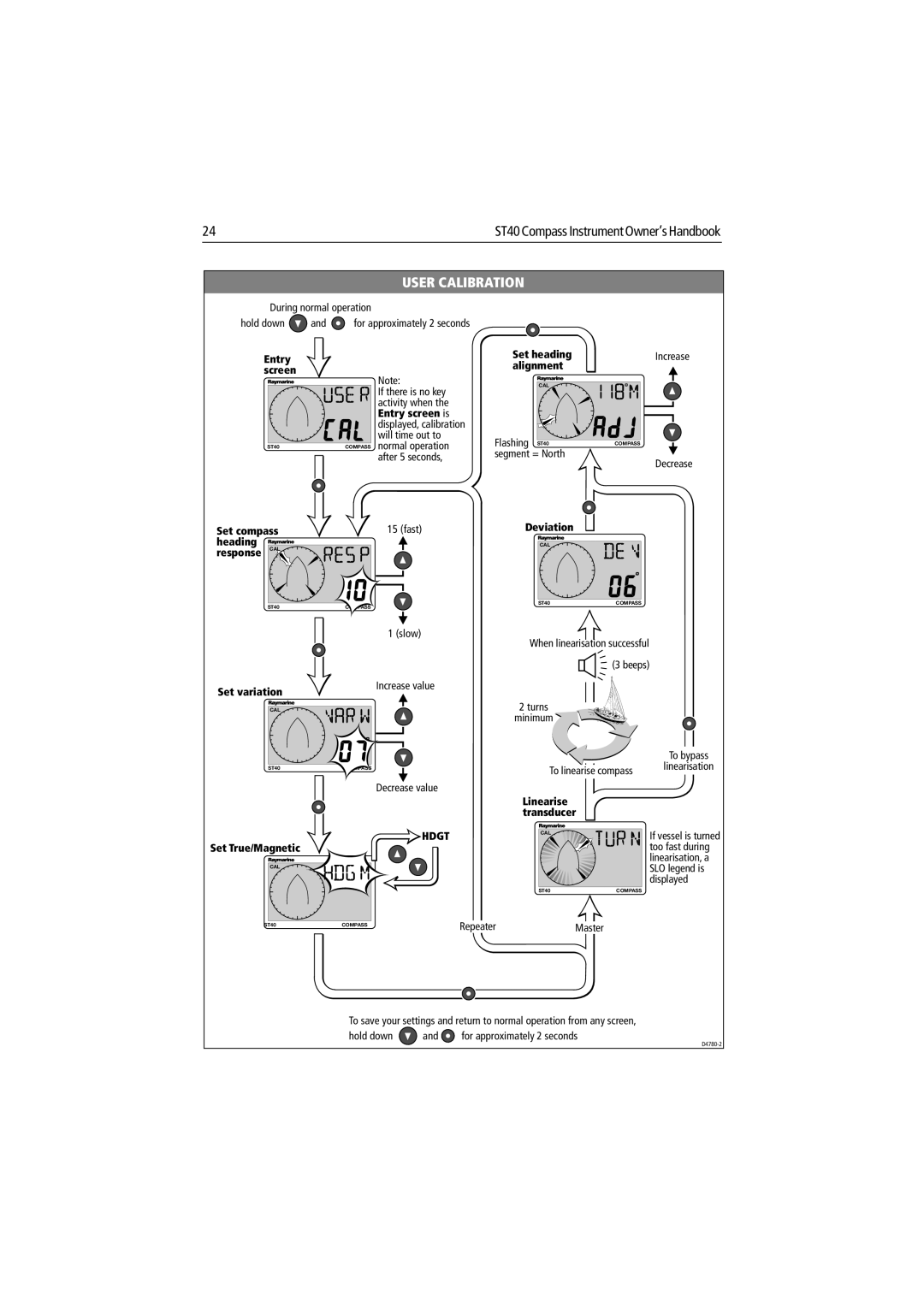
During normal operation
hold down  and
and  for approximately 2 seconds
Entry screen
Note:
| If there is no key |
| activity when the |
| Entry screen is |
| displayed, calibration |
| will time out to |
ST40 | COMPASS normal operation |
| after 5 seconds, |
Set compass | 15 (fast) |
heading |
|
response CAL |
|
ST40 | COMPASS |
| 1 (slow) |
Set heading | Increase |
alignment |
|
CAL |
|
Flashing ST40 | COMPASS |
segment = North | Decrease |
|
Deviation
CAL
ST40 | COMPASS |
When linearisation successful
(3 beeps)
Set variation
CAL
Increase value
2 turns
minimum
To bypass
ST40 | COMPASS |
Decrease value
HDGT
Set True/Magnetic
CAL
To linearise compass
Linearise transducer
CAL
ST40 | COMPASS |
linearisation
If vessel is turned too fast during linearisation, a SLO legend is displayed
ST40 | COMPASS |
RepeaterMaster
To save your settings and return to normal operation from any screen,
hold down  and
and  for approximately 2 seconds