Solid-State Memory Camcorder
For the customers in the U.S.A
For the customers in Canada
For the customers in Europe
For the State of California, USA only
For the customers in the USA and Canada
For the customers in Taiwan only
Pour les clients au Canada
Pour les clients en Europe
Für Kunden in Europa
Pour les utilisateurs aux Etats-Unis et au Canada
Für Kunden in Deutschland
Page
Table of Contents
Using the PHU-60K
Switching the ND Filters
Recording Shot Marks
Slow & Quick Motion Recording
Overview of the Setup Menus
Playback
Audio Status Screen
Video Status Screen
Troubleshooting
Connecting External Devices
MPEG-2 Video Patent Portfolio License 155
Package Configuration
Features
New Generation of HD Recording System
Creative Recording Modes and Settings
Cutting-edge Camera Technologies
Variety of functions and designs for high operability
Xdcam EX web sites
System Requirements for Using the Applications
Using the CD-ROM
Reading the CD-ROM Manuals
Uninstalling an application program
Software Installation
Xdcam EX Clip Browsing Software
Attach an optional accessory, such as a video light
Power CAMERA/MEDIA switch Picture Profile button
Parts Identifications
Camcorder
Eyecup
Eyecup can be attached in the reversed direction
Hooks for the shoulder strap left and right
Attach the supplied shoulder strap as shown below
Rear connector panel
Monitor VOL volume buttons
Operation panel on the handle
Audio control block
Front lower operation block
Side operation panel
Card slot block
Upper operation panel
When attaching to a tripod
Bottom
Shot Transition operation block
Tripod receptacles
IR Remote Commander Supplied
Lens control block Controls on the grip
To remove the lens hood
Buttons without remarks can be used
REC Pause buttons
REC record buttons
SUB Clip button does not function with this camcorder
On-Screen Indications
Indications in Camera Mode
Remarks
Direct Menu Operation
To operate the Direct menu
Direct menu for Tlcs mode selection
Menu disappears, and the new setting is displayed
Direct menu of the selected items appears
Power Supply
Using a Battery Pack
Mounting the battery pack
Removing the battery pack
Using AC Power DC in Power
If the battery charge remaining becomes low
To check in power-off status
To change the message levels
Turning Power On
Turning Power Off
Setting the Clock
Setting the time and date
Time Zone
Move the cursor to Finish then press the joystick or dial
Adjusting the Viewfinder
Adjusting the focus in the viewfinder
Adjusting the contrast and brightness
Adjusting the color
Adjusting the position distance from your eye
Adjusting the angle
Switching between color and monochrome modes
Adjust the horizontal position
To open
To detach
Push the clip on the bottom to release Flip up the eyepiece
LCD screen
Adjusting the Lens
Adjusting the Flange Focal Length
For the PMW-EX3 are called exclusive lenses
This manual
During adjustment
When the adjustment finished
If the adjustment fails
Replacing the Lens
Removing the supplied lens
Attaching an exclusive lens
Pull the lens forward to remove
Turn the lens mount lever downward
When using a non-exclusive lens
When using an exclusive lens
When you mount a serial lens
When you mount a non-serial lens
Adjusting the Grip Using the Cheek Pad
Attaching the cheek pad
Remove the shoulder pad
Pull the shoulder pad to remove
Return the shoulder pad to its original position
Attach the cable clamp you removed in step
To attach the DC cable clamp
Supplied screw Cable clamp
To use the IR Remote Commander
Secure the clamp, using the supplied screw
To activate using the menu
To activate using an assignable button
Battery lifetime
Label space. When applying the label sheet
Handling SxS Memory Cards
About SxS Memory Cards
Usable SxS memory cards
Inserting/Removing an SxS Memory Card
Status indications by the Access lamps
Inserting an SxS memory card
Switching Between SxS Memory Cards
Formatting an SxS Memory Card
Removing an SxS memory card
To execute formatting
To restore a card
Restoring an SxS Memory Card
To format by menu operation
Replacing an SxS memory card
Using the PHU-60K
Connecting/Removing the PHU Connection Cable
To update the managerial file
Connecting the PHU connection cable
Disconnecting the PHU connection cable
Formatting the PHU-60K
Secure the cable at the cable clamp
Message is displayed for three seconds
To restore the hard disk
Restoring the PHU-60K
Mount a fully charged battery pack Load SxS memory cards
Basic Operation Procedure
Camcorder is turned on and enters Camera mode
Recording Full Auto mode
To prevent a switching error
Checking the last recorded clip Rec Review
To delete clips
Selecting the Video Format
Selectable Formats
Clip recording data and clip name
With Ntsc Area selected
Switching the ND Filters
ND filter switch
Changing the Format
64ND 8ND
Adjusting the White Balance
Selecting the Adjustment Mode
Adjust the lens iris opening
If auto white-balance adjustment fails
Executing Auto White Balance
Press the WHT BAL button
Adjusting the Black Balance
Displaying the safety-zone marker
Displaying the Markers
Activating the marker indications
Displaying the Zebra Patterns
Setting the Gain
Fixed gain mode manual gain adjustment
AGC mode automatic gain control
Selecting the gain with the switch
Setting the Electronic Shutter
Recording in AGC Mode
Setting the fixed shutter with Camera SET menu
Setting with the Direct menu
Speed standard speed mode
Angle standard angle mode
Adjusting the Iris
Shooting in Auto Shutter Mode
Recording in Auto Iris Mode
Auto Iris mode
Adjusting the Zoom
Adjusting the Iris Manually
Switching the Zoom Mode
Manual Zoom mode
Using the Power Zoom
To adjust with the power zoom lever on the grip
To adjust with the Zoom button on the handle
Speed Zoom button operation switch
Adjusting the Focus
Adjusting in Full MF Mode
Expanded Focus
Adjusting in MF Mode
Peaking
Adjusting in AF Mode
Focusing in AF mode
Adjusting the focus with the focus ring
One-Push Momentary Auto Focusing
Using Macro Mode
Macro switch
Press the Steady Shot button on the lens
Steady Shot button
Using the Flicker-Reduction function
Reducing Flickers
Setting the Timecode
Setting the Time Data
Running Modes of the Timecode
Setting the User Bits
Setting eight digits as desired
Displaying the Time Data
Recording the current date as the user bits
Using the Built-in Stereo Microphones
Using External Inputs
Using an External Microphone
Set the Audio in switches, both CH-1 and CH-2, to INT
Adjusting the Audio Recording Levels
To adjust the levels manually
To adjust the levels automatically AGC
Monitoring the Audio
Press the BARS/CAM button
Outputting the Color Bars and Reference Tone
BARS/CAM button
Rec Review
Inserting a shot mark during recording
Changing Functions
Assign 1 button Lens Info
Assign 2 button BRT Disp
Assign 3 button Histogram
Preparatory Settings
Interval Recording
Exit the menu
Objects that move very slowly
Performing Interval Recording
Canceling Interval Recording mode
Stopping Interval Recording
Frame Recording
Performing Frame Recording
Select Frame Rec of the Camera SET menu
Select the Number of Frames value for one recording session
Set Setting of Frame Rec of the Camera SET menu to Off
Slow & Quick Motion Recording
Stopping Frame Recording
Example
Recording in Slow & Quick Motion Mode
Setting the recording frame rate with the Direct menu
Canceling Slow & Quick Motion mode
Stopping recording
Canceling Freeze Mix status
Freeze Mix Image Alignment
To use the Freeze Mix function
Superimposing a Freeze Mix image
Mode button and indicator
Shot Transition
Shot-transition operation buttons and indications
Button and B button
Setting procedure
Shot-transition information area
Trans Time
Trans Speed
Checking the registered settings Shot
Start Timer
Recording with a Shot Transition
Registering a shot
When Rec Link is Shot-A or Shot
To cancel recording while a transition is in progress
Ending recording
Releasing a Shot Transition
When using an assignable button
Fader Function
Canceling the Fader function
For fading in a scene
For fading out
Fading-out process begins
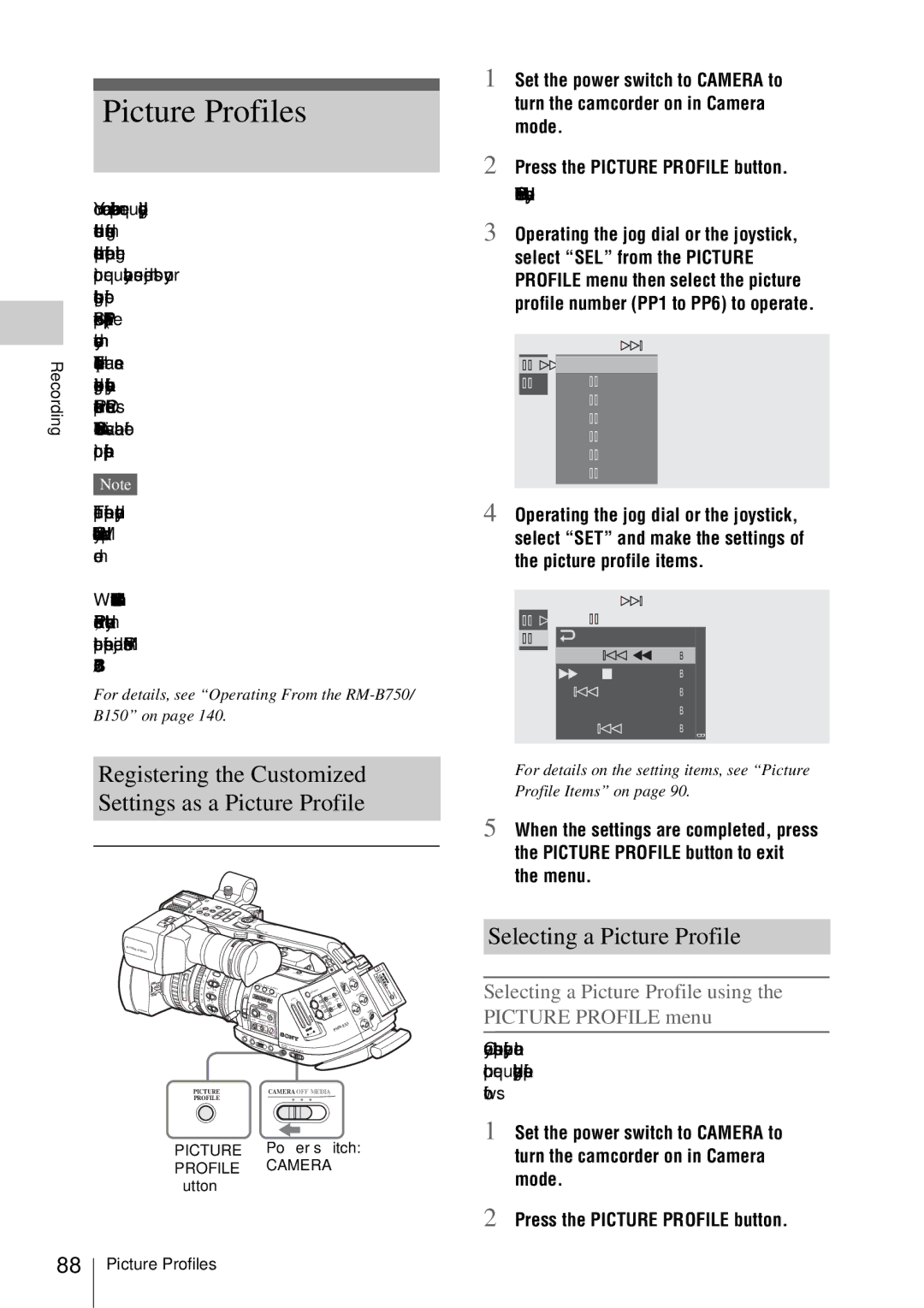
Settings as a Picture Profile
Picture Profiles
Registering the Customized
Selecting a Picture Profile
Resetting a Picture Profile
Copying the Settings of a Picture Profile
Selecting a Picture Profile using the Direct menu
Picture Profile Items
Items
Profile Name
Matrix
White
Detail
Skin Tone Detail
Knee
Select Area Detection
To delete using the Setup menu
To delete using the assignable button
Deleting Clips
Deleting the Last Recorded Clip
Storing the Setup File
Storing/Retrieving the Setting Data
Retrieving the Setup File
Playing Back Clips
Thumbnail Screen
Clip index frame
Date and starting time of recording Clip name OK mark
Switching the SxS memory cards
Playback
Displaying only the clips marked OK on the thumbnail screen
Special recording information
Switching to high-speed playback
Pausing the playback
Information displayed on the playback screen
Cueing up
Monitoring audio
Adding shot marks during playback
Stopping playback
100
Press the Stop button
Clip Operation Menus
Clip Operations
101
Clip Operation menu in Pause mode
Basic Operations of the Clip Operation Menus
Displaying a Clip Operation menu
Clip Operation menu on the thumbnail screen
Displaying the Detailed Information of a Clip
Adding the OK Mark to a Clip
Adding the OK mark
Deleting the OK mark
To cancel copying on the way
Copying a Clip
Deleting a Clip
Displaying the Expand Clip Screen
Displaying the Shot Mark Screen
Expand Clip screen
Clip Operation menu on the Expand Clip screen
105
Adding/Deleting Shot Marks
Changing the Index Frame
Dividing a Clip
107
Select Divide Clip from the Clip Operation menu
Canceling the status screen display
Switching the status screens
Showing the Status Screens
Available status screens
Camera Status Screen
109
Camera Mode
Media Mode
Audio Status Screen
110
BUTTON/REMOTE Status Screen
Video Status Screen
111
BATTERY/MEDIA Status Screen
Battery Battery charge remaining
HDD A/HDD B Battery remaining of PHU-60K units
112
Overview of the Setup Menus
Setup Menu Layers
Setup Menu Configuration
113
Displaying the Setup menu
Basic Menu Operations
Menu controls
114
Setting the Setup menus
Example When the cursor is located at Camera SET menu icon
115
Press the jog dial or the joystick
Entering a character string
Terminating the menu operation
116
For an item that requires your confirmation
Setup Menu List
Camera SET Menu
117
Menu items
Menu items Subitems and setting values Contents
118
119
120
Audio SET Menu
121
Audio Input
Audio Output
Video SET Menu
Menu items Setting values Contents
122
VF SET Menu
123
Peaking
Marker
124
Display On/Off
Lens Menu
TC/UB SET Menu
125
Menu Configuration
126
Flare
Shading
Others Menu
127
128
Assign Button
Tally
Hours Meter
129
130
Connecting External Monitors
131
75-ohm Coaxial cable Audio cable Optional
75-ohm Cable supplied Video Coaxial cable Optional
SDI OUT connector BNC type
Component OUT connector mini-D connector
Monitor OUT connector BNC type
Video connector S connector
Supply the operating power independently
Operating Clips With a Computer
To connect with a USB cable
To use the ExpressCard slot of a computer
Using a nonlinear editing system
Select Execute by operating the jog dial or the joystick
Macintosh
To use Final Cut Pro of Apple Inc
Perform the preparatory settings of the camcorder
Connecting an External Device i.LINK Connection
135
Recording External Input Signals
Setting on this camcorder
Nonlinear Editing
136
What is i.LINK?
About i.LINK
137
Press the REC START/STOP button on the handle
Aligning the phase of the video signal Genlock
External Synchronization
About data transfer speed of i.LINK
About the required i.LINK cable
139
To release the external timecode synchronization
Ohm coaxial TC in cables optional Reference Timecode
Ohm coaxial
Remote Control Unit
Releasing Remote Control mode
Operating From the RM B750/B150
Connection
To cancel Slow & Quick Motion mode
141
Operating the menu from the RM-B750
Select S&Q Motion from the Camera SET menu
Functions Operable From the RM-B750/B150 Camera Mode
Adjustments of the lens functions
Adjustments of the Picture Profiles
142
143
Picture Profile item
Important Notes on Operation
Use and Storage
Shipping
Care of the unit
Phenomena specific to Cmos image sensors
About the LCD panels
145
Output formats in clip playback mode Media mode
Video Formats and Output
Video Output format Format YPbPr Out Select HD Select SD
Clip format Output format YPbPr Out Select HD Select SD
Limitations of Outputs
147
Storing compensation data for a non- exclusive lens
Lens File Operations
148
Backup Battery
Service life of the backup battery
149
To change the file name
150
Replacing the backup battery
Attach the cover in the original position
Troubleshooting
Operating Power
Symptoms Cause Remedy
Recording/Playback
External Devices
152
Error/Warning Indications
Error Indications
153
Buzzer Tally Cause and measures Viewfinder Lamps
154
Tally Cause and measures Viewfinder Lamps
General
Specifications
155
Input connectors
Camera Block
Audio Block
Viewfinder
Optional Accessories
Output connectors
Computer connectors
Supplied Lens VCL-614B2X
158
Dimensions
Unit mm inches
Index
159
Direct menu 26, 54, 59, 62, 66, 80, 89 Disp Clip Info
160
161
162
Shot MARK2 ADD
Zebra 57
163