Topcom Twintalker 7000
9Battery Level Indication
The BATTERY CHARGE LEVEL is indicated by the number of squares present inside the BATTERY icon on the LCD Screen.
Battery Full
Battery 2/3 charged
Battery 1/3 charged
Battery empty
When the BATTERY CHARGE LEVEL is low, the BATTERY icon will flash to indicate that the batteries need to be replaced or recharged and an acoustic warning is audible.
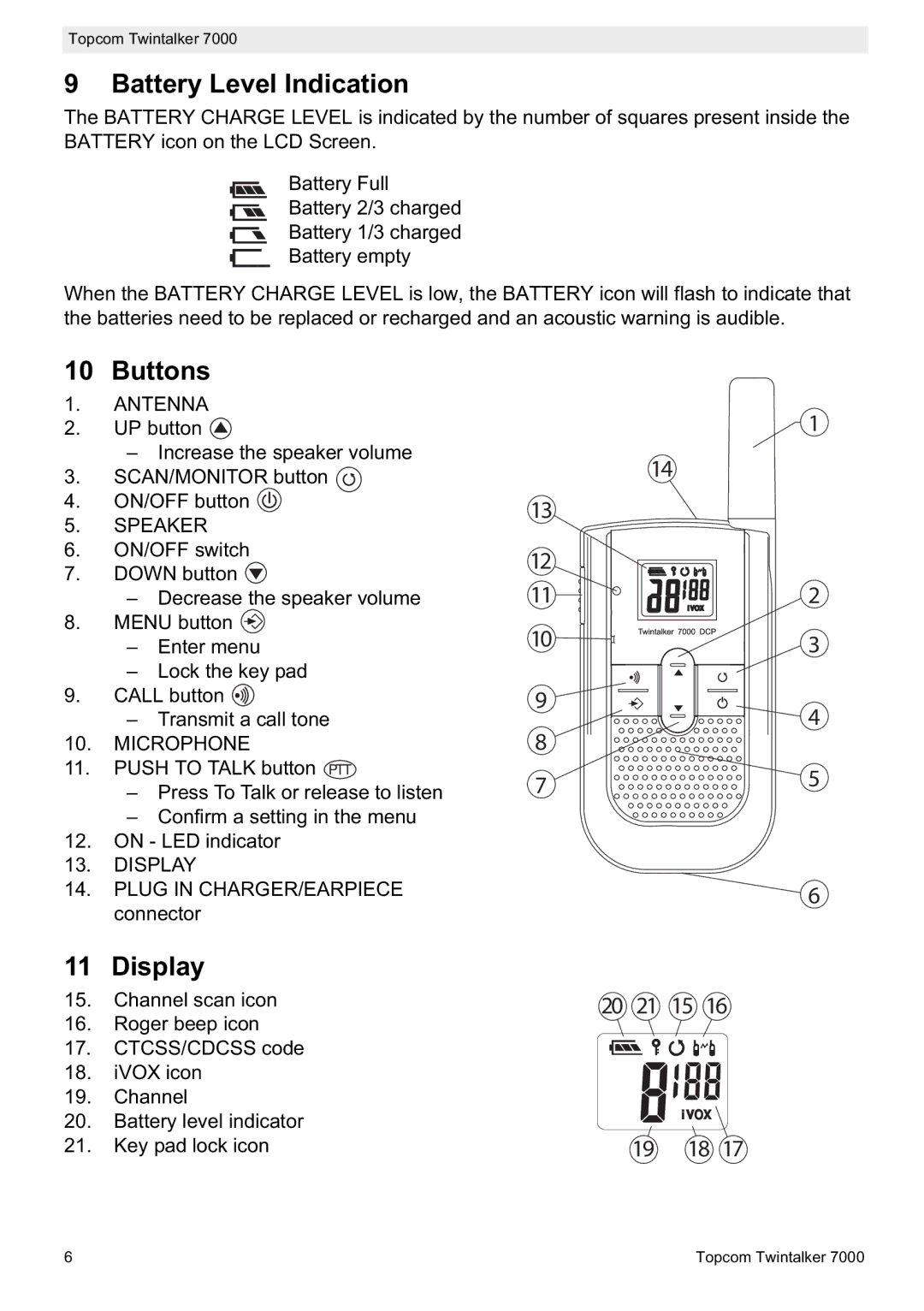
10 Buttons
1.ANTENNA
2.UP button 
–Increase the speaker volume
3.SCAN/MONITOR button 
4.ON/OFF button 
5.SPEAKER
6.ON/OFF switch
7.DOWN button 
–Decrease the speaker volume
8.MENU button 
–Enter menu
–Lock the key pad
9.CALL button 
–Transmit a call tone
10.MICROPHONE
11.PUSH TO TALK button PTT
–Press To Talk or release to listen
–Confirm a setting in the menu
12.ON - LED indicator
13.DISPLAY
14.PLUG IN CHARGER/EARPIECE connector
11 Display
15.Channel scan icon
16.Roger beep icon
17.CTCSS/CDCSS code
18.iVOX icon
19.Channel
20.Battery level indicator
21.Key pad lock icon
|
|
|
| 1 |
| 14 |
|
| |
13 |
|
|
|
|
12 |
|
|
|
|
11 |
|
|
| 2 |
10 |
|
|
| 3 |
9 |
|
|
| 4 |
8 |
|
|
| |
|
|
|
| |
7 |
|
|
| 5 |
|
|
|
| 6 |
20 | 21 | 15 | 16 | |
| 19 | 18 | 17 | |
6 | Topcom Twintalker 7000 |