Manuals
/
JVC
/
TV and Video
/
Flat Panel Television
JVC
LT-26C50BU, LT-26C50SU, LT-32C50BU, LT-32C50SU
manual
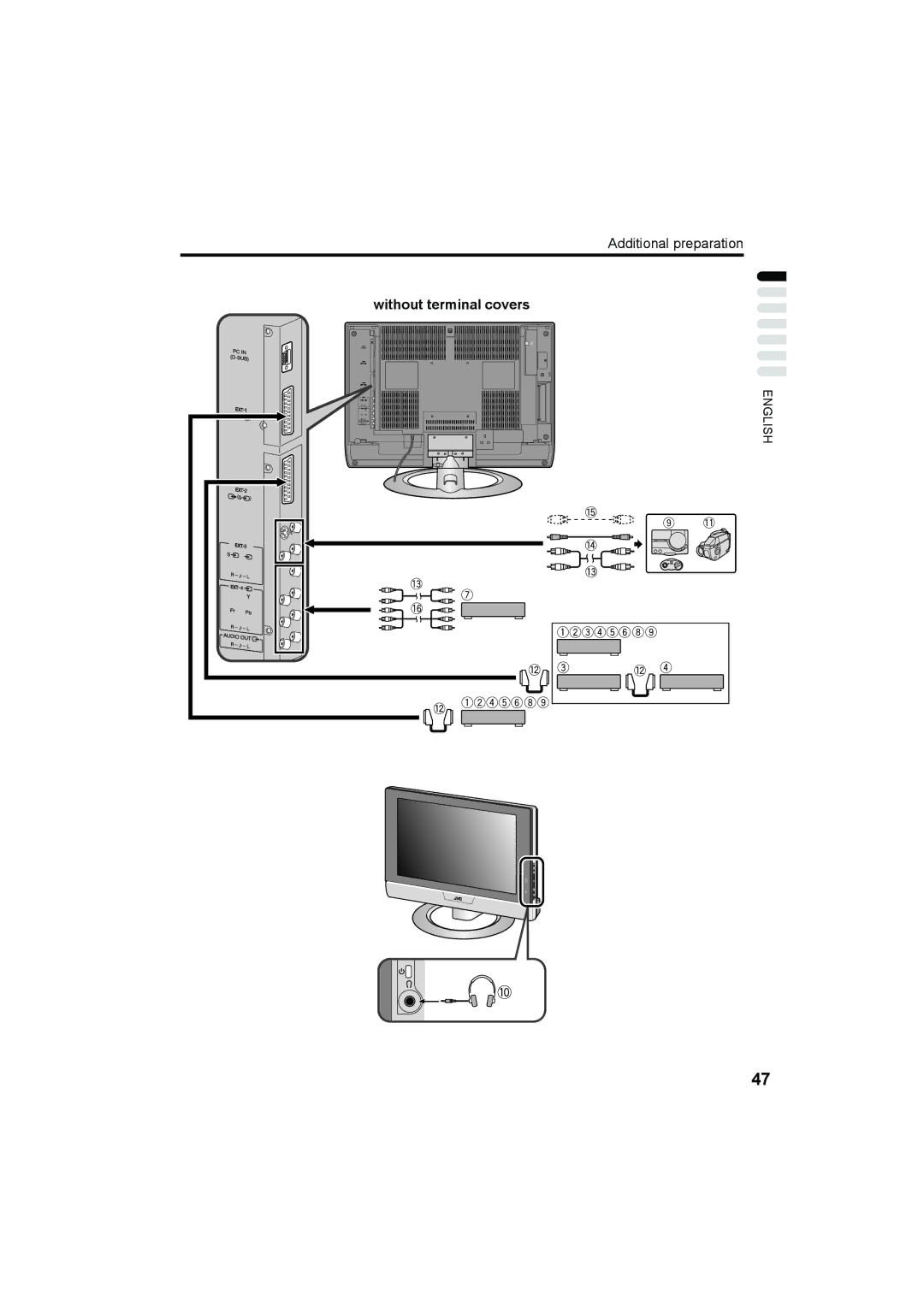
Without terminal covers
Models:
LT-26C50SU
LT-26C50BU
LT-32C50SU
LT-32C50BU
1
1
2
3
4
5
6
7
8
9
10
11
12
13
14
15
16
17
18
19
20
21
22
23
24
25
26
27
28
29
30
31
32
33
34
35
36
37
38
39
40
41
42
43
44
45
46
47
48
49
50
51
52
53
54
55
56
57
58
58
Download
58 pages
19.05 Kb
43
44
45
46
47
48
49
50
51
52
Troubleshooting
Specification
Sleep Timer
Connecting to the computer
„ Other issues
SET UP menu
Adjust the volume
Initial settings
„ Cleaning the screen
Features
Page 48
Image 48
Additional preparation
without terminal covers
ENGLISH
47
Page 47
Page 49
Page 48
Image 48
Page 47
Page 49
Contents
LT-32C50BU LT-26C50BU LT-32C50SU LT-26C50SU
LCD TV
English
Pixel defects
Distance recommendations
„ Cleaning the screen
S.T. demonstration
Contents
Page
Removing the terminal covers
„ Cable holder
Connecting the aerial and video cassette recorder VCR
Connecting the power cord to the AC outlet
Putting the batteries into the remote control
Initial settings
Press the # button on the remote control
Press the a button
„ ACI function
Press the a button to display the T-V Link menu
If you do not have a T-V Link compatible VCR connected
If ACI START/ACI Skip appears in the Auto Program menu
If ACI Error is displayed in the Auto Program menu
Link functions
„ Downloading the data to VCR
Turn on the VCR Press the a button
When Feature not Available is displayed
„ Pre-set download
„ Direct Rec
Turn the TV on from standby mode
TV buttons and functions
Choose a TV channel
Watch images from external devices
Adjust the volume
Using the Menu
Press the r Volume q buttons
Use the MENU/OK button
Remote control buttons and functions
Turn the TV on or off from Standby mode
Press the # standby button to turn TV on or off
Choose a TV channel and watch images from external devices
To return to a TV channel
To use the programme number PR 0 AV
Press the r q buttons to adjust the volume
Information function
Channel number display
Time display
„ Choose the Zoom mode
Zoom function
„ Adjusting the visible area of the picture
3D Sound function
Return to TV channel instantly
Using the Freeze function
Using the Multi-picture function
To return the Multi-picture to one screen
„ Setting the picture effect
Favourite channel function
„ Favourite channel registration
„ Calling the favourite channel
Set the VCR/TV/DVD Switch to the VCR or DVD position
Operating a JVC brand VCR or DVD player
VCR
DVD
Using the List Mode
Press B button to go into the List mode
Teletext function
Basic operation
Hold
Sub-page
Reveal
Size
Cancel
Press H Cancel button
Index
Press the G Index button
Using the TV’s menu
Press the Hbutton to display the menu bar
Using the TV’s menu
Picture menu
Features
„ Digital VNR
„ Super DigiPure
„ Movie Theatre
„ Colour Management
„ Picture Management
„ Colour System
„ 43 Auto Aspect
Sound menu
Features menu
Sleep Timer
Child Lock
„ To set the Child Lock function
Appearance
Blue Back
„ To view a locked TV channel
Favourite Setting
Choose Favourite SETTING, then press the a or 3 button
SET UP menu
Auto Program
EDIT/MANUAL
„ Basic operation
„ Move
„ Delete
Choose EDIT/MANUAL, then press the a or 3 button
„ ID
Before performing Insert or Manual operation
To cancel the Insert function
„ Insert
„ Manual
France
Language
Decoder EXT-2
EXT Setting
Component Auto Select
„ S-IN S-VIDEO input
ID List
To cancel the S-IN S-VIDEO input setting
„ ID List
Press the 5 or 6 buttons to choose an EXT terminal
To erase a name assigned to the EXT terminal
„ Dubbing
Press the 5 buttons to choose the arrow from the menu
EXT-1/EXT-3
Connecting to the computer
Table of signals for each type of computer
When a picture is not displayed
Displaying a computer screen
Connecting external equipment
„ Connecting the PC
Before connecting anything
Additional preparation
Without terminal covers
„ Connecting headphones
„ Video or sound signal output from the EXT-2 terminal
„ T-V Link compatible VCR
„ TV output from the EXT-1 terminal
„ Connecting speakers/amplifier
CH/CC numbers
Channel
CH/CC numbers
Troubleshooting
„ If you cannot turn on the TV
„ If you cannot turn off the TV
„ No picture or no sound
„ If the TV does not respond to the remote control
„ Other issues
„ Poor sound
Troubleshooting
Specifications
We may change the design and specifications without notice
Specifications
Victor Company of Japan, Limited LCT1700-001A-U CR-JMUK
Top
Page
Image
Contents