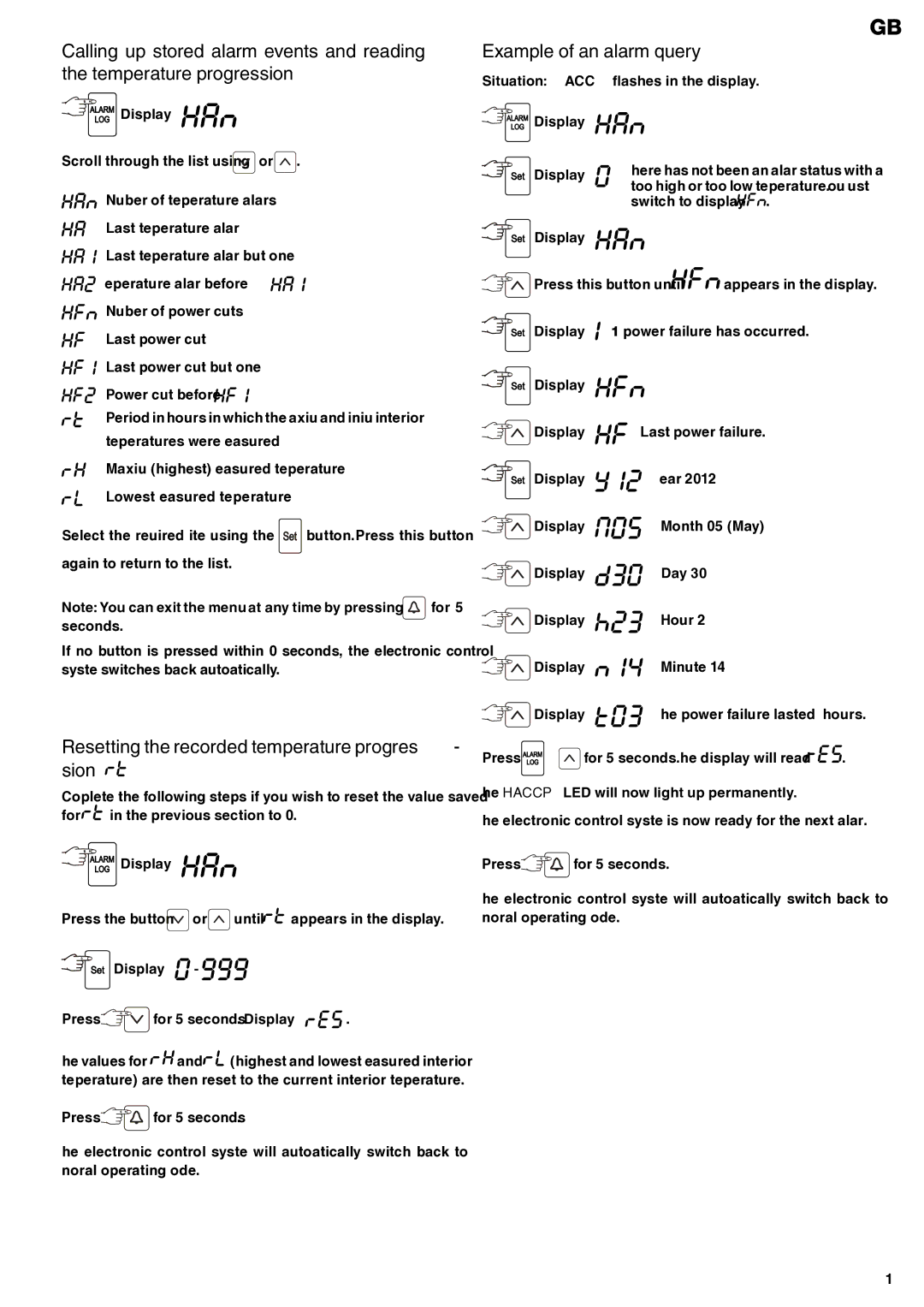
Calling up stored alarm events and reading the temperature progression


 Display =


Scroll through the list using  or
or  .
.
Number of temperature alarms
Last temperature alarm
Last temperature alarm but one
Temperature alarm before 


Number of power cuts
Last power cut
Last power cut but one
Power cut before 


Period in hours in which the maximum and minimum interior temperatures were measured
Maximum (highest) measured temperature Lowest measured temperature
Select the required item using the 

 button. Press this button again to return to the list.
Note: You can exit the menu at any time by pressing  for 5 seconds.
If no button is pressed within 60 seconds, the electronic control system switches back automatically.
Resetting the recorded temperature progres- sion 

Complete the following steps if you wish to reset the value saved
for 
 in the previous section to 0.


 Display =


Press the button  or
or  until
until 
 appears in the display.

 Display =
 -
- 


Press  for 5 seconds. Display =


 .
.
The values for 

 and
and 
 (highest and lowest measured interior temperature) are then reset to the current interior temperature.
Press 
 for 5 seconds.
The electronic control system will automatically switch back to normal operating mode.
GB
Example of an alarm query
Situation: HACCP flashes in the display.


 Display =


Display = | There has not been an alarm status with a | |
| too high or too low temperature. You must | |
| switch to display | . |

 Display =


 Press this button until


 appears in the display.
 Display =
  1 power failure has occurred.
Display = |
|
Display = | Last power failure. |
Display = | Year 2012 |
Display = | Month 05 (May) |
Display = | Day 30 |
Display = | Hour 23 |
Display = | Minute 14 |
Display = | The power failure lasted 3 hours. |
Press  +
+  for 5 seconds. The display will read

 .
.
The HACCP LED will now light up permanently.
The electronic control system is now ready for the next alarm.
Press 
 for 5 seconds.
The electronic control system will automatically switch back to normal operating mode.
19