Photo Information
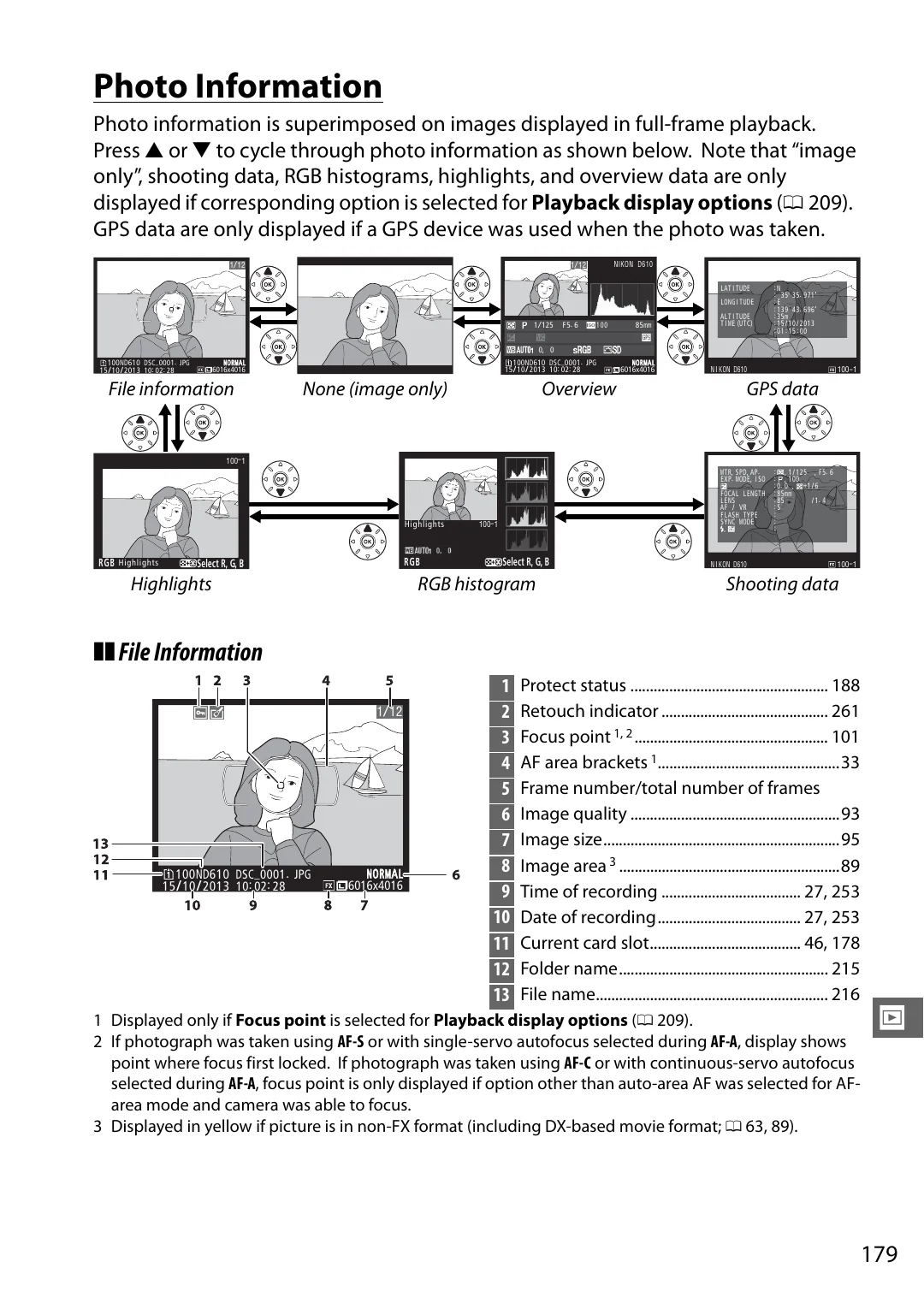
Photo information is superimposed on images displayed in full-frame playback.
Press 1 or 3 to cycle through photo information as shown below. Note that “image
only”, shooting data, RGB histograms, highlights, and overview data are only
displayed if corresponding option is selected for Playback display options (0 209).
GPS data are only displayed if a GPS device was used when the photo was taken.
1 / 12
1 / 12
NIKON D610
L A T I T U D E
L O N G I T U D E
1 / 125
F5. 6
100
85mm
A L T I T U D E
T I M E ( U T C )
OR AL
N ORM
6016x4016
N I KON D610
: N
: 3 5 º 3 5 . 9 7 1 ‘
: E
: 1 3 9 º 4 3 . 6 9 6 ‘
: 3 5 m
: 1 5 / 1 0 / 2 0 1 3
: 0 1 : 1 5 : 0 0
0, 0
100ND610 DSC_0001. JPG
15 / 10 / 2013 10: 02: 28
OR AL
N ORM
6016x4016
100ND610 DSC_0001. JPG
15 / 10 / 2013 10: 02: 28
File information
None (image only)
Overview
100-1
GPS data
100-1
M T R , S P D , A P .
E X P . M O D E , I S O
Highlights
RGB Highlights
RGB
Select R, G, B
Highlights
F O C A L L E N G T H
L E N S
A F / V R
F L A S H T Y P E
S Y N C M O D E
,
100-1
Select R, G, B
RGB histogram
N I KON D610
: , 1 / 1 25 , F 5 . 6
: , 1 0 0
: 0 . 0 , + 1 / 6
: 8 5 m m
: 8 5
/ 1 . 4
: S
:
:
:
100-1
Shooting data
❚❚ File Information
1 / 12
100ND610 DSC_0001. JPG
15 / 10 / 2013 10: 02: 28
OR AL
N ORM
6016x4016
1 Protect status ................................................... 188
2 Retouch indicator ........................................... 261
3 Focus point 1, 2 .................................................. 101
4 AF area brackets 1 ...............................................33
5 Frame number/total number of frames
6 Image quality ......................................................93
7 Image size.............................................................95
8 Image area 3 .........................................................89
9 Time of recording .................................... 27, 253
10 Date of recording..................................... 27, 253
11 Current card slot....................................... 46, 178
12 Folder name...................................................... 215
13 File name............................................................ 216
1 Displayed only if Focus point is selected for Playback display options (0 209).
2 If photograph was taken using AF-S or with single-servo autofocus selected during AF-A, display shows
point where focus first locked. If photograph was taken using AF-C or with continuous-servo autofocus
selected during AF-A, focus point is only displayed if option other than auto-area AF was selected for AF-
area mode and camera was able to focus.
3 Displayed in yellow if picture is in non-FX format (including DX-based movie format; 0 63, 89).
I
179