185
I
Thumbnail Playback
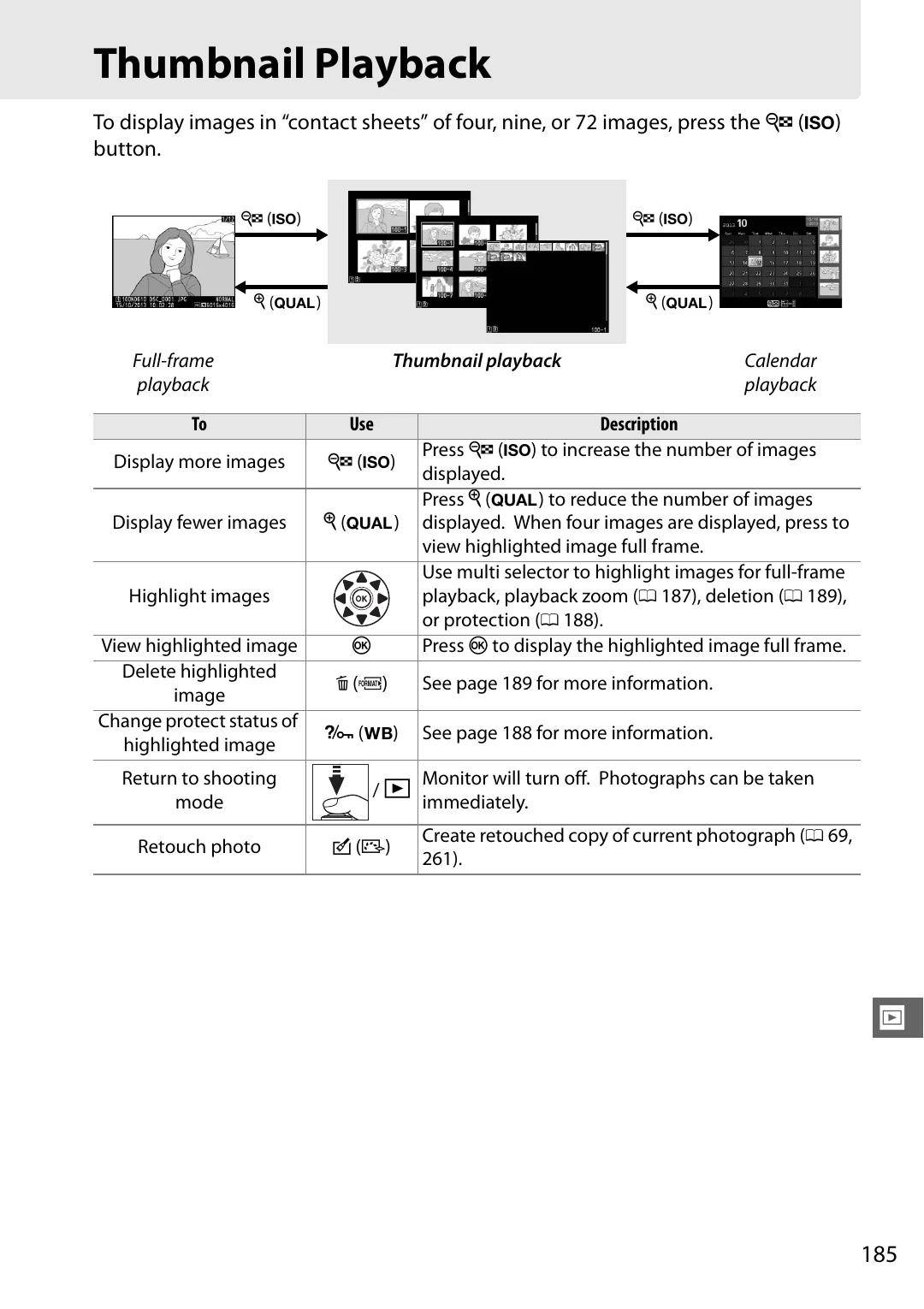
To display images in “contact sheets” of four, nine, or 72 images, press the
W
(
S
)
button.
Full-frame
playback
Thumbnail playback
Calendar
playback
To
Use
Description
Display more images
W
(
S
)
Press
W
(
S
) to increase the number of images
displayed.
Display fewer images
X
(
T
)
Press
X
(
T
) to reduce the number of images
displayed. When four images are displayed, press to
view highlighted image full frame.
Highlight images
Use multi selector to highlight images for full-frame
playback, playback zoom (
or protection (
View highlighted image
J
Press
J
to display the highlighted image full frame.
Delete highlighted
image
O
(
Q
)
See page 189 for more information.
Change protect status of
highlighted image
L
(
U
)
See page 188 for more information.
Return to shooting
mode
/
K
Monitor will turn off. Photographs can be taken
immediately.
Retouch photo
c
(
b
)
Create retouched copy of current photograph (
W
(
S
)
X
(
T
)
W
(
S
)
X
(
T
)