189
I
Deleting Photographs
To delete the photograph displayed in full-frame playback or highlighted in the
thumbnail list, press the
O
(
Q
) button. To delete multiple selected photographs, all
photographs taken on a selected date, or all photographs in the current playback
folder, use the
Delete
option in the playback menu. Once deleted, photographs can
not be recovered. Note that pictures that are protected or hidden can not be deleted.
Full-Frame, Thumbnail, and Calendar Playback
Press the
O
(
Q
) button to delete the current photograph.
1
Select an image.
Display the image or highlight it in the thumbnail list in thumbnail or calendar
playback.
2
Press the
O
(
Q
) button.
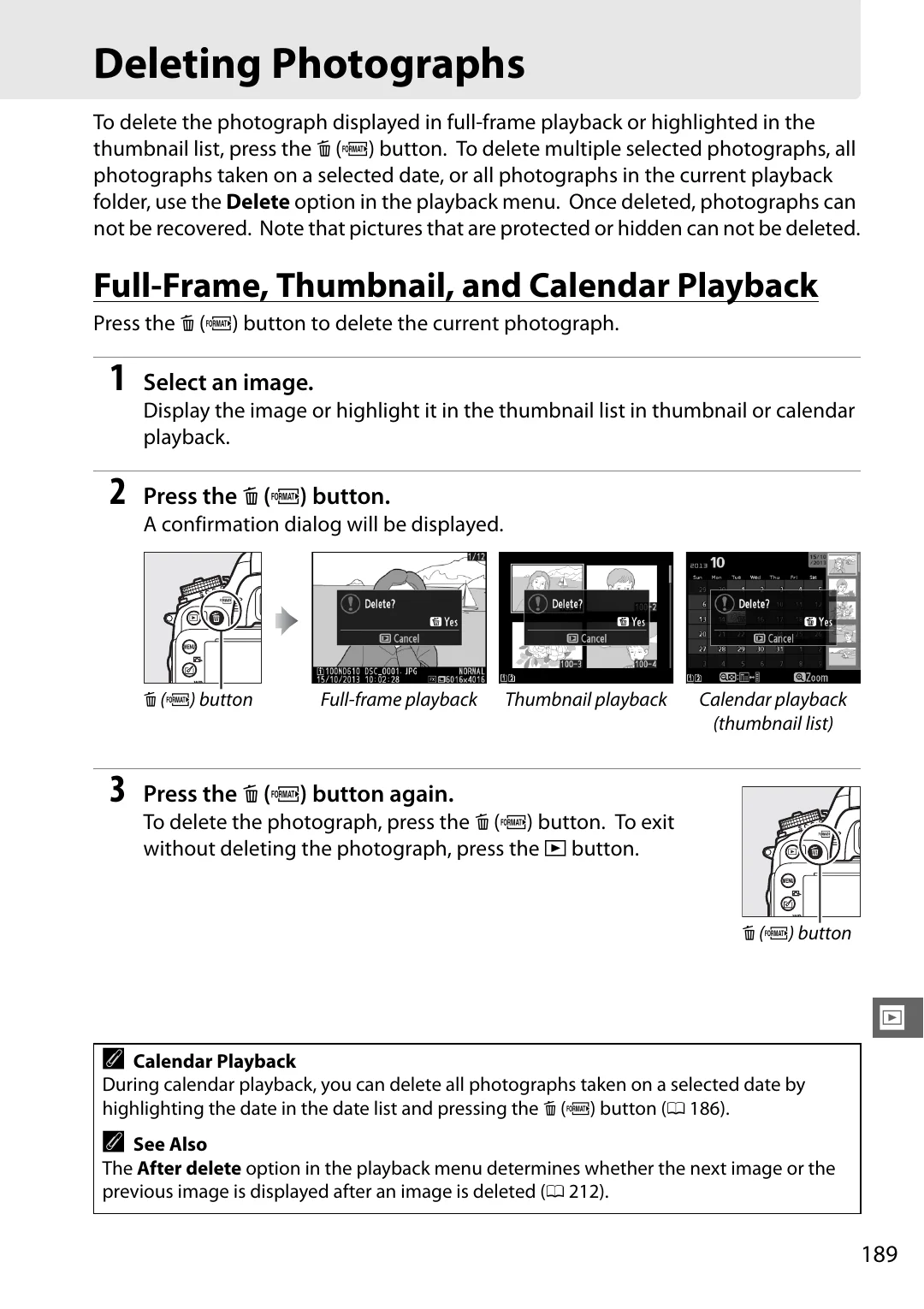
A confirmation dialog will be displayed.
3
Press the
O
(
Q
) button again.
To delete the photograph, press the
O
(
Q
) button. To exit
without deleting the photograph, press the
K
button.
O
(
Q
) button
Full-frame playback
Thumbnail playback
Calendar playback
(thumbnail list)
A
Calendar Playback
During calendar playback, you can delete all photographs taken on a selected date by
highlighting the date in the date list and pressing the
O
(
Q
) button (
A
See Also
The
After delete
option in the playback menu determines whether the next image or the
previous image is displayed after an image is deleted (
O
(
Q
) button