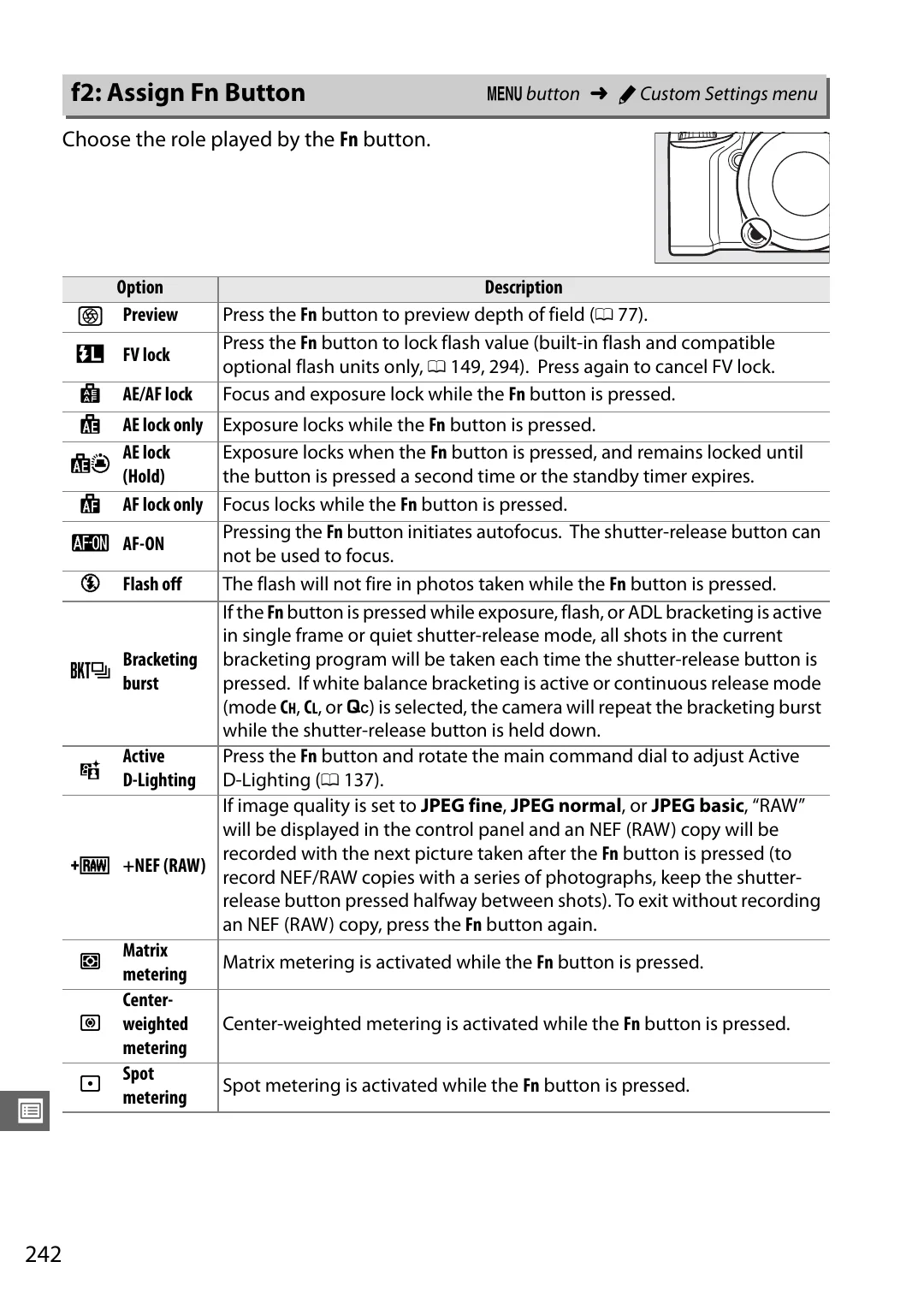
242
U
Choose the role played by the
Fn
button.
f2: Assign Fn Button
G
button
➜
A
Custom Settings menu
Option
Description
q
Preview
Press the
Fn
button to preview depth of field (
r
FV lock
Press the
Fn
button to lock flash value (built-in flash and compatible
optional flash units only,
149, 294). Press again to cancel FV lock.
B
AE/AF lock
Focus and exposure lock while the
Fn
button is pressed.
C
AE lock only
Exposure locks while the
Fn
button is pressed.
E
AE lock
(Hold)
Exposure locks when the
Fn
button is pressed, and remains locked until
the button is pressed a second time or the standby timer expires.
F
AF lock only
Focus locks while the
Fn
button is pressed.
A
AF-ON
Pressing the
Fn
button initiates autofocus. The shutter-release button can
not be used to focus.
s
Flash off
The flash will not fire in photos taken while the
Fn
button is pressed.
t
Bracketing
burst
If the
Fn
button is pressed while exposure, flash, or ADL bracketing is active
in single frame or quiet shutter-release mode, all shots in the current
bracketing program will be taken each time the shutter-release button is
pressed. If white balance bracketing is active or continuous release mode
(mode
C
H
,
C
L
, or
M
) is selected, the camera will repeat the bracketing burst
while the shutter-release button is held down.
y
Active
D-Lighting
Press the
Fn
button and rotate the main command dial to adjust Active
D-Lighting (
e
+NEF (RAW)
If image quality is set to
JPEG fine
,
JPEG normal
, or
JPEG basic
, “RAW”
will be displayed in the control panel and an NEF (RAW) copy will be
recorded with the next picture taken after the
Fn
button is pressed (to
record NEF/RAW copies with a series of photographs, keep the shutter-
release button pressed halfway between shots). To exit without recording
an NEF (RAW) copy, press the
Fn
button again.
L
Matrix
metering
Matrix metering is activated while the
Fn
button is pressed.
M
Center-
weighted
metering
Center-weighted metering is activated while the
Fn
button is pressed.
N
Spot
metering
Spot metering is activated while the
Fn
button is pressed.