239
U
6
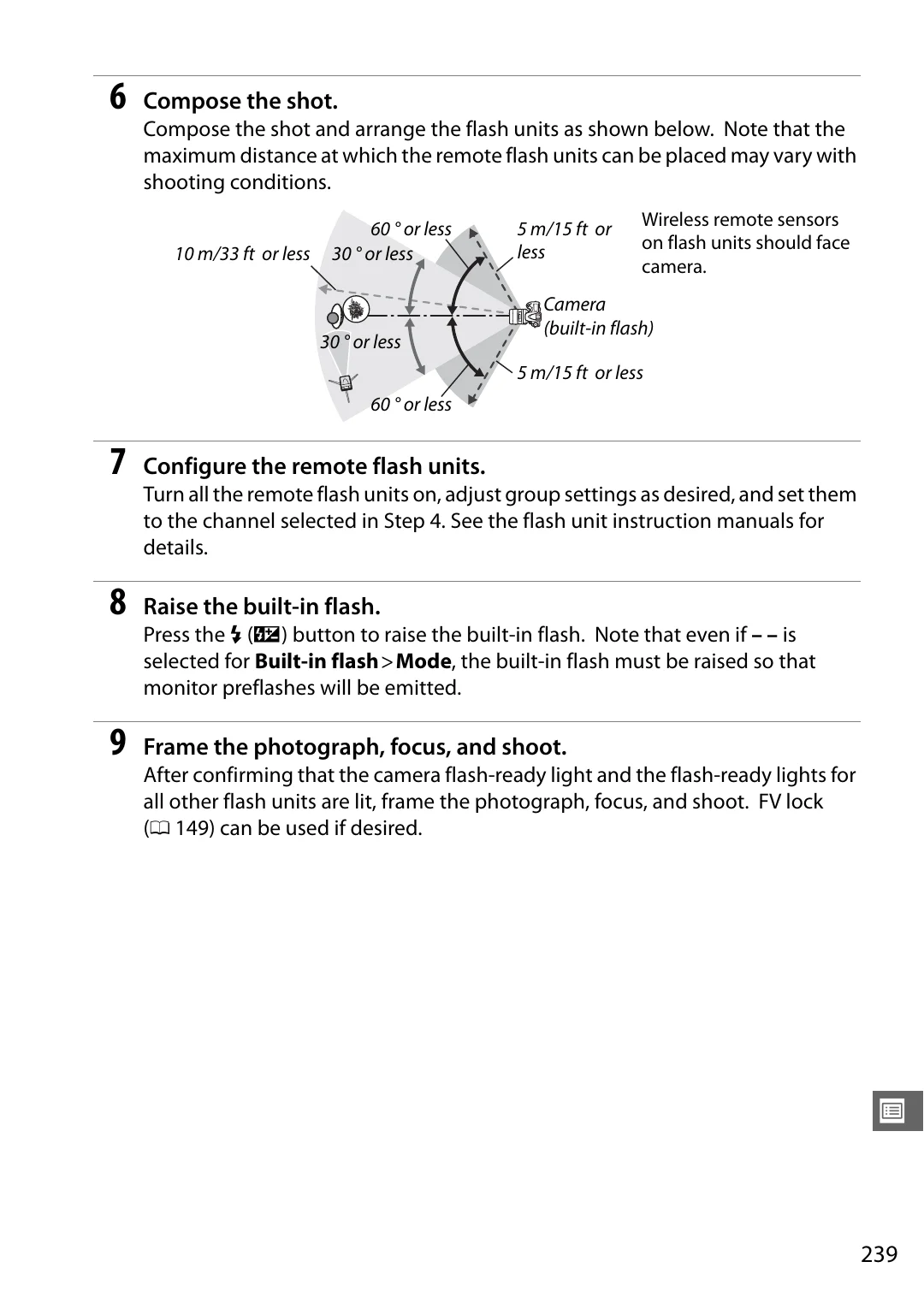
Compose the shot.
Compose the shot and arrange the flash units as shown below. Note that the
maximum distance at which the remote flash units can be placed may vary with
shooting conditions.
7
Configure the remote flash units.
Turn all the remote flash units on, adjust group settings as desired, and set them
to the channel selected in Step 4. See the flash unit instruction manuals for
details.
8
Raise the built-in flash.
Press the
M
(
Y
) button to raise the built-in flash. Note that even if
– –
is
selected for
Built-in flash
>
Mode
, the built-in flash must be raised so that
monitor preflashes will be emitted.
9
Frame the photograph, focus, and shoot.
After confirming that the camera flash-ready light and the flash-ready lights for
all other flash units are lit, frame the photograph, focus, and shoot. FV lock
(
149) can be used if desired.
60 ° or less
30 ° or less
10 m/33 ft or less
30 ° or less
60 ° or less
5 m/15 ft or
less
5 m/15 ft or less
Camera
(built-in flash)
Wireless remote sensors
on flash units should face
camera.