151
t
t
Other Shooting Options
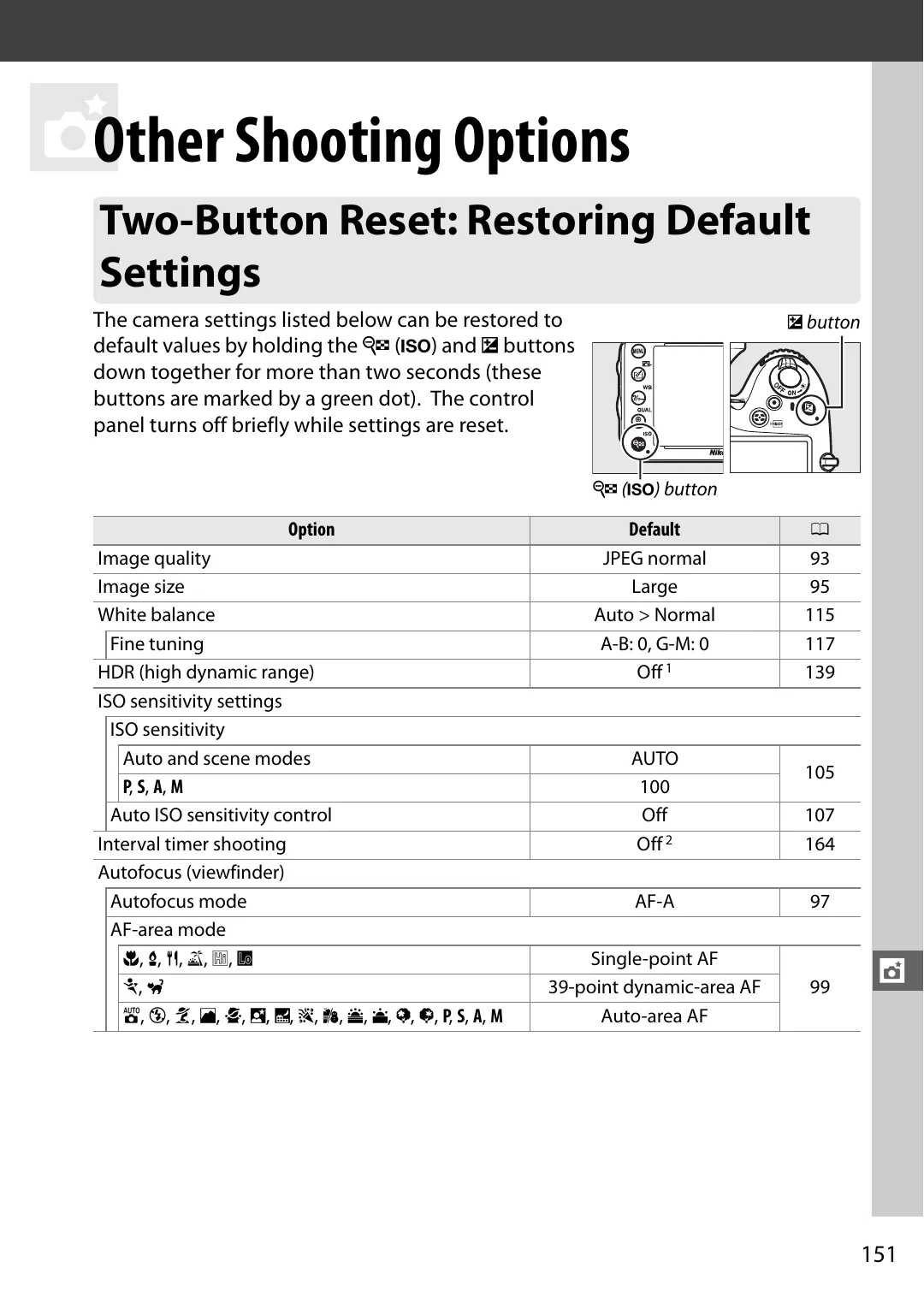
The camera settings listed below can be restored to
default values by holding the
W
(
S
) and
E
buttons
down together for more than two seconds (these
buttons are marked by a green dot). The control
panel turns off briefly while settings are reset.
Two-Button Reset: Restoring Default
Settings
Option
Default
0
Image quality
JPEG normal
Image size
Large
White balance
Auto > Normal
Fine tuning
A-B: 0, G-M: 0
HDR (high dynamic range)
Off
1
ISO sensitivity settings
ISO sensitivity
Auto and scene modes
AUTO
P
,
S
,
A
,
M
100
Auto ISO sensitivity control
Off
Interval timer shooting
Off
2
Autofocus (viewfinder)
Autofocus mode
AF-A
AF-area mode
n
,
x
,
0
,
1
,
2
,
3
Single-point AF
m
,
w
39-point dynamic-area AF
i
,
j
,
k
,
l
,
p
,
o
,
r
,
s
,
t
,
u
,
v
,
y
,
z
,
P
,
S
,
A
,
M
Auto-area AF
E
button
W
(
S
) button