63
y
Image Area
Regardless of the option selected for
Image area
in the shooting menu (
movies and photographs recorded in movie live view (
57) have an aspect ratio of
16 : 9. Images recorded with
On
selected for
Image area
>
Auto DX crop
and a DX
lens attached use a DX-based movie format, as do images recorded with
DX (24×16)
1.5×
selected for
Image area
>
Choose image area
. An FX-based movie format is
used when
FX (36 × 24) 1.0×
is selected. A
a
icon is displayed when the DX-based
movie format is selected.
A
Movie Live View Photographs
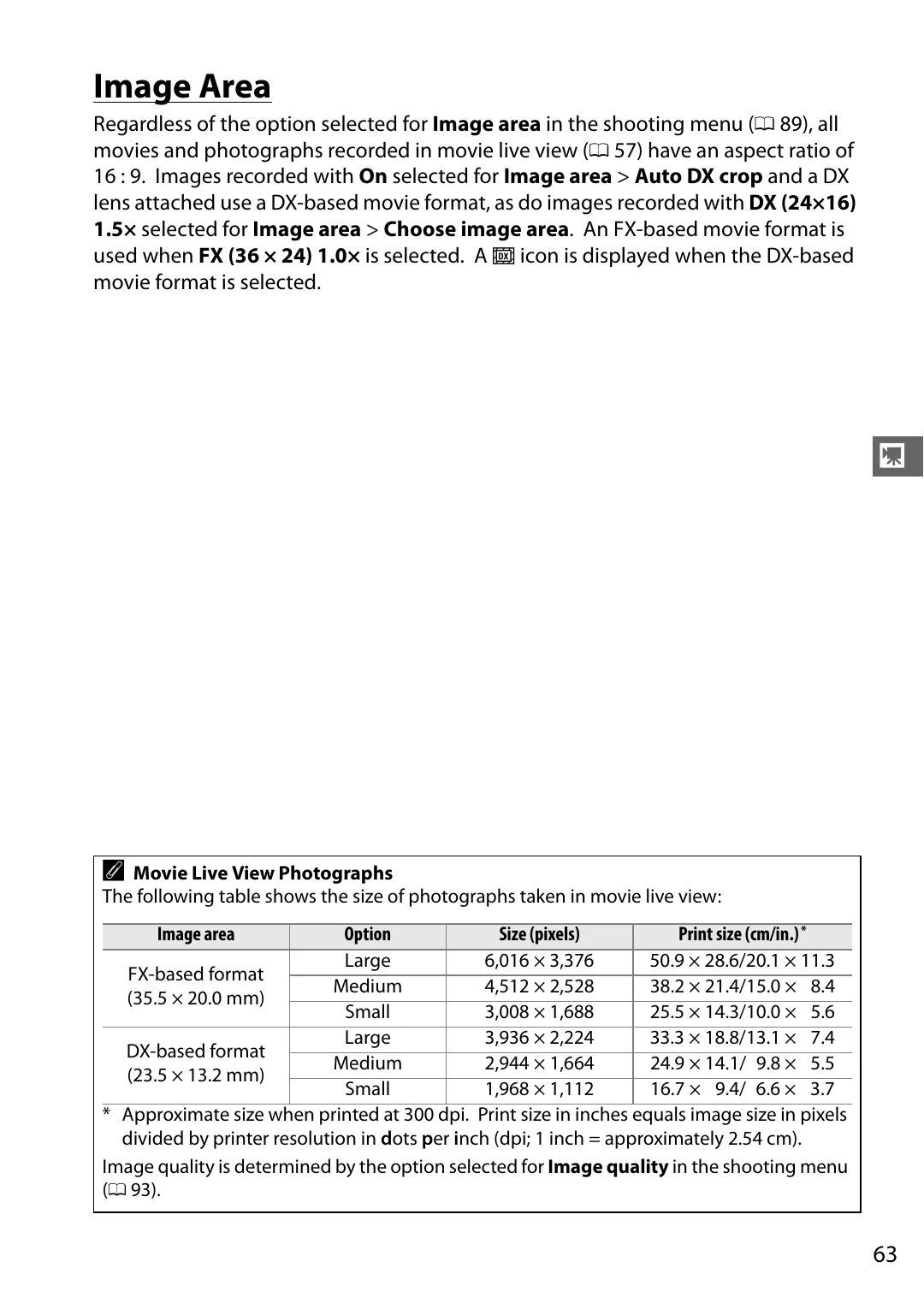
The following table shows the size of photographs taken in movie live view:
Image area
Option
Size (pixels)
Print size (cm/in.)
*
FX-based format
(35.5 × 20.0 mm)
Large
6,016 × 3,376
50.9 × 28.6/20.1 × 11.3
Medium
4,512 × 2,528
38.2 × 21.4/15.0 × 8.4
Small
3,008 × 1,688
25.5 × 14.3/10.0 × 5.6
DX-based format
(23.5 × 13.2 mm)
Large
3,936 × 2,224
33.3 × 18.8/13.1 × 7.4
Medium
2,944 × 1,664
24.9 × 14.1/ 9.8 × 5.5
Small
1,968 × 1,112
16.7 × 9.4/ 6.6 × 3.7
* Approximate size when printed at 300 dpi. Print size in inches equals image size in pixels
divided by printer resolution in
d
ots
p
er
i
nch (dpi; 1 inch = approximately 2.54 cm).
Image quality is determined by the option selected for
Image quality
in the shooting menu