39
s
A
The Shutter-Release Button
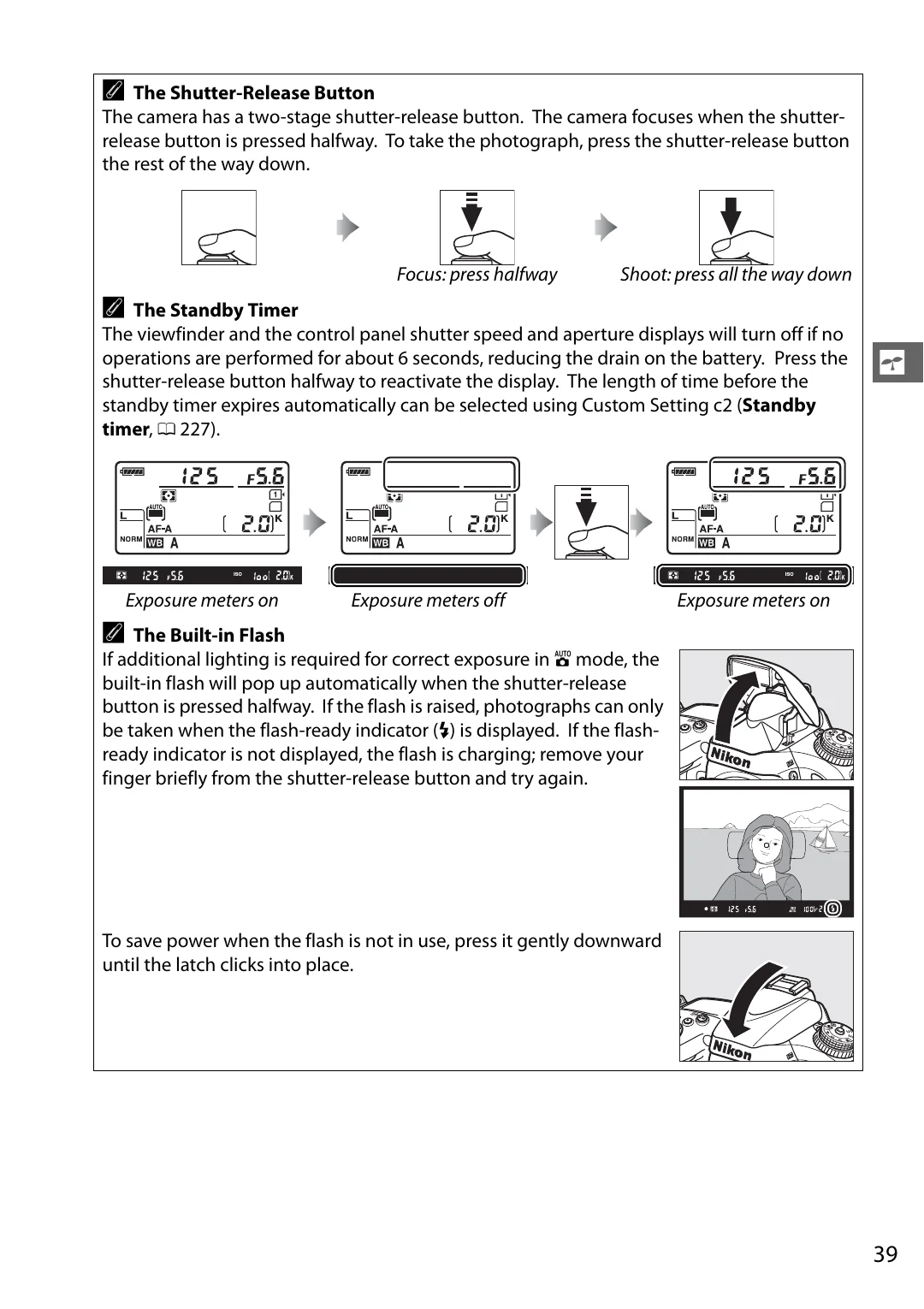
The camera has a two-stage shutter-release button. The camera focuses when the shutter-
release button is pressed halfway. To take the photograph, press the shutter-release button
the rest of the way down.
Focus: press halfway
Shoot: press all the way down
A
The Standby Timer
The viewfinder and the control panel shutter speed and aperture displays will turn off if no
operations are performed for about 6 seconds, reducing the drain on the battery.
Press the
shutter-release button halfway to reactivate the display. The length of time before the
standby timer expires automatically can be selected using Custom Setting c2 (
Standby
timer
,
Exposure meters on
Exposure meters off
Exposure meters on
A
The Built-in Flash
If additional lighting is required for correct exposure in
i
mode, the
built-in flash will pop up automatically when the shutter-release
button is pressed halfway. If the flash is raised, photographs can only
be taken when the flash-ready indicator (
M
) is displayed. If the flash-
ready indicator is not displayed, the flash is charging; remove your
finger briefly from the shutter-release button and try again.
To save power when the flash is not in use, press it gently downward
until the latch clicks into place.