10
Pre
parin
g for Sh
ootin
g
•
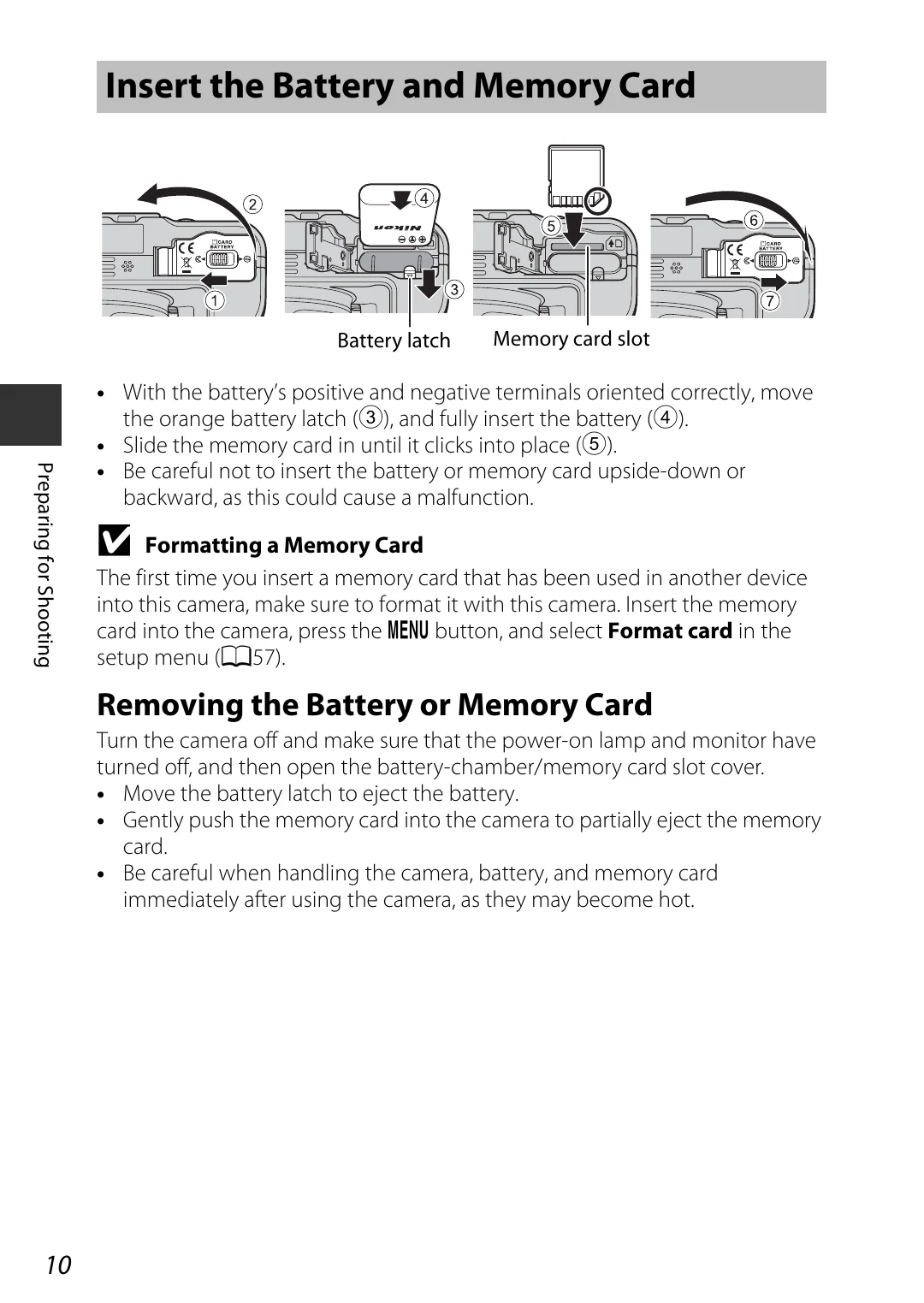
With the battery’s positive and negative terminals oriented correctly, move
the orange battery latch (
3
), and fully insert the battery (
4
).
•
Slide the memory card in until it clicks into place (
5
).
•
Be careful not to insert the battery or memory card upside-down or
backward, as this could cause a malfunction.
B
Formatting a Memory Card
The first time you insert a memory card that has been used in another device
into this camera, make sure to format it with this camera. Insert the memory
card into the camera, press the
d
button, and select
Format card
in the
setup menu (
Removing the Battery or Memory Card
Turn the camera off and make sure that the power-on lamp and monitor have
turned off, and then open the battery-chamber/memory card slot cover.
•
Move the battery latch to eject the battery.
•
Gently push the memory card into the camera to partially eject the memory
card.
•
Be careful when handling the camera, battery, and memory card
immediately after using the camera, as they may become hot.
Insert the Battery and Memory Card
Battery latch
Memory card slot