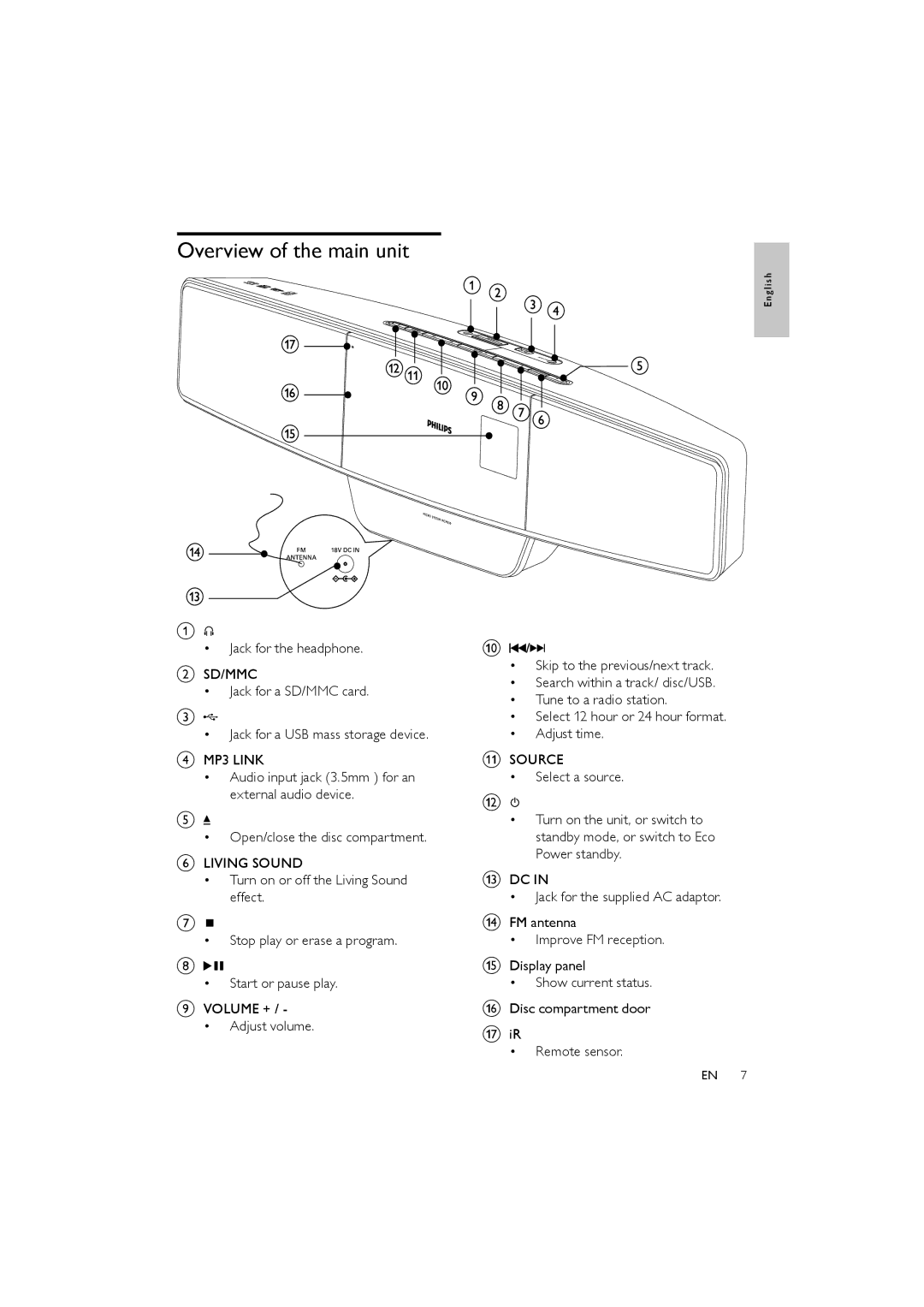
Overview of the main unit
a


•Jack for the headphone.
bSD/MMC
•Jack for a SD/MMC card.
c
•Jack for a USB mass storage device.
dMP3 LINK
•Audio input jack (3.5mm ) for an external audio device.
e
•Open/close the disc compartment.
fLIVING SOUND
•Turn on or off the Living Sound effect.
g
•Stop play or erase a program.
h

•Start or pause play.
iVOLUME + / -
•Adjust volume.
E n g l i s h
j /
/

•Skip to the previous/next track.
•Search within a track/ disc/USB.
•Tune to a radio station.
•Select 12 hour or 24 hour format.
•Adjust time.
kSOURCE
•Select a source.
l
•Turn on the unit, or switch to standby mode, or switch to Eco Power standby.
mDC IN
•Jack for the supplied AC adaptor.
nFM antenna
•Improve FM reception.
oDisplay panel
•Show current status.
pDisc compartment door
qiR
•Remote sensor.
EN 7