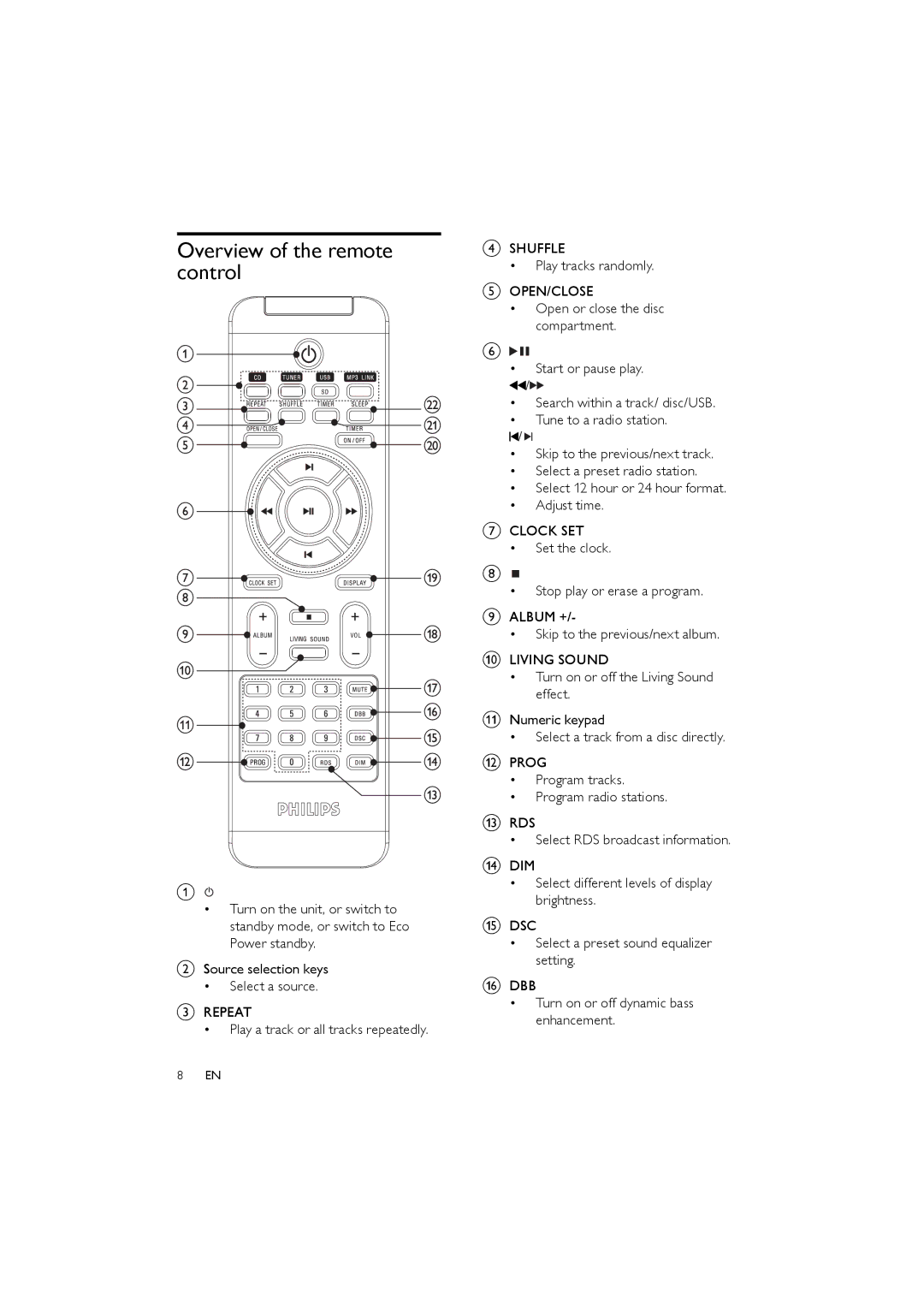
Overview of the remote control
a
•Turn on the unit, or switch to standby mode, or switch to Eco Power standby.
bSource selection keys
•Select a source.
cREPEAT
•Play a track or all tracks repeatedly.
8EN
dSHUFFLE
•Play tracks randomly.
eOPEN/CLOSE
•Open or close the disc compartment.
f

•Start or pause play.
 /
/

•Search within a track/ disc/USB.
•Tune to a radio station.
 /
/ 

•Skip to the previous/next track.
•Select a preset radio station.
•Select 12 hour or 24 hour format.
•Adjust time.
gCLOCK SET
•Set the clock.
h
•Stop play or erase a program.
iALBUM +/-
•Skip to the previous/next album.
jLIVING SOUND
•Turn on or off the Living Sound effect.
kNumeric keypad
•Select a track from a disc directly.
lPROG
•Program tracks.
•Program radio stations.
mRDS
•Select RDS broadcast information.
nDIM
•Select different levels of display brightness.
oDSC
•Select a preset sound equalizer setting.
pDBB
•Turn on or off dynamic bass enhancement.