The IR Blaster
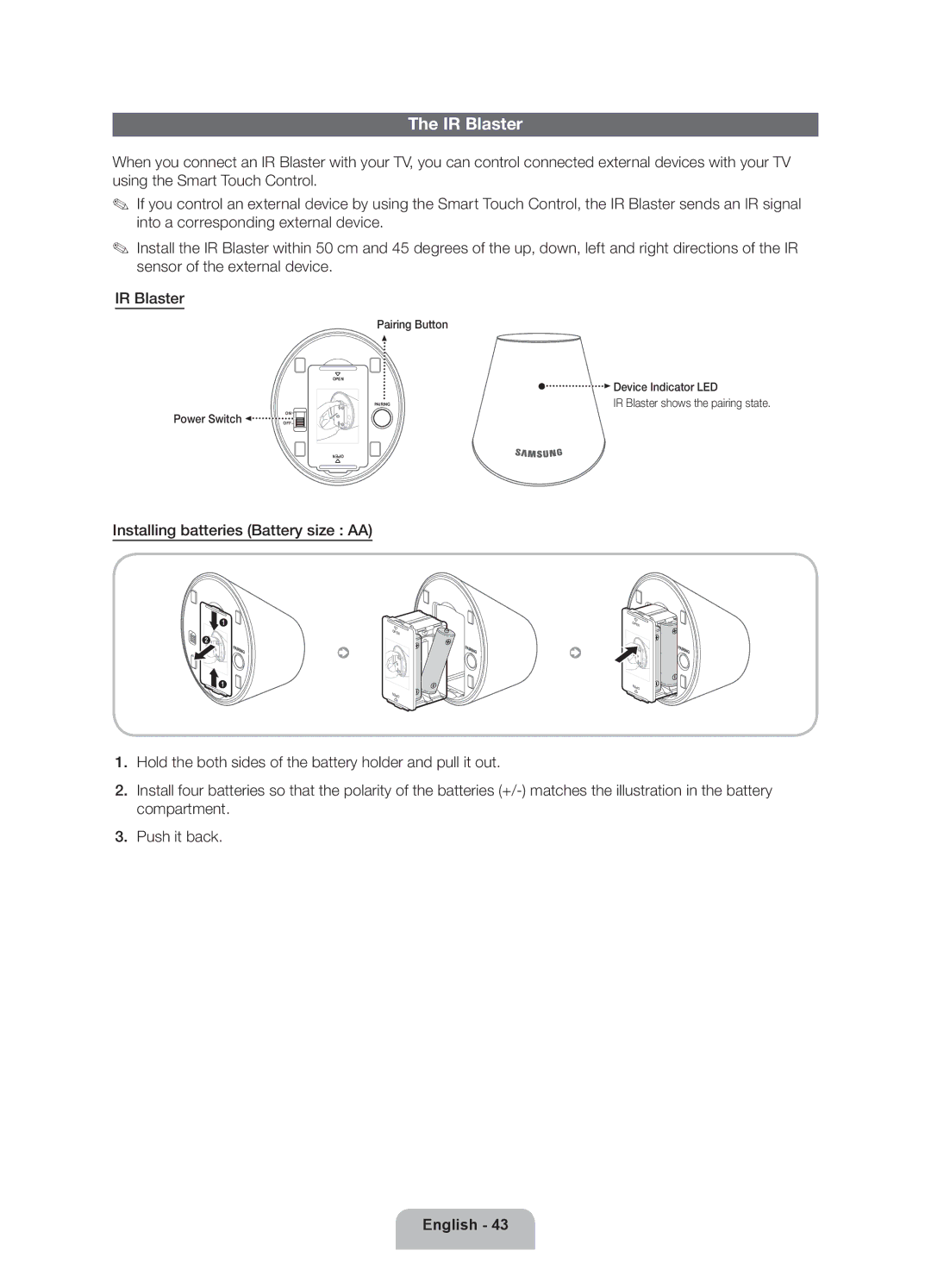
When you connect an IR Blaster with your TV, you can control connected external devices with your TV using the Smart Touch Control.
✎✎ If you control an external device by using the Smart Touch Control, the IR Blaster sends an IR signal into a corresponding external device.
✎✎ Install the IR Blaster within 50 cm and 45 degrees of the up, down, left and right directions of the IR sensor of the external device.
IR Blaster
Power Switch 
ON
OFF
Pairing Button
OPEN |
| Device Indicator LED |
|
| |
1 | PAIRING | IR Blaster shows the pairing state. |
2 |
|
|
1 |
|
|
OPE | N |
Installing batteries (Battery size : AA)
X
| 1 |
2 | 1 |
| 2 |
| 1 |
 1
1
| N |
|
N | OPE |
|
|
| |
OPE |
|
|
|
| 1 |
1 | 2 |
|
|
| |
2 |
| 1 |
1 |
|
|
| OPE | N |
|
| |
OPE | N |
|
|
|
1.Hold the both sides of the battery holder and pull it out.
2.Install four batteries so that the polarity of the batteries
3.Push it back.