Benutzerhandbuch
Dieses Handbuch verwenden
Erst lesen
Anweisungssymbole
Bewahren Sie dieses Handbuch zur künftigen Verwendung auf
Die Ein-/Aus-/Reset-/Sperrtaste
Copyright
Marken
Infos ZU DIVX-VIDEO
Inhalt
Erste Schritte
Unterhaltung
114
Zusammenbauen
Auspacken
SIM- oder USIM-Karte einsetzen
Akku laden
Zusammenbauen
Stecken Sie den USB-Netzadapter in eine Netzsteckdose
Erste Schritte
Gerät ein- und ausschalten
››In den Offline-Modus wechseln
Mit dem Gerät vertraut machen
››Aufbau des Geräts
Interne Wi-Fi/Bluetooth/GPS-Antenne
››Anzeigesymbole
Tasten
Sperrtaste
Zum Sperren des Touchscreens
Erste Schritte
Touchscreen bedienen
››Touchscreen drehen
››Touchscreen sperren und entsperren
Mit dem Home-Bildschirm vertraut machen
››Elemente zum Home-Bildschirm hinzufügen
Systemleiste
››Elemente vom Home-Bildschirm entfernen
››Shortcut für eine Anwendung hinzufügen
Wählen Sie eine Elementkategorie aus
Anwendungen aufrufen
››Benachrichtigungsbereich verwenden
Gerät anpassen
››In den Stumm-Modus wechseln
››Animation beim Fensterwechsel aktivieren
→ Bildschirm → Animation
Wählen Sie eine Animationsoption aus
››Display-Helligkeit anpassen
››Bildschirmsperre festlegen
→ Bildschirm → Helligkeit
››SIM- oder USIM-Karte sperren
PIN-Entsperrcode festlegen
Wählen Sie Empfänger der Alarm-SMS
››FunktionMobilgerät findenaktivieren
→ Standort und Sicherheit → Info über SIM-Wechsel
Annehmen
Zwischen Ziffern-/Symbolmodus und ABC-Modus wechseln
Text eingeben
››Tastaturtyp ändern
››Text mit der Android-Tastatur eingeben
››Text mit der Samsung-Tastatur eingeben
››Text mit der Swype-Tastatur eingeben
Sie können auch auf die Tasten tippen, um Text einzugeben
Zwischen Groß- und Kleinschreibung wechseln
››Text kopieren und einfügen
Nummer Funktion
Verfügbar
Internet
Internet
››Auf Webseiten surfen
Wählen Sie → Seiteninfo, um Details zur Seite anzuzeigen
››Mehrere Seiten öffnen
››Per Spracheingabe nach Informationen suchen
Lesezeichen hinzufügen
Pulse
››Auf letzten Verlauf zugreifen
››Feeds lesen
››Feedquellen verwalten
››Anwendung herunterladen und installieren
››Anwendung deinstallieren
Wählen Sie Deinstallieren
Market
YouTube
››Videos wiedergeben
››Videos hochladen
Hochladen
Maps
››Nach einem bestimmten Ort suchen
››Wegbeschreibung zu einem bestimmten Ziel abrufen
Öffnen Sie die Anwendungsliste und wählen Sie Maps
Latitude
Places
Navigation
Google-Suche
Geben Sie das Ziel mit einer der folgenden Methoden ein
Suche
Samsung Apps
Apps
Kommunikation
Nachrichten
››Textnachricht SMS senden
››Multimedia-Nachricht MMS senden
››Text- oder Multimedia-Nachricht anzeigen
Google Mail
››E-Mail-Nachricht anzeigen
Um eine Antwort auf die Nachricht an alle
Mail
››E-Mail-Konto einrichten
››E-Mail-Nachricht senden
Um nach einer E-Mail-Nachricht zu suchen
Chatten
››Status festlegen
››Freunde zur Freundesliste hinzufügen
Social Hub
››Chat beginnen
Einladung senden
Wählen Sie , um den Chat zu beenden
Unterhaltung
MP3-Player
››Musikdateien zum Gerät hinzufügen
››Musik wiedergeben
››Wiedergabeliste erstellen
Öffnen Sie die Anwendungsliste und wählen Sie MP3-Player
Music Hub
››MP3-Player-Einstellungen anpassen
Aus
Angezeigt werden sollen
Kamera
››Fotografieren
Nummer Funktion Dient zum Ändern der Blitzeinstellung. Sie
Unterhaltung
Szenen fotografieren
››Fotos im Eigenaufnahmemodus aufnehmen
››Fotos im Smile-Modus aufnehmen
››Panoramafoto aufnehmen
››Actionfoto aufnehmen
››Kamera-Einstellungen anpassen
››Video aufnehmen
Das Video wird automatisch gespeichert
Video-Player
››Videokamera-Einstellungen anpassen
Auflösung Dient zum Ändern der Auflösungsoption
Galerie
Unterstützte Dateiformate
Typ Format Bild Erweiterung BMP, GIF, JPG, PNG
Video
››Foto anzeigen
Wählen Sie Um ein Foto zu löschen
Foto-Editor
››Video wiedergeben
Dient zum Drehen oder Umdrehen des Bilds
Persönliche Informationen
Kontakte
››Kontakt erstellen
››Kontakte nach Konto abrufen
››Kontakt suchen
››Kontakte importieren oder exportieren
Öffnen Sie die Anwendungsliste und wählen Sie Kontakte
Wählen Sie → Import/Export → Aus Speicher importieren
››Kontakte kopieren oder verschieben
Wählen Sie zur Bestätigung OK
Wählen Sie → Import/Export → Von SIM-Karte importieren
Wählen Sie → Import/Export → Auf SIM-Karte exportieren
››Eigene Visitenkarte erstellen
››Kontakte von Community-Konten abrufen
››Gruppe von Kontakten erstellen
Wählen Sie → SNS-Freunde anzeigen
Kalender
››Kalenderansicht ändern
››Ereignis erstellen
››Ereignisse anzeigen
››Ereignisalarm ausschalten
Memo
››Memo erstellen
››Memos anzeigen
Drucken
Memo auf Community-Websites hochladen
Memo an andere Personen schicken
Verbindungen
PC-Verbindungen
››Mit Samsung Kies verbinden
››Mit Windows Media Player synchronisieren
››Als Massenspeichergerät verbinden
››WLAN-Funktion aktivieren
››WLAN finden und Verbindung herstellen
→ Drahtlos und Netzwerke
Wählen Sie WLAN, um die WLAN-Funktion zu aktivieren
››WLAN manuell hinzufügen
››WLAN-Verbindung über einen WPS
Wählen Sie WPS-Push-Schaltfläche → OK
Wi-Fi Direct
››Statische IP-Einstellungen festlegen
››Gerät mit anderem WLAN-Gerät verbinden
››Daten über Wlan senden
Bluetooth
››Daten über Wlan empfangen
››Drahtlose Bluetooth-Funktion einschalten
››Andere Bluetooth-fähige Geräte finden und koppeln
››Daten über die drahtlose Bluetooth-Funktion senden
››Daten über die drahtlose Bluetooth-Funktion empfangen
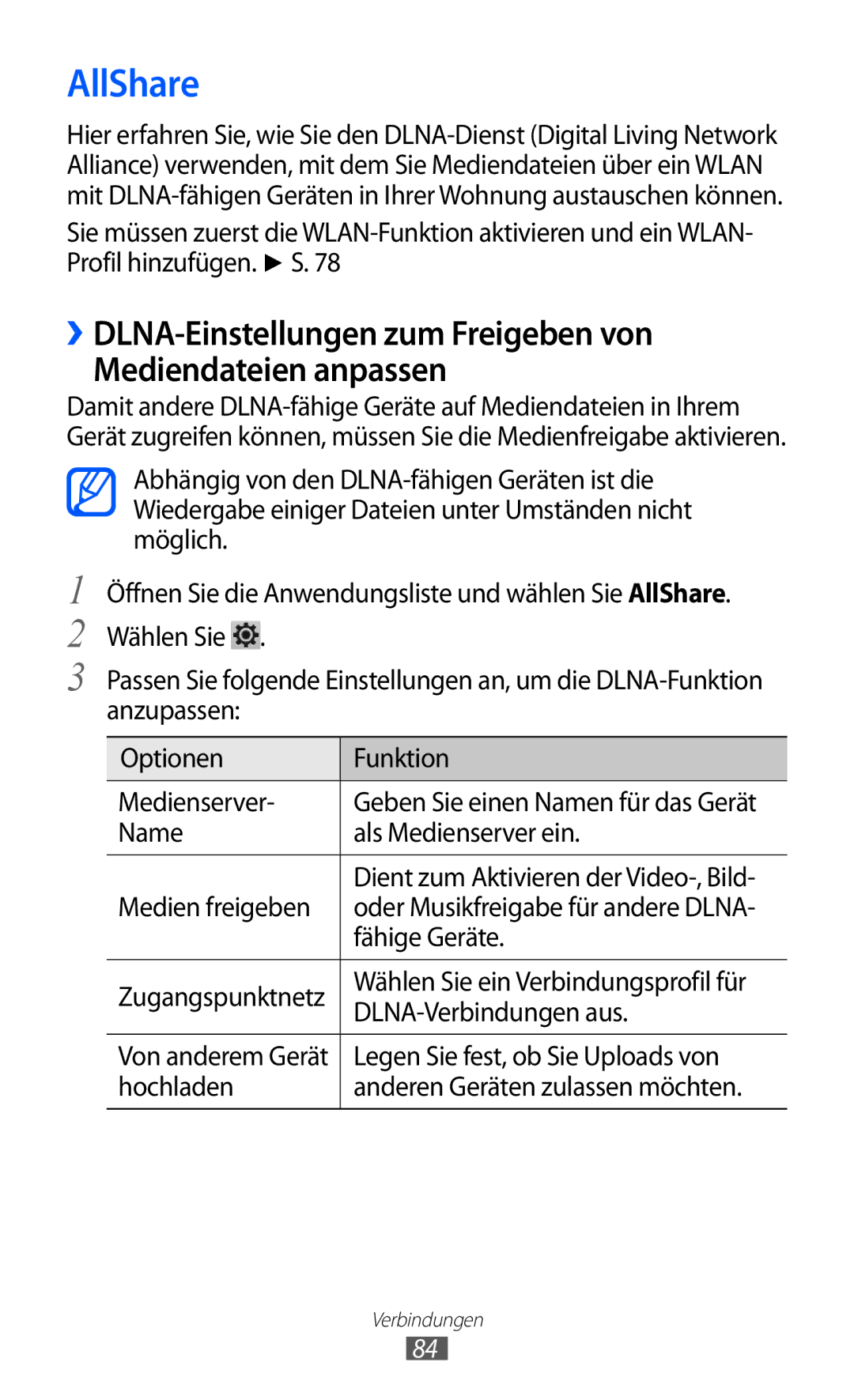
AllShare
››Dateien auf einem anderen DLNA-fähigen Gerät wiedergeben
››Fremde Dateien auf dem Gerät wiedergeben
››Dateien eines Geräts auf einem anderen Gerät wiedergeben
Öffnen Sie die Anwendungsliste und wählen Sie AllShare
Netzfreigabe für Mobilgeräte
→ Drahtlos und Netzwerke → Tethering und mobiler Hotspot
Netz-SSID
Angezeigt wird
Bluetooth-Funktion freigeben
→ Drahtlos und Netzwerke → Bluetooth-Einstellungen
››Standortdienste aktivieren
→ Standort und Sicherheit
Verwenden
Google-Suche
VPN-Verbindungen
››VPN-Verbindungen einrichten
→ Drahtlos und Netzwerke → VPN-Einstellungen
Alarm
››Neuen Alarm einstellen
››Alarm beenden
››Alarm löschen
Rechner
Downloads
EBook
››Bücher lesen
Um nach Text im Buch zu suchen
Dateien
››Buchdateien importieren
Musik
Verbindung mit Video
››Datei öffnen
››Ordner erstellen
Öffnen Sie die Anwendungsliste und wählen Sie Dateien
Stift-Memo
››Dateien kopieren oder verschieben
››Dateien löschen
Polaris Office
Neues Dokument erstellen
Dokument öffnen
››Dokumente online verwalten
Zeigen Sie das Dokument wie gewünscht an
Sprachsuche
Weltuhr
Einstellungen
Einstellungsmenü aufrufen
Drahtlos und Netzwerke
››Bluetooth
››Bluetooth-Einstellungen
››Kies über Wlan
››Tethering und mobiler Hotspot
Ton
››VPN-Einstellungen
››Mobile Netzwerke
102
Bildschirm
Hier können Sie die Einstellungen für das Display ändern
Bildschirm
Modus Dient zum Auswählen eines Anzeigemodus
Energiesparmodus
Standort und Sicherheit
104
SIM-Kartensperre einrichten
105
Anwendungen
Entwicklung
106
Konten und Sync
Motion-Einstellungen
107
Firewall
Datenschutz
Speicher
Sprache und Eingabe
››Sprache auswählen
››Spracherkennungseinstellungen
››Text-zu-Sprache-Einstellungen
››Aktuelle Eingabemethode
››Auswahl für Eingabemethode
››Eingabemethoden konfigurieren
Swype
110
Samsung-Tastatur
Samsung-Tastatur Dient zum Verwenden der Samsung- Tastatur
111
Eingabehilfe
112
Datum und Uhrzeit
Info zu Gerät
Zeitzone auswählen Dient zum Festlegen Ihrer Heimatzeitzone
Stundenformat verwenden Die Uhrzeit wird im
Rat und Hilfe bei Problemen
114
Der Touchscreen reagiert langsam oder falsch
115
Laden Sie den Akku
116
Ein Bluetooth-Gerät wird nicht gefunden
117
Sicherheitshinweise
118
119
Schutz von Gerät, Akkus und Ladegeräten vor Beschädigung
120
Schalten Sie das Gerät in einem Flugzeug aus
Richtige Pflege und Nutzung des Mobilgeräts
121
122
Vorsichtiger Umgang mit Lichteffekten
123
Nicht auf das Gerät oder den Akku beißen oder daran saugen
124
Zerlegen, modifizieren oder reparieren Sie das Gerät nicht
Installieren Sie Mobilgeräte und Ausrüstung mit Sorgfalt
125
Korrekte Entsorgung von Altgeräten
126
Korrekte Entsorgung des Akkus dieses Produkts
127
128
Index
129
SMS senden
Massenspeicher Samsung Kies Windows Media Player
130
Bluetooth PC VPN WLAN
Videos hochladen Videos wiedergeben
131
Telekommunikationsendeinrichtungen
Tragbares GSM-, WCDMA-, WLAN-Gerät GT-P7300
Installation von Kies PC Sync

 .
.