D R O I D T a B L E T
Intellectual Property
Disclaimer of Warranties Exclusion of Liability
Open Source Software
ATTSM-T217AUMEnglishMHCTN111413F5
Modification of Software
Safe Samsung Approved For Enterprise
Samsung Telecommunications America STA, LLC
Headquarters 1301 E. Lookout Drive Richardson, TX
Page
Page
Table of Contents
Messaging
114
Health and Safety
Samsung Product
Getting Started
Special Text
Battery
Battery Indicator
Charging the Battery
Display Screen timeout
Getting Started
Installing the SIM Card
Setting Up Your Device
Let’s Set Up Your Device
Turning Your Device On and Off
Turning Your Device On
Creating a New Google Account
Using Google Maps
AT&T Ready2Go
To access the Task Manager
Task Manager
Task Manager Application
Touch and hold Home and then touch
Memory Card
Installing a Memory Card
Removing a Memory Card
Galaxy Tab Accessories
Securing Your Device
Troubleshooting
Press the Power/Lock Key
Power/Lock Key for 8 to 10 seconds
Locking the Device Manually
Features
Support for microSD and microSDHC memory cards
Media devices. For more information, refer to
Front View
Back Key Return to the previous screen or option
Side Views
Back View and Bottom
Home Screen
Home screen is the starting point for using your device
Apps Display the Apps screen
Displays when you touch Home
Extended Home Screen
Customizing the Home Screen Pages
Under Add to Home screen, touch
Display Settings
Adding and Removing Home Screen Pages
Navigating Your Device
Command Keys
Screen Navigation
Notifications
Notification Panel
Quick Settings
Or touch to list all of the Quick Settings
Touch the time and date at the top to configure
GPS Active Displays when GPS is active
Following table lists those icons
Status Bar
Driving Mode New notifications will be read by your device
Screenshot Captured a screenshot has been captured
Primary Shortcuts
App Shortcuts
Removing App Shortcuts
Touch the Apps tab
Widgets
Folders
Adding Widgets to a Home screen
Removing Widgets
Managing Folders
Wallpapers
Removing a Folder
Apps Screen
Application Information
Using the Multi Window
Repositioning the Multi Window
To relocate the Multi window Apps panel
Using Multi Window to Run Multiple Apps on the Same Screen
To restore a Multi window application
Customizing the Multi Window Apps
To rearrange the Multi window applications
Current apps are switched App #1
Border Switch Bar Apps
Current on-screen app Internet
Touch the desired application area top or bottom
Multiple Users
Screen Capture
To split the current applications
Users
Using the Samsung Keyboard
Entering Text
Text Input Methods
Touch Select input method
Configuring the Samsung Keyboard
Touch Settings
Entering Symbols and Numbers
Keyboard Types
Using Predictive Text
Using Google Voice Typing from Samsung Keyboard
Editing Text
Editing Existing Text
Copying, Deleting, or Replacing Text
To select and copy, delete, or replace text
Selected text is highlighted between
Pasting Text
Using the Handwriting Feature
Closing the Keyboard
Handwriting
Handwriting Tips
Handwriting Settings
Using Google Voice Typing
Touch Handwriting
Entering Text Using Swype
Using Swype to Enter Text
Enabling Swype
Touch Swype to activate it. The Swype keyboard is displayed
Swype Settings
Swype Text Entry Tips
Accounts
Setting Up Your Accounts
Add account
To access Contacts
Contacts
Creating Contacts
Touch Back to remove the keyboard
Updating Contacts
Deleting Contacts
Managing Photo IDs
Touch Contacts
Contacts Display Options
Linked Contacts
Sharing Contact Information
Linking Contacts
Touch Menu Link contact
Separating Contacts
Groups
Importing and Exporting Contacts
Creating a New Group
Touch Contacts Touch Menu Import/Export
Renaming a Group
Deleting Groups
Adding Group Members
Removing Group Members
Accessing Favorites
Favorites
Adding Favorites
Removing Favorites
Setting Up Your Gmail Account
Settings ADD Account
Types of Messages
Gmail
Gmail Settings
Configuring Email Accounts
Refreshing Your Gmail Account
Composing and Sending Gmail
Refreshing Your Email Account
Managing Your Email Accounts
Deleting Email Accounts
Touch Menu Settings, then touch General settings
Email Settings
Message preview line Choose a message preview line amount
Composing and Sending Email
Google+
While composing a message
Hangouts
Messenger
Messenger
Messenger screen displays
Multimedia
Camera
Camera Settings
Editing Camera Settings Shortcuts
Touch Settings Edit shortcuts
Taking Photos
GPS tag Touch to switch the GPS tag on or off
Configuring Camera Settings
Reset Set all Camera settings to the defaults Multimedia
Camcorder
Editing Camcorder Settings Shortcuts
Camcorder Settings
Recording Videos
Configuring Camcorder Settings
Effects Apply an effect to videos
Using the Image Viewer
Touch the screen to show or hide Image Viewer options
Selecting Photos and Videos to View
Gallery
Touch Fast Forward
Viewing Photos and Videos
Viewing Groups of Photos and Videos
Touch Gallery
Favorite Mark the photo or video as a favorite
Delete
Photo frame Add a decorative frame to the photo
Setting a Picture As
Settings
Accounts Manage your account information
Touch Menu Set as
Playing Videos
Sharing Photos and Videos
Touch Menu Select item
Touch Share via
Video Player Touch the Thumbnails, List, or Folders tab
Video Player
During playback, press Menu for options
Music Player
Music Player
Music Player Options and Settings
Searching for Music
Advanced
Music menu
Managing Playlists
Creating a Playlist
Renaming a Playlist
Changing the Order of a Playlist
Accessing the Music Player
Playing Music
Music Player Controls
Deleting a Playlist
Music Player Screen
During playback, use the sound and playlist controls
List Mode Touch to switch to the list of songs
Options While Playing a Song
Main View Touch to return to the main Music Player screen
Playback Controls
Accessing the Music App
Play Music
Google Play Music
Changing Library View
Play Music Menu
Play Music Options
Shopping for Music at the Play Store
For more information touch Menu Help
Music Hub
Making Online Music Available Offline
To view information about finding and buying music
Touch Play Music Touch Menu Help
Browser
Navigating the Internet
Using Browser Windows
Access a website quickly by entering the URL
Entering a URL
Selecting Items On a
Settings Labs and touch Quick controls to uncheck it
Creating Bookmarks
Browser Menu
Browser Quick Controls
Wi-Fi
Finding Wi-Fi Networks
Turning Wi-Fi On or Off
Access your corporate network
Adding a Wi-Fi Network Manually
Configuring Wi-Fi Settings
Under Wireless and networks, touch to turn Wi-FiON
Show advanced options
To initiate a new scan, touch Scan
Wi-Fi Direct
Icon will display on the Status Bar
Turning Bluetooth On or Off
Bluetooth
Sharing Information with Connected Device
Sharing Data with a Bluetooth Device
Pairing with a Bluetooth Device
Under Wireless and networks, touch to turn Bluetooth on
Receiving Data from a Bluetooth Device
To receive data from a Bluetooth device
Additional Bluetooth Settings
Managing Downloads
Uninstalling an App
Connecting as a Mass Storage Device
Synchronizing with Windows Media Player
Kies Via Wi-Fi
Connecting with Samsung Kies
Installing and Removing a Memory Card
Mounting an SD Card
Formatting a Memory Card Using Your Device
Unmounting an SD Card
Formatting a Memory Card
Storage Touch Unmount SD card
Touch New updates
To update the applications
Updating Applications
Accessing the Apps Screen
Bluetooth/Wi-Fi Antenna
GPS Applications
Location of Internal Antennas
Alarm
Adding and Configuring Alarms
Activating Alarms
Editing and Deleting Alarms
AT&T AllAccess
Turning Off an Alarm
Setting the Snooze Feature
Amazon Kindle
AT&T Locker
AT&T Ready2Go
Calculator
From the Apps screen, touch Browser
Calendar
From the Apps screen, touch Calendar
Touch Edit to update the event details
Creating an Event or Task
Managing Events
Touch Today to return to the current date
Calendar Settings
Touch Menu Settings Calendars Add account
Touch Menu Settings
Add Additional Calendar Accounts
Downloads
Chrome
102
Famigo
Flipboard
Game Hub
Games
Google Settings
Google
Using Group Play from an Application
Group Play
Share via Group Play
Group Play instead of Share
Local
Maps
Memo
Composing a Memo
Memo Options
My Files
From the Apps screen, touch Messenger
Enable list mode
Add Folder Add a new folder in the current folder
To view a photo file Touch the file
To view a video file Touch the file
Using myAT&T
MyAT&T
Navigation
Play Books
Play Magazines
Play Movies & TV
Play Store
Polaris Office
Settings
Translator
Voice
Samsung Apps
Initial Configuration
WatchON
WatchON Menu
Touch WatchON
World Clock
YouTube
YPmobile
Order
Accessing Settings
Wireless and Network
Settings Screen
Wi-Fi
More Settings
Airplane Mode
Data Usage
Touch the Data usage cycle drop-down menu and select a date
Default Setup Options
Touch Network operators Touch Default setup
Mobile Networks
Following options display
From the Settings screen, touch More settings VPN
Touch Save to save your VPN settings Settings
Adding a Basic VPN
Touch Basic VPN
Adding an Advanced IPsec VPN
Touch Advanced IPsec VPN Touch Add VPN COnnection
Delete a VPN
VPN
Blocking Mode
Kies via Wi-Fi
Touch to turn Blocking mode on
Device
Driving Mode
Volume
Set the volume level for all types of sounds
Touch and drag the sliders to set the volume for
Display
Notifications
System
Wallpaper
Screen Timeout
Notification Panel
Multi Window
Brightness
Touch Settings Display
Daydream
Smart Screen
Font Style and Size
Power Saving Mode
Show Battery Percentage
Storage
Device Memory
Battery
From the Settings screen, touch Battery
Touch Refresh to update the display
Application Manager
Reset app preferences
Running Services
Downloaded
126
Set Up Owner Profile
Users
Change Owner Nickname
Add a New User
Personal
Location Services
Browser Bar
Lock Screen
Screen Lock
Swipe options
Help text Show help information on the Lock screen
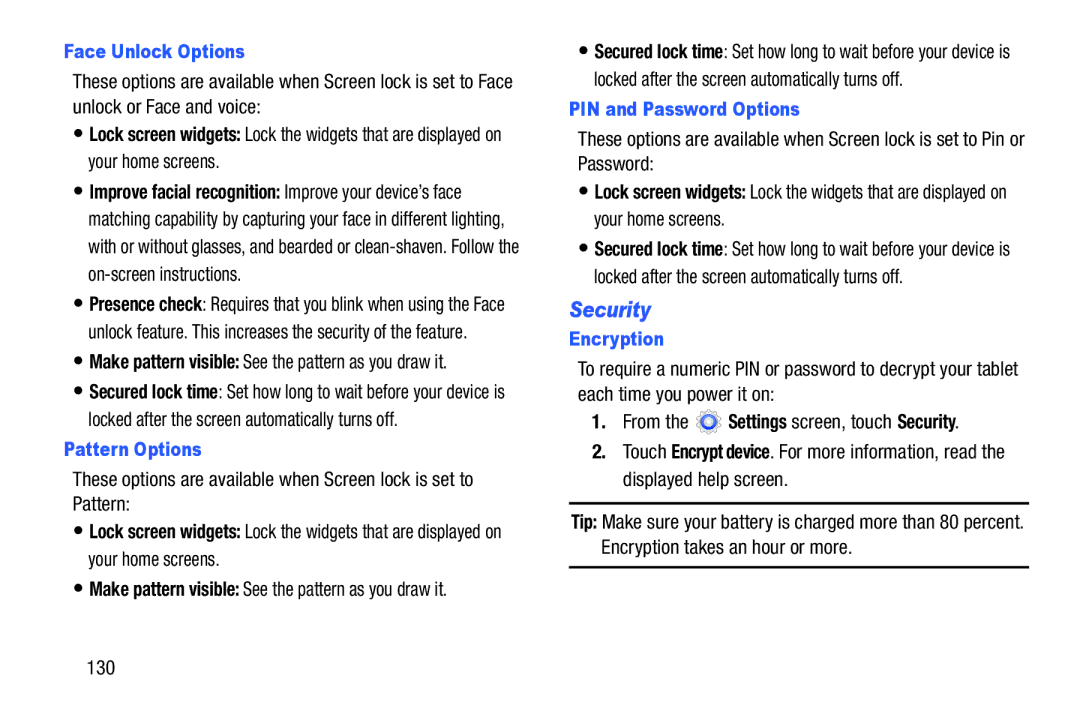
PIN and Password Options
Security
Face Unlock Options
Pattern Options
Factory Data Reset Password
Touch Set up SIM card lock
Passwords
SIM Card Lock
Device Administration
Credential Storage
Trusted Credentials
Touch Trusted credentials
Language
Language and Input
Keyboards and Input Methods
Configuring Google Voice Typing
134
SwiftKey Flow Type words by swiping between letters
Configuring the Swype Keyboard
Updates Check for available Swype updates
Speech
136
Back Up and Reset
Backup Account
Touch Text-to-speech options
Mouse/Trackpad
Factory Data Reset
Automatic Restore
Touch Factory data reset
Adding an Account
Managing Accounts
Contacts, and so on
System
Signing In to your Samsung Account
Voice Control
Touch Samsung account
Accessory
Configure the following settings
Date and Time
Automatic time zone Allows the network to set the time zone
Accessibility
142
Services
Vision
To set vision options
Hearing
Touch Press and hold delay, and then touch a delay time
About Device
Mobility
Recognition
Software Update Options
Software Update
Touch Check for updates
Do cell phones pose a health hazard?
Exposure to Radio Frequency RF Signals
146
Interphone Study
147
International Cohort Study on Mobile Phone Users Cosmos
148
Reducing Exposure Hands-Free Kits and Other Accessories
Cell Phone Industry Actions
Hands-Free Kits
149
Children and Cell Phones
150
Specific Absorption Rate SAR Certification Information
151
This tablet has an FCC ID number A3LSMT217A Model
152
FCC Part 15 Information to User
Commercial Mobile Alerting System Cmas
Smart Practices While Driving
On the Road Off the Tablet
Do not take notes or look up information while driving
154
Battery Use and Safety
155
UL Certified Travel Charger
Samsung Mobile Products and Recycling
156
Your Location
Display / Touch-Screen
157
Care and Maintenance
Navigation
Emergency Communication
Extreme heat or cold
Responsible Listening
American Academy of Audiology
Plaza American Drive, Suite Reston, VA Voice 800 160
Using Your Mobile Device Near Other Electronic Devices
Operating Environment
Street, S.W., Suite Patriots Plaza Building Washington, DC
Email cdcinfo@cdc.gov Internet
Implantable Medical Devices
Other Medical Devices
Vehicles
Posted Facilities
Restricting Childrens Access to Your Mobile Device
When your Device is Wet
FCC Notice and Cautions
FCC Notice
Other Important Safety Information
164
165
What is covered and for how long?
Standard Limited Warranty
What is not covered?
What are SAMSUNG’s obligations?
What must you do to obtain warranty service?
167
What are the limits on SAMSUNG’s liability?
168
What is the procedure for resolving disputes?
169
Severability
Precautions for Transfer and Disposal
170
End User License Agreement for Software
171
172
173
174
175
Dispute Resolution
176
177
Removable. Alternatively, you may opt out by calling
178
Sign UP NOW
179
Accessory
Airplane Mode Alarm Amazon Kindle App Shortcuts
Back Key Camera Back Up and Reset
Battery
Display / Touch-Screen Display Settings
Extended Home Screen Factory Data Reset Password 131 Famigo
Context-Sensitive Menus Data Usage Date and Time
Device
Kies Via Wi-Fi Language and Input settings
Local Location Services Settings Lock Screen
Google Account
Google Voice Typing
Menus
Messages
Messenger Mobile Networks Mouse/Trackpad
Multi Window
Quick Controls Quick Settings Reducing Exposure
Recycling Sound settings Screen Capture
Reset
Software Update Sound Settings
TripAdvisor Troubleshooting
USB settings
Wireless Networking
Touch Screen

 Settings screen, touch Security.