Part names
Remote control unit
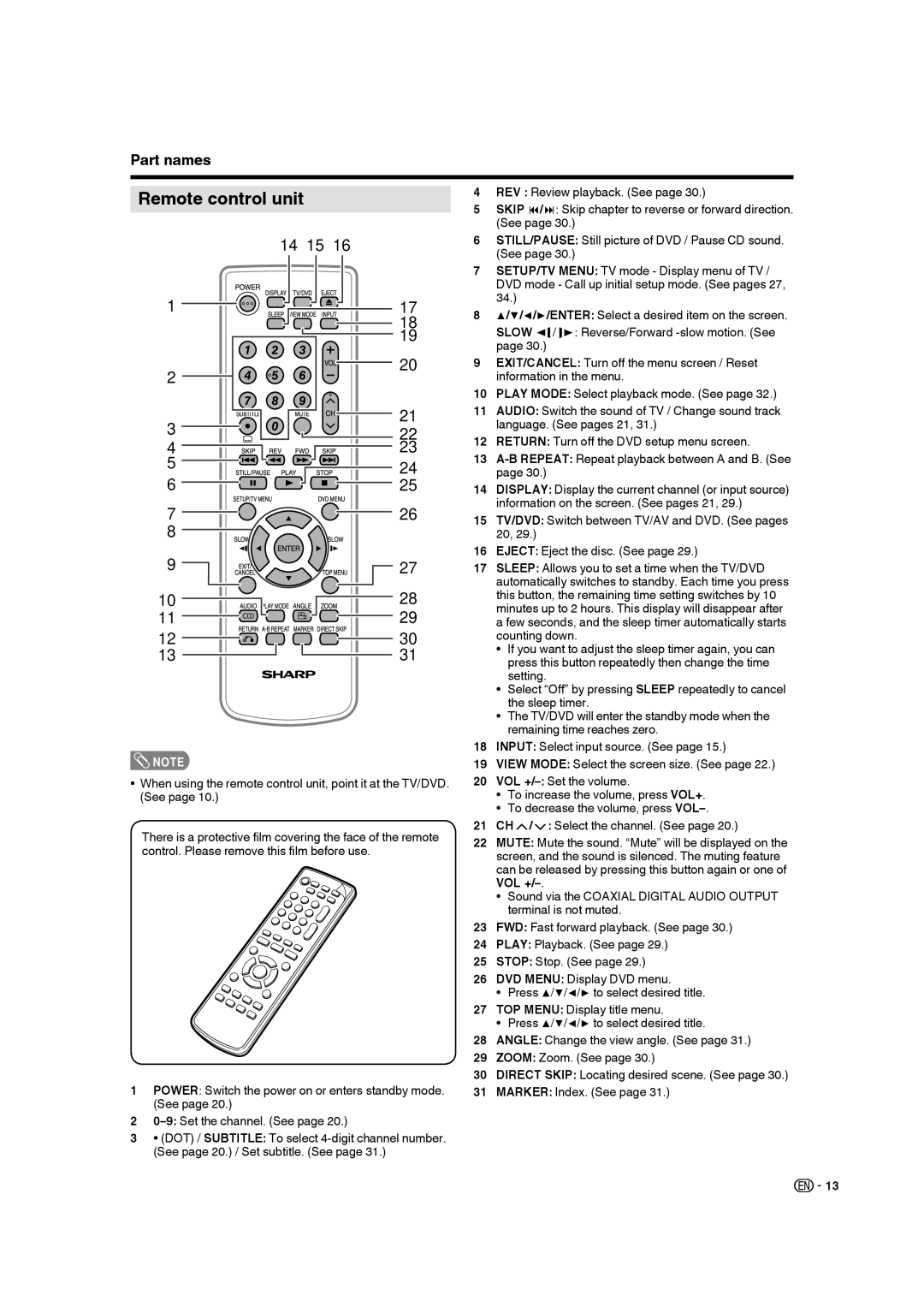
4REV : Review playback. (See page 30.)
5 SKIP / : Skip chapter to reverse or forward direction. (See page 30.)
1
2
3
4
5
6
7
8
9

10
11
12
13
14 15 16
17
18
19
20
21
22
23
24
25
26
 27
27
28 |
29 |
30 |
31 |
6STILL/PAUSE: Still picture of DVD / Pause CD sound. (See page 30.)
7SETUP/TV MENU: TV mode - Display menu of TV / DVD mode - Call up initial setup mode. (See pages 27, 34.)
8▲/▼/◀/▶/ENTER: Select a desired item on the screen.
SLOW |
| / |
| : Reverse/Forward |
| ||||
|
| |||
page 30.) |
|
|
|
|
|
|
|
|
9 | EXIT/CANCEL: Turn off the menu screen / Reset | |
| information in the menu. | |
10 | PLAY MODE: Select playback mode. (See page 32.) | |
11 | AUDIO: Switch the sound of TV / Change sound track | |
| language. (See pages 21, 31.) | |
12 | RETURN: Turn off the DVD setup menu screen. | |
13 | ||
| page 30.) | |
14 | DISPLAY: Display the current channel (or input source) | |
| information on the screen. (See pages 21, 29.) | |
15 | TV/DVD: Switch between TV/AV and DVD. (See pages | |
| 20, 29.) | |
16 | EJECT: Eject the disc. (See page 29.) | |
17 | SLEEP: Allows you to set a time when the TV/DVD | |
| automatically switches to standby. Each time you press | |
| this button, the remaining time setting switches by 10 | |
| minutes up to 2 hours. This display will disappear after | |
| a few seconds, and the sleep timer automatically starts | |
| counting down. | |
| • | If you want to adjust the sleep timer again, you can |
|
| press this button repeatedly then change the time |
| • | setting. |
| Select “Off” by pressing SLEEP repeatedly to cancel | |
| • | the sleep timer. |
| The TV/DVD will enter the standby mode when the | |
|
| remaining time reaches zero. |
18 | INPUT: Select input source. (See page 15.) | |
 NOTE
NOTE
•When using the remote control unit, point it at the TV/DVD. (See page 10.)
There is a protective film covering the face of the remote control. Please remove this film before use.
1POWER: Switch the power on or enters standby mode. (See page 20.)
2
3• (DOT) / SUBTITLE: To select
19 | VIEW MODE: Select the screen size. (See page 22.) | |
20 | VOL | |
| • | To increase the volume, press VOL+. |
| • | To decrease the volume, press |
21 | CH / : Select the channel. (See page 20.) | |
22 | MUTE: Mute the sound. “Mute” will be displayed on the | |
| screen, and the sound is silenced. The muting feature | |
| can be released by pressing this button again or one of | |
| VOL | |
| • | Sound via the COAXIAL DIGITAL AUDIO OUTPUT |
|
| terminal is not muted. |
23 | FWD: Fast forward playback. (See page 30.) | |
24 | PLAY: Playback. (See page 29.) | |
25 | STOP: Stop. (See page 29.) | |
26 | DVD MENU: Display DVD menu. | |
| • | Press ▲/▼/◀/▶ to select desired title. |
27 | TOP MENU: Display title menu. | |
| • | Press ▲/▼/◀/▶ to select desired title. |
28 | ANGLE: Change the view angle. (See page 31.) | |
29 | ZOOM: Zoom. (See page 30.) | |
30 | DIRECT SKIP: Locating desired scene. (See page 30.) | |
31 | MARKER: Index. (See page 31.) | |

 13
13