Appendix
Troubleshooting-DVD
| Problem |
| Possible Solution |
• | Playback doesn’t start. | • | No disc is inserted. (See page 29.) |
|
| • | The disc may be dirty. Clean up the disc. (See page 7.) |
|
| • The TV/DVD cannot play | |
• | No picture. | • | TV/DVD selector is not set correctly. (See page 29.) |
• | No sound. | • | Check the input selector of the amplifier is set properly. |
|
| • | The TV/DVD is in the special playback mode. (See page 30.) |
|
| • | Select the correct Audio Output position on AV amplifier. |
• Picture is distorted during fast | • | The picture will be distorted occasionally. | |
| reverse/forward playback. |
|
|
• | Stopping playback, search, | • | Some discs may not do some of the functions. |
| slowmotion play, repeat play, or |
|
|
| program play, etc. cannot be |
|
|
| performed. |
|
|
|
|
|
|
• | No surround sound. | • | The setup does not match your stereo system. |
|
| ||
• The TV/DVD or remote operation | • Turn off the TV/DVD and unplug the AC power cord for several minutes, then | ||
| key is not functioning. |
| replug it. |
• Playback does not start when the | • | Check the Parental setup. (See page 36.) | |
| title is selected. |
|
|
• Audio soundtrack and/or subtitle | • | Multilingual language is not recorded on the DVD disc. (See page 31.) | |
| language is not changed when |
|
|
| you playback a DVD. |
|
|
• | No subtitle. | • | Some discs have no subtitles. (See page 31.) |
|
| • | Subtitles are cleared. Press SUBTITLE. (See page 31.) |
• Angle cannot be changed. | • | ||
• “This operation can’t be performed” | • | The function is prohibited with the TV/DVD or the disc. (See page 29.) | |
| appears on the screen. |
|
|
Cautions regarding use in high and low temperature environments
•When the unit is used in a low temperature space (e.g. room, office), the picture may leave trails or appear slightly delayed. This is not a malfunction, and the unit will recover when the temperature returns to normal.
•Do not leave the unit in a hot or cold location. Also, do not leave the unit in a location exposed to direct sunlight or near a heater, as this may cause the cabinet to deform and the Liquid Crystal panel to malfunction.
Storage temperature:
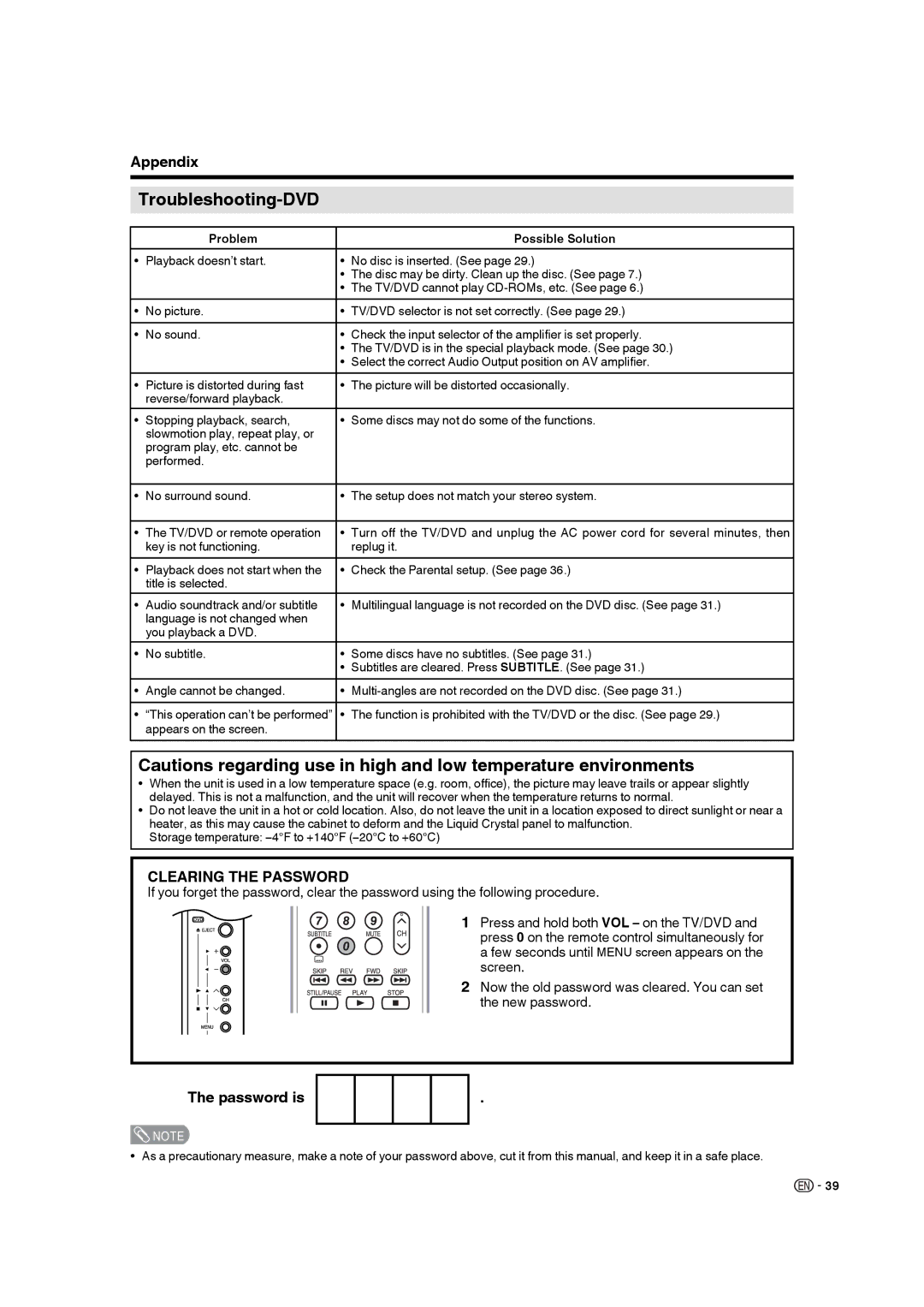
CLEARING THE PASSWORD
If you forget the password, clear the password using the following procedure.
1 Press and hold both VOL – on the TV/DVD and press 0 on the remote control simultaneously for a few seconds until MENU screen appears on the screen.
2 Now the old password was cleared. You can set the new password.
The password is
.
 NOTE
NOTE
• As a precautionary measure, make a note of your password above, cut it from this manual, and keep it in a safe place.

 39
39