Using external equipment
Displaying an external equipment image
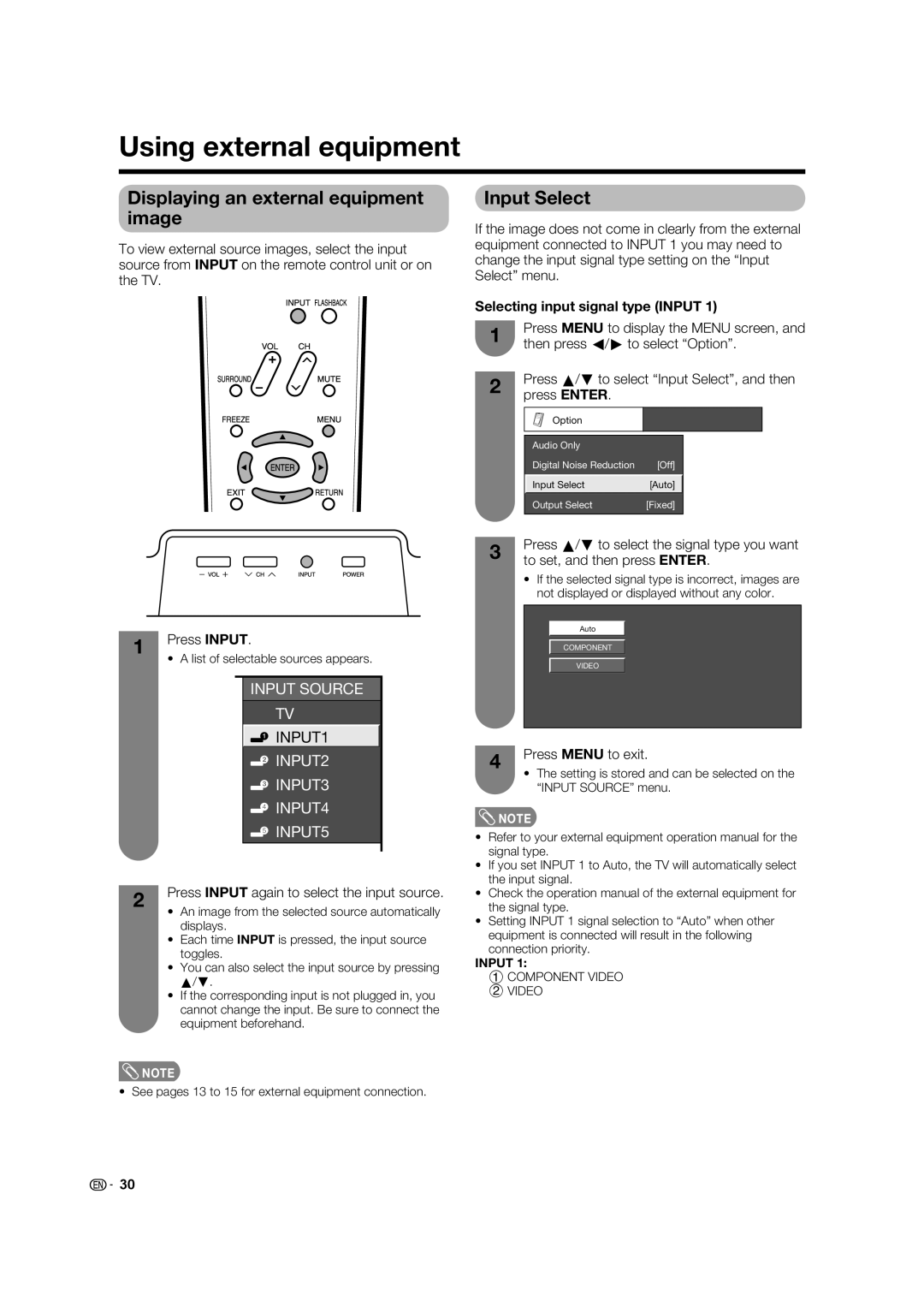
To view external source images, select the input source from INPUT on the remote control unit or on the TV.
1 | Press INPUT. | |||||||
• | A list of selectable sources appears. | |||||||
| ||||||||
|
|
|
|
|
|
|
| |
|
|
|
|
| INPUT SOURCE |
| ||
|
|
|
|
| TV |
| ||
|
|
|
|
|
|
| ||
|
|
|
|
| INPUT1 |
|
| |
|
|
|
|
|
|
|
| |
|
|
|
|
| INPUT2 |
| ||
|
|
|
|
| INPUT3 |
| ||
|
|
|
|
| INPUT4 |
| ||
|
|
|
|
| INPUT5 |
| ||
|
|
|
|
|
|
|
| |
2 | Press INPUT again to select the input source. | |||||||
• | An image from the selected source automatically | |||||||
| ||||||||
|
| displays. | ||||||
| • | Each time INPUT is pressed, the input source | ||||||
|
| toggles. | ||||||
| • | You can also select the input source by pressing | ||||||
|
| a/b. | ||||||
| • | If the corresponding input is not plugged in, you | ||||||
|
| cannot change the input. Be sure to connect the | ||||||
|
| equipment beforehand. | ||||||
 NOTE
NOTE
• See pages 13 to 15 for external equipment connection.
Input Select
If the image does not come in clearly from the external equipment connected to INPUT 1 you may need to change the input signal type setting on the “Input Select” menu.
Selecting input signal type (INPUT 1)
1 | Press MENU to display the MENU screen, and | |||||
then press c/d to select “Option”. | ||||||
| ||||||
2 | Press a/b to select “Input Select”, and then | |||||
press ENTER. |
|
|
| |||
|
|
|
| |||
|
|
|
|
|
| |
|
| Option |
|
|
| |
|
|
|
|
|
| |
|
|
|
|
|
| |
|
| Audio Only |
|
|
| |
|
| Digital Noise Reduction | [Off] |
|
| |
|
|
|
|
|
| |
|
| Input Select | [Auto] |
|
| |
|
|
|
|
|
| |
|
| Output Select | [Fixed] |
|
| |
|
|
|
|
|
| |
3 | Press a/b to select the signal type you want | |
to set, and then press ENTER. | ||
| ||
| • If the selected signal type is incorrect, images are |
not displayed or displayed without any color.
Auto
COMPONENT
VIDEO
4 | Press MENU to exit. | |
• The setting is stored and can be selected on the | ||
| ||
| “INPUT SOURCE” menu. |
 NOTE
NOTE
•Refer to your external equipment operation manual for the signal type.
•If you set INPUT 1 to Auto, the TV will automatically select the input signal.
•Check the operation manual of the external equipment for the signal type.
•Setting INPUT 1 signal selection to “Auto” when other equipment is connected will result in the following connection priority.
INPUT 1:
1 COMPONENT VIDEO
2VIDEO
30