qConversion Mode
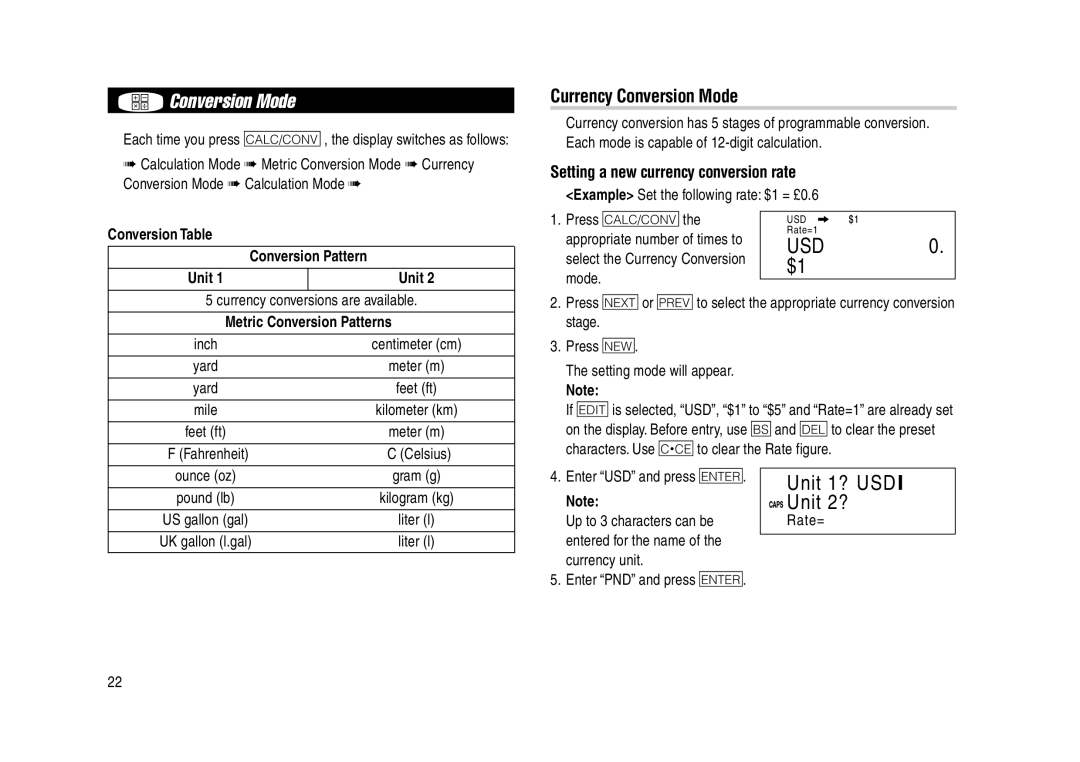
Each time you press q, the display switches as follows:
➠Calculation Mode ➠ Metric Conversion Mode ➠ Currency Conversion Mode ➠ Calculation Mode ➠
Currency Conversion Mode
Currency conversion has 5 stages of programmable conversion. Each mode is capable of
Setting a new currency conversion rate
<Example> Set the following rate: $1 = £0.6
Conversion Table
| Conversion Pattern |
Unit 1 | Unit 2 |
1.Press qthe appropriate number of times to select the Currency Conversion mode.
 USD
USD


 Rate=1
USD | 0. |
$1 |
|
5 currency conversions are available.
Metric Conversion Patterns
inch | ⇔ | centimeter (cm) |
|
|
|
yard | ⇔ | meter (m) |
|
|
|
yard | ⇔ | feet (ft) |
|
|
|
mile | ⇔ | kilometer (km) |
|
|
|
feet (ft) | ⇔ | meter (m) |
|
|
|
°F (Fahrenheit) | ⇔ | °C (Celsius) |
2.Press <or >to select the appropriate currency conversion stage.
3.Press n.
The setting mode will appear.
Note:
If eis selected, “USD”, “$1” to “$5” and “Rate=1” are already set on the display. Before entry, use band dto clear the preset characters. Use cto clear the Rate figure.
ounce (oz) | ⇔ | gram (g) |
|
|
|
pound (lb) | ⇔ | kilogram (kg) |
|
|
|
US gallon (gal) | ⇔ | liter (l) |
|
|
|
UK gallon (l.gal) | ⇔ | liter (l) |
4.Enter “USD” and press x.
Note:
Up to 3 characters can be entered for the name of the currency unit.
5.Enter “PND” and press x.


 Unit 1? USD I

 Unit 2?

 Rate=
Rate=
22