Solaris 10 Container Guide
Table of contents
III
Network limitation IPQoS
Duplicating zones with zoneadm detach/attach and zfs clone
Disclaimer
VII
Introduction
Overview
Solaris Containers and Solaris Zones
Ug Characteristics of Solaris 10 Zones
Zones and privileges
Zones and software installation
Zones and security
CPU resources
Zones and resource management
Processor sets in a resource pool
Fair share scheduler in a resource pool
User interfaces for zones
Network resource management IPQoS = IP Quality of Service
Memory resource management
Branded zones Linux and Solaris 8/Solaris 9 compatibility
Zones and high availability
Solaris container cluster aka zone cluster
Virtualization technologies compared
Domains/physical partitions
App Server
Dd Logical partitions
Logical partitions
Dd Container Solaris zones in an OS
Containers Solaris zones in an OS
Dd Consolidation in one computer
Consolidation in one computer
Summary of virtualization technologies
Physical Logical Resource Virtualisation Management
App
Grid computing with isolation
Solution
Requirement
Assessment
Small web servers
Global Zone System
Dd Use case Multi-network consolidation
Multi-network consolidation
Dd Use case Multi-network monitoring
Multi-network monitoring
Dd Use case Multi-network backup
Multi-network backup
Consolidation development/test/integration/production
Dd Use case Consolidation of test systems
Consolidation of test systems
Requirements
Training systems
Dd Use case Server consolidation
Server consolidation
Dd Use case Confidentiality of data and processes
Confidentiality of data and processes
Dd Use case Developer test systems
Test systems for developers
Solaris 8 and Solaris 9 containers for development
Solaris 8 and Solaris 9 containers as revision systems
Dd Use case Hosting for different companies on one computer
Hosting for several companies on one computer
Da Use case SAP portals in Solaris containers
SAP portals in Solaris containers
Da Live upgrade
Upgrade- and Patch-management in a virtual environment
DC1 DC2
Flying zones Service-oriented Solaris server infrastructure
Solaris Container Cluster aka zone cluster
Sparse-root zones
Concepts
− /lib − /platform − /sbin − /usr
Whole-root zones
Platform ~3.6 GB Software in zones
Comparison between sparse-root zones and whole-root zones
Whole-root Var Usr
Software installation by the global zone usage in all zones
Software installations in Solaris and zones
Installation by the local zone usage in the local zone
Program/application storage
Data storage
ZFS within a zone
Root disk layout
Opt/staroffice
NFS and local zones
Options for using ZFS in local zones
Volume manager in local zones
Network address management for zones
Network concepts Introduction into networks and zones
Shared IP instance and routing between zones
Ndd -set /dev/ip iprestrictinterzoneloopback
Plumb, snoop1M, dhcp5 or ipfilter5 is possible
Exclusive IP instance
Interface = InterfacenameInstance + VLAN-ID
Firewalls between zones IP filter
Ipmp
Zones and limitations in the network
Dynamic configuration of devices
Static configuration of devices
Services
Separate name services in zones
Hosts database
Projects
Applications in local zones only
Paradigms
Clustered containers
One application per zone
Client
Solaris Container Cluster
Configuration and administration
Installation and administration of a branded zone
Automatic configuration of zones by script
Automated provisioning of services
Patching a system with local zones
Patching with live upgrade
Lifecycle management
Moving zones between architectures sun4u/sun4v
Patching with upgrade server
Patching with zoneadm attach -u
∙ create /zones/zone1
Backup and recovery of zones
Using boot arguments in zones
Backup of zones with ZFS
Management and monitoring
Migration of a zone to another system
Monitoring zone workload
Consolidating log information of zones
Extended accounting with zones
Auditing operations in the zone
Global# dtrace -n iostart@zonename = count
DTrace of processes within a zone
Types of resource management
Resource management
Capping of CPU time for a zone
General resource pools
Fair share scheduler FSS
Lightweight processes LWP
Fair share scheduler in a zone
Projects, projadd, projmod, projdel
Rcapstat
Limiting memory resources
Assessing memory requirements for global and local zones
Limiting virtual memory
Network limitation IPQoS
Limiting locked memory
IPC limits Semaphore, shared memory, message queues
Privileges and resource management
Dd Planning a Solaris container
Solaris container navigator
Dd Self-qualification of an application in a container
4zonecfgbrand=native
Dd File /etc/zones/index
Installation and configuration
Configuration files
Command Description
Special commands for zones
Command Description
Var
Swap
Var/crash
Metadb
Configuring a sparse root zone required Actions
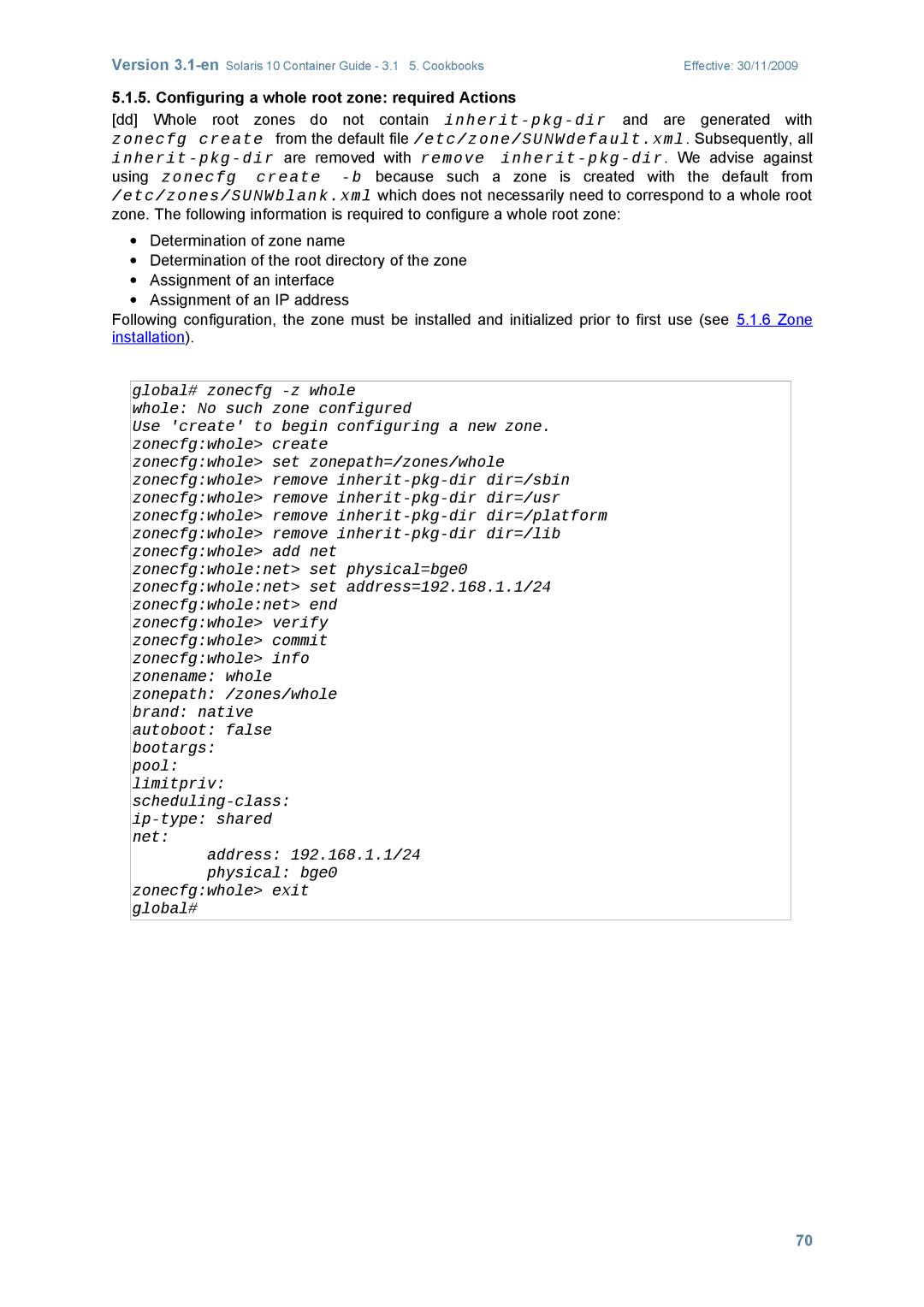
Configuring a whole root zone required Actions
Zone initialization with sysidcfg
Zone installation
Uninstalling a zone
Changing the set of privileges of a zone
Optional settings
Starting zones automatically
Storage within a zone
Using a device in a local zone
Zone1# ls /dev/dsk C1d0s0
Local zone mounts a UFS file system from a device
User level NFS server in a local zone
Using a DVD drive in the local zone
Version 3.1-enSolaris 10 Container Guide 3.1 5. Cookbooks
ZFS in a zone
Several zones share a file system
Tank 30.2M 10G 18K None Tank/zone1 16.3M 983M Mnt
User attributes for ZFS within a zone
Automatic quick installation of zones
Configuring a zone by command file or template
With zonecfg -z zone export -f file of an existing zone
− zonecfg -z zone -f file
Zones hardening
Accelerated automatic creation of zones on a ZFS file system
Set default router for shared IP instance
Change network configuration for shared IP instances
Network
Network interfaces for exclusive IP instances
Set interceptloopback
IP filter between shared IP zones on a system
Zones, networks and routing
IP filter between exclusive IP zones on a system
Global and local zone with shared network
Implementation
NetworkNetwork
Zone 1 /etc/hostname.bge1 Zone 2 /etc/hostname.bge2
Ifconfig bge1 plumb down
Zones in separate networks using the shared IP instance
Zoneadm -z zone1 ready Zoneadm -z zone2 ready
Set defrouter=192.168.202.2
Zone 1 /etc/hostname.bge1
Zones in separate networks using exclusive IP instances
Zonecfg set ip-type=exclusive
Zone2 192.168.202.1 are now active
192.168.101.201
Zone 1 /etc/hostname.bge1
Zone1 192.168.201.1,192.168.200.1 and zone2192.168.202.1
Zoneadm -z zone1 boot, zoneadm -z zone2 boot
Zone 1 /etc/hostname.bge3 /etc/defaultrouter
Load Balancer
Root password for system maintenance control-d to bypass
Booting a zone
Boot arguments in zones
Software installation per mount
∙ Detach the zone with zoneadm -z zone detach
Software installation with provisioning system
Zone migration among systems
Global# zoneadm List -vc
Zone migration within a system
Global Running Native Shared Test Export/home/zone/test
Global# zoneadm -z test halt
Duplicating zones with zoneadm clone
Global Running Native Shared Test Installed Container/test
100
ID Name Status Path Brand
101
Duplicating zones with zoneadm detach/attach and zfs clone
102
Moving a zone between a sun4u and a sun4v system
103
Shutting down a zone
Using live upgrade to patch a system with local zones
Lucreate -c s10-807 -n s10-807+1 -m //dev/dsk/c1t0d0s4ufs
Lumount s10-807+1
105
Reboot Luactivate s10-807+1 init
Zone1# dtrace -l tail +2 zone1#
DTrace in a local zone
Zone accounting
Zone audit
Swap Tmp Tmpfs Yes Size=250m
Limiting the /tmp-size within a zone
Limiting the CPU usage of a zone CPU capping
Resource pools with processor sets
108
109
Dynamic resource pools for zones
Global # svcs dynamic
Implementing memory resource management for zones
Limiting the physical main memory consumption of a project
Rcapadm -z zone1 -m 40m
110
111
Global # prctl -i zone zone1 Zone 22 zone1
Zone.max-swap Privileged 180MB Deny System 16.0EB Max
OpenSolaris general
Solaris Container in OpenSolaris
Ipkg-Branded zones
112
113
Cookbook Configuring an ipkg zone
Cookbook Installing an ipkg zone
114
References