Add media
Trigger Activation
Video20101213100341
Vivotek
Customized Script
Applications Motion detection
Check Enable this profile
Vivotek
Check Enable camera tampering detection
Applications Tampering detection
Recording Recording settings
Recording Settings
Continuous recording
NAS server
Vivotek
20140210 20140211 20140212
SD card control
Local storage SD card management
SD card staus
Local storage Content management
Searching and Viewing the Records
Search Results
Click to switch pages
URL Commands for the Network Camera
Appendix
General CGI URL Syntax and Parameters
Security Level
Get Server Parameter Values
Method GET/POST
Vivotek
Return
Groupname
Value to assigned Assign value to the parameter groupname
Vivotek
Available parameters on the server
System
Group system
Vivotek
None
Vivotek
System.info
Group status
Status
Security
Group security
Network
Group network
Subgroup of network ieee8021x
TLS
Subgroup of network ipv6
Subgroup of network qoscos
Subgroup of network qosdscp
Port
Subgroup of network ftp
Subgroup of network http
Subgroup of network https
Subgroup of network rtp
Subgroup of network rtsp
Subgroup of networkrtsps0~n-1multicast, n is stream count
Group ipfilter
IP Filter
Subgroup of network pppoe
IPv6 address list
Video input
Rbgain indicates using rgain Gbain
Rbgain indicates using Rgain and gbain
Group videoin
Bit 1 = Built-in or external
Maxexposure ~32000 Maximum exposure time
Svc is only supported with Stream
S0~m-1forcei Force I frame
Alternative video input profiles per channel
Group videoinprofilei0~m-1
IR cut control
Image setting per channel
Sir Boolean Enable/disable Smart IR
Group ircutcontrol
Vivotek
According to mode
Time Shift settings
Motion detection settings
Settings
Name Value Default Security Description
Tampering detection settings
Ddns
Groupexpresslink
Express link
UPnP port forwarding
Group upnppresentation
Group syslog
System log
Snmp
Group snmp
Layout configuration
Group layout
Group privacymaskc0~n-1for n channel product
Privacy mask
Capability
Group capability
Nvideoout Positive Number of video out Integer Interface
Vivotek
Vivotek
Mjpeg
Vivotek
Audiooutcodec
Audiolineout
Audioincodec
Transmissionmode
DVR
Detection
Number of stream that
Tracking
Manual in hybrid mode
Maximum number
Tracking window
Parameter Value Default Security Description
WebAPI Information for a channel
Vivotek
WebAPI Information for a mode
Get/set Effectivepixel WxH Visible area of full scene
Customized event script
Group eventcustomtaskfilei0~2
Event setting
Group eventi0~2
Path to store media
Server setting for event action
Group serveri0~4
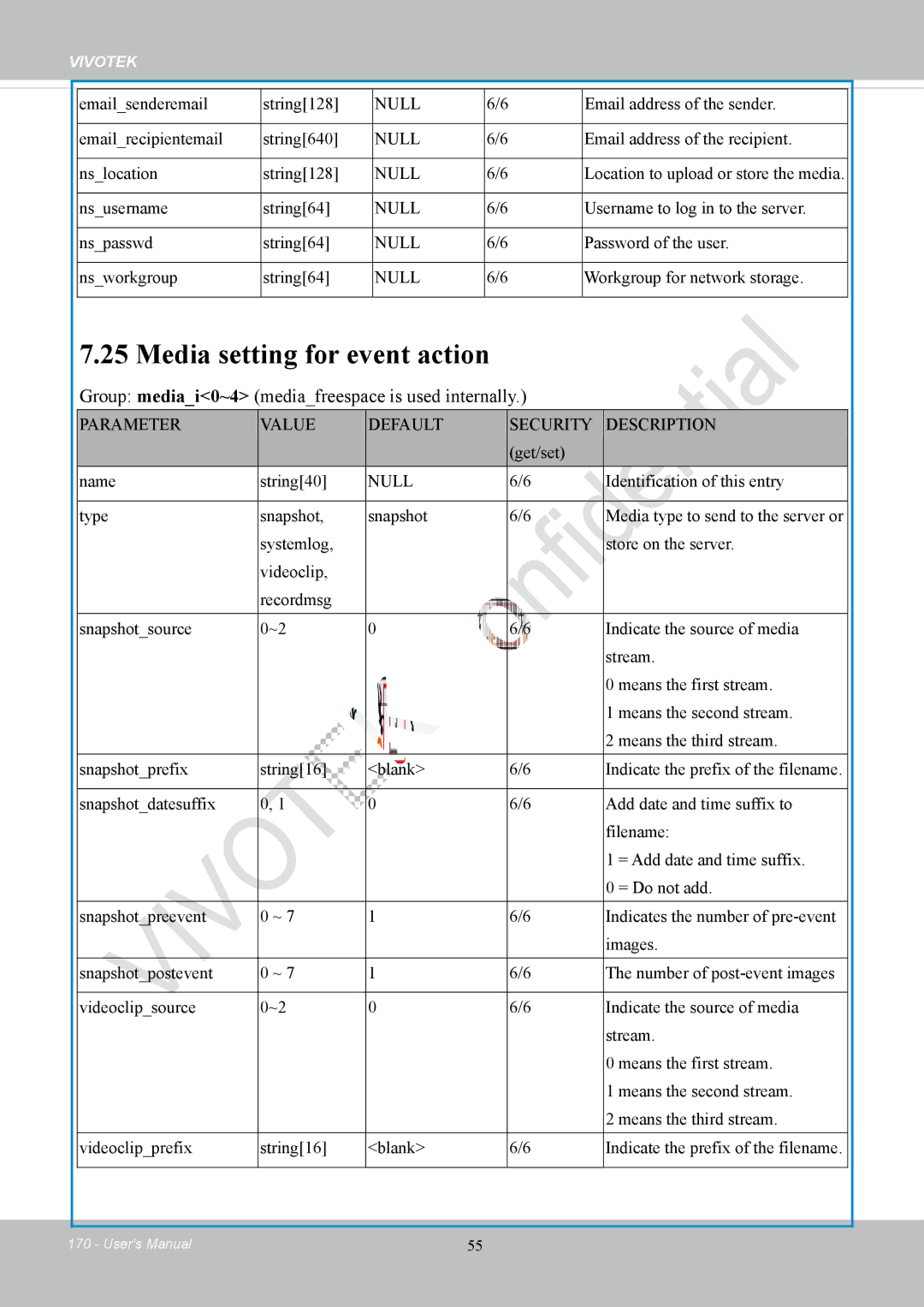
Media setting for event action
Group mediai0~4 mediafreespace is used internally
Recording
Group recordingi0~1
Vivotek
Https
Group https
Storage management setting
Group eptzc0~n-1for n channel product
EPTZ setting
Region of interest
Exposure window setting per channel
Group exposurewinc0~n-1for n channel products
Name Value Default Security Description
Stream number
Capture Single Snapshot
Account Management
Method=value&username=name&userpass=value&privilege=value
System Logs
Privilege=value…&return=return
Method Post Syntax
Upgrade Firmware
EPTZ Camera Control
Example
Parameter Value Description
EPTZ Preset Locations
EPTZ Recall
IP Filtering
IP Filtering for Onvif
Event/Control Http Tunnel Channel
Method GET
Get SDP of Streams
Open the Network Stream
Command search
Storage managements
File is locked
Indicate if the file is locked or not
File is not locked
Locked file would not be removed from UI or cyclic
Return Message
Vivotek
Ex. Local storage status in javascript format
Command queryStatus
Ex. Local storage status in XML format
Http//servername/cgi-bin/admin/downloadMedias.cgi?FilePath
FilePath is in queryststus return message
Virtual input
Return
Open Timeshift Stream timeshiftenable=1
Timeshiftcnsmallow=1
Export Files
Currentlanguage ~20
End of document
Upload Files
Method Post
Technical Specifications
Technical Specifications
Technology License Notice
AMR-NB Standard
Electromagnetic Compatibility EMC
Liability