Page
LegacySelect Technology Control
Advanced Features
Manageability
Active Management Technology
Accessing iAMT setup
IAMT Features
Out of Band Management
Turning Off iAMT
Dell OpenManage Applications
Alert Standard Format
Dell Client Manager DCM
Dell Client Manager DCM Console
Physical Security
Option Settings
Chassis Intrusion Detection
Padlock Ring and Security Cable Slot
Trusted Platform Module TPM
Enabling the TPM Feature
Security Management Software
Computer Tracking Software
Power Management for Windows XP and Windows Vista
About Smart Cards and Fingerprint Readers
Hyperthreading and Multi-Core Technology
Power Schemes Tab
Power Options Properties
Advanced Tab
Hibernate Tab
Configuring Power Management Settings
Sleep Mode
Options in Windows Vista
Replacing the Battery
Battery
Back to Contents
Recommended Tools
Working on Your Computer
Before Working on Your Computer
Turning Off Your Computer
After Working on Your Computer
Desktop Computer
About Your Computer Removing and Replacing Parts
Cards
Installing a PCI Card
PCI Cards
Page
Removing a PCI Card
Removing a PCI Card From the Riser-Card Cage
Page
Installing a PCI Card in the Riser-Card Cage
Page
PS/2 Serial Port Adapter
Installing a PS/2 Serial Port Adapter
Removing a PS/2 Serial Port Adapter
Installing a PS/2 Serial Port Adapter in the Riser-Card Cage
Removing a PS/2 Serial Port Adapter From the Riser-Card Cage
Back to Contents
Processor
Installing the Processor
Removing the Processor
Back to Contents
Page
Removing the Chassis Intrusion Switch
Chassis Intrusion Switch
Replacing the Chassis Intrusion Switch
Resetting the Chassis Intrusion Detector
Select System Setup
Connecting Drive Cables
General Drive Installation Guidelines
Data Interface Connectors
Sata Connector
Connecting and Disconnecting Drive Cables
Power Cable Connectors
Drive Inserts
Removing Drive Inserts
Replacing Drive Inserts
Optical Drive
Removing an Optical Drive
Installing an Optical Drive
Removing a Floppy Drive
Floppy Drive
Installing a Floppy Drive
Removing a Media Card Reader
Media Card Reader
Installing a Media Card Reader
Page
Hard Drive
Installing a Hard Drive
Removing a Hard Drive
Page
Back to Contents
System Fan
Installing the System Fan
Removing the System Fan
Removing the Heat Sink Assembly
Heat Sink Assembly
Installing the Heat Sink Assembly
Back to Contents
Removing the I/O Panel
Panel
Replacing the I/O Panel
Page
Replacing the Power Supply
Power Supply
DC Power Connector P1
DC Power Connectors
Pin Number Signal name 18-AWG Wire
Onboard/PEG
Deactivate default
Quiet
Suggested
Power On
Power Off default
On is set to disabled
Enable
Changing the Boot Sequence for the Current Boot
Boot Sequence
Enable F12 = Boot menu enabled by default
Clear Log Mark all Entries
Password Protection
Booting to a USB Device
Changing the Boot Sequence for Future Boots
System Password
Assigning a System Password
Administrator Password
Typing Your System Password
Deleting or Changing an Existing System Password
Disabling a Forgotten Password and Setting a New Password
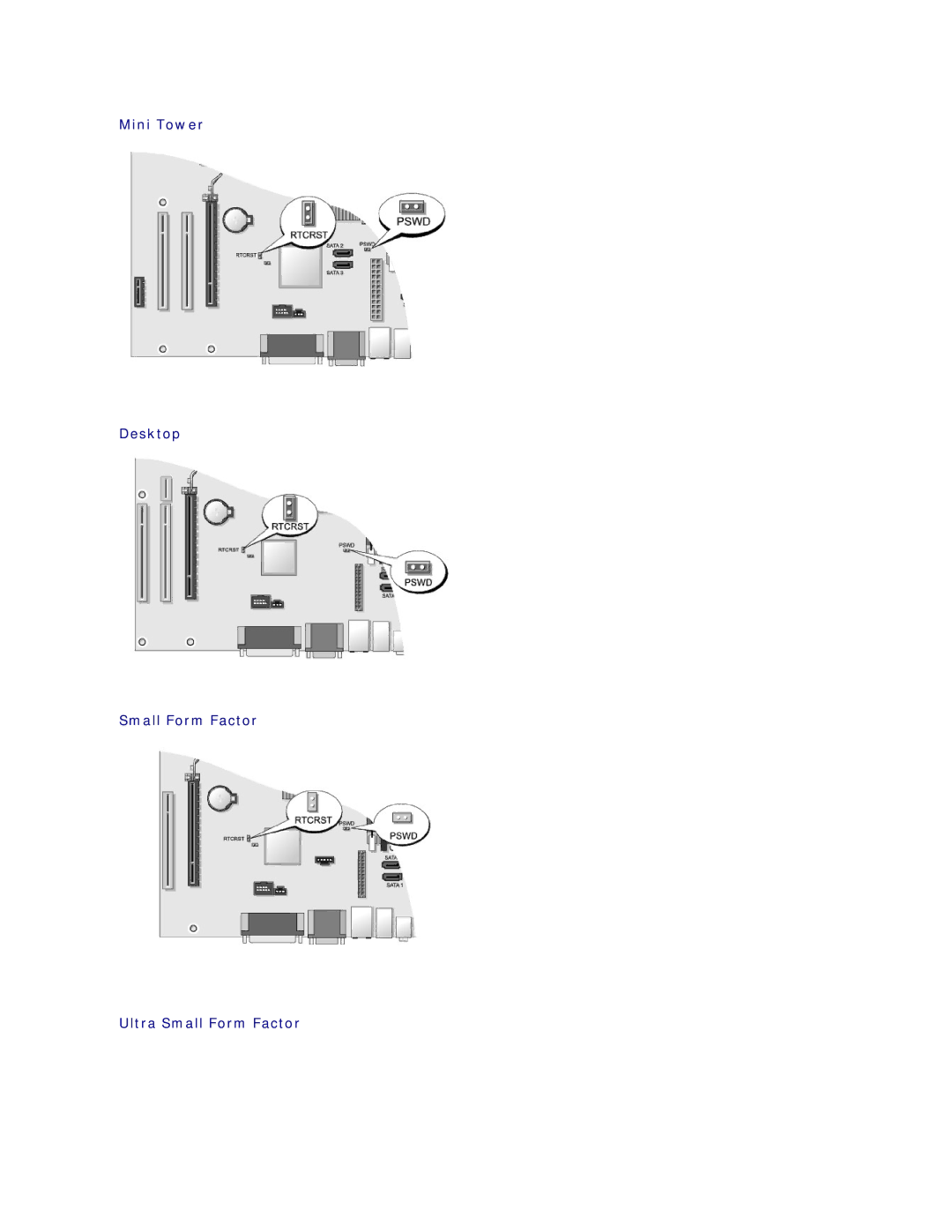
Jumper Settings
Assigning an Administrator Password
Deleting or Changing an Existing Administrator Password
Mini Tower Desktop Small Form Factor Ultra Small Form Factor
Jumper Setting Description
Clearing Forgotten Passwords
Set Client Dhcp to Static IP
Clearing Cmos Settings
Change the Lookup Method to Static IP
Back to Contents
Power Lights
Troubleshooting
Diagnostic Lights
Tools
Light Pattern Problem Description Suggested Resolution
Diagnostic Light Codes During Post
Blinking Amber
Steady Amber
Steady Green
Steady
Power Supply Diagnostic Light
Blinking Green
System Messages
Beep Codes
Code Cause
When to Use the Dell Diagnostics
Dell Diagnostics
Fix a Problem section, click Hardware Troubleshooter
Hardware Troubleshooter
Starting the Dell Diagnostics From Your Hard Drive
Option Function
Dell Diagnostics Main Menu
Battery Problems
Solving Problems
Drive Problems
Tab Function
Problems writing to an optical drive
Optical drive problems
Hard drive problems
Click Properties Tools Check Now
Ieee 1394 Device Problems
Error Messages
Click Uninstall
Click Start Control Panel Programs Programs and Features
Lockups and Software Problems
Keyboard Problems
Computer does not start up
Computer stops responding
Other software problems
Memory Problems
Program crashes repeatedly
Program is designed for an earlier Windows operating system
Network Problems
Mouse Problems
Click Start Control Panel Mouse
Click Start Control Panel Hardware and Sound Mouse
Printer Problems
Power Problems
Sound and Speaker Problems
Scanner Problems
No sound from speakers
Click Start Control Panel Hardware and Sound Printer
No sound from headphones
Video and Monitor Problems
Screen is blank Screen is difficult to read
3D image quality is poor
Dell Technical Update Service
Only part of the display is readable
Click Start Control Panel Appearance and Themes
Remove the cover see Removing the Computer Cover
Module Bay
Page
Securing a Device in the Module Bay
Back to Contents
Attaching the Cable Cover
Cable Cover Optional
Removing the Cable Cover
Heat Sink and Processor
Installing the Processor
Page
Back to Contents
Chassis Intrusion Switch
Select System Setup
Drives
Removing the Hard Drive
Page
Replacing the Hard-Drive Fan
Removing the Hard-Drive Fan
Back to Contents
System Fans
Installing the System Fans
Removing the System Fans
Back to Contents
Removing the Power Button
Power Button
Replacing the Power Button
Speakers
Replace the computer cover Turn on power to the computer
Ultra Small Form Factor