Quick Reference Guide
W . d e l l . c o m s u p p o r t . d e l l . c o m
Abbreviations and Acronyms
Contents
Contents
Finding Information
Quick Reference Guide
User’s Guide
What Are You Looking For? Find It Here Warranty information
Dell Product Information Guide
Dell Support Website support.dell.com
Windows Help and Support Center
How to use Linux
Operating System CD
Dell Supported Linux Sites
Linux.dell.com Quick Reference Guide
Setting Up Your Computer Tower Orientation
Connect the monitor
VGA
Two VGA connectors with one VGA adapter
Card Connect the power
Setting Up Your Computer Desktop Orientation
Mouse
Connect the modem
DVI
Two VGA connectors with one VGA adapter
Connect the power cables Turn on the computer and monitor
About Your Computer
Front View Tower Orientation
Blinking green The computer is in a power-saving state
You troubleshoot problems with your computer
Diagnostic lights
Typically remain connected, such as printers and keyboards
Slot wired as
Back View Tower Orientation
Back Panel Connectors
Parallel connector
Have a USB mouse, plug it into a USB connector
Address. For more information, see your User’s Guide
Connector
If you have a USB keyboard, plug it into a USB connector
Network adapter
Securely attached
Dell rotatable badge
Front View Desktop Orientation
Optional Video cameras and external storage devices
Back View Desktop Orientation
One PCI slot
Power supply Rotatable hard drive bay
Inside View
Front fan Card fan Quick Reference Guide
Power supply
Inside View Hard Drive Bay Rotated Out
System Board Components
Locating Your User’s Guide
Cable Colors
Removing the Computer Cover
Is removed
Cover latch release Computer cover
Solving Problems
Troubleshooting Tips
Caring for Your Computer
Resolving Software and Hardware Incompatibilities
Restoring the Computer to an Earlier Operating State
Using Microsoft Windows XP System Restore
Creating a Restore Point
Enabling System Restore
Using the Last Known Good Configuration
Undoing the Last System Restore
Starting the Dell Diagnostics From Your Hard Drive
Dell Diagnostics
When to Use the Dell Diagnostics
Before You Start Testing
Beep Codes
Page
Diagnostic Light Codes Before Post
Diagnostic Lights
Error Messages
Amber Bios is not executing
To wake the computer with a USB mouse or
Keyboard, substitute the mouse or keyboard
With a working PS/2 mouse or keyboard
Diagnostic Light Codes During Post
Install one memory module in memory module
Connector DIMM1
Performance and reduced error-correction capability
Press F1 to boot to the operating system
Ensure that no special memory module/memory
Are compatible with your computer
Frequently Asked Questions
How Do Solution
Tower Orientation on page 9 or
Desktop Orientation on
Find documentation for
On the card. Setting Up Your
Computer Tower Orientation on
Index
Index
Index
Hurtig referencevejledning
Bemærk, bemærkning og forsigtig
Forkortelser og akronymer
Indholdsfortegnelse
Klargøring af computeren opretstående
Set indefra Harddiskplads drejet ud
Indholdsfortegnelse
Kaldes også ResourceCD
Her finder du oplysninger
Cden Drivere og hjælpeprogrammer
Hvad søger du? Find det her Oplysninger om garanti
Dell Produktinformationsvejledning
Brugervejledning
MicrosoftWindows XP Hjælp og support
Webstedet for Dell Support support.dell.com
Windows Hjælp og support
Operativsystem-cd
Sådan anvendes Linux
Dell-understøttede Linux-websteder
Linux.dell.com Hurtig referencevejledning
Klargøring af computeren opretstående
Du skal udføre alle trin for at opsætte computeren korrekt
Tilslut skærmen
Dual DVI Y-kabeladapter
Brug DVI-stikkene til at slutte
En VGA-skærm til et
Computeren til én eller to
DVI-skærme
Tilslut højttalerne
Klargøring af computeren liggende
Tilslut modem- eller 2 netværkskablet
Dual VGA Y-kabeladapter
Eller to DVI-skærme På computeren
Brug VGA-adapteren til at slutte
Til at slutte computeren til én
Tilslut højttalerne
Om computeren
Set forfra opretstående
Problemer med computeren
Diagnosticerings
Der til Lysdioder for diagnosticering på side
USB 2.0-stik
Set bagfra opretstående
Express x8-slot fastkoblet som
Stik på bagpanel
Parallelt stik
En USB-printer, skal du slutte den til et USB-stik
Line-out
Stik til netværksadapter
Er forsvarligt tilsluttet
Bemærk Slut ikke et telefonkabel til netværksstikket
Eks. et separat intra- og extranet
Set forfra liggende
Med problemer med computeren
Henvises der til Lysdioder for diagnosticering på side
Strømstik Sæt strømkablet Hurtig referencevejledning
Set bagfra liggende
Fastkoblet som x4 og én PCI-slot
Øverste 5,25 drevplads Hurtig referencevejledning
Set indefra
Strømforsyning Drejelig harddiskplads
Frontventilator Kortventilator Hurtig referencevejledning
Set indefra Harddiskplads drejet ud
Strømforsyning Systemkort
Systemkortkomponenter
Her finder du din brugervejledning
Kablernes farver
Fjernelse af computerdækslet
Træk frigørelsesknappen til dækslet tilbage
Frigørelsesknap til dæksel Computerdæksel
Fejlfindingstip
Problemløsning
Vedligeholdelse af computeren
Gendannelse af computeren til en tidligere driftstilstand
Brug af Microsoft Windows XP Systemgendannelse
Oprettelse af et gendannelsespunkt
Aktivering af Systemgendannelse
Brug af Sidste kendte fungerende konfiguration
Fortryd sidste systemgendannelse
Brugervejledningen
Hvornår anvendes Dell Diagnostics
Start af Dell Diagnostics fra harddisken
Bip-koder
Før du begynder at teste
Fejl ved test af matematisk coprocessor
Fejl ved cache-test
Fejlmeddelelser
Lysdioder for diagnosticering
Diagnosticeringslysdiodekoder før Post
Gul Bios udføres ikke
Udfør proceduren i Processorproblemer
Med en fungerende PS/2-mus eller et
Fungerende tastatur og derefter forsøge
Diagnosticeringslysdiodekoder under Post
Kør Dell Diagnostics. Se i Brugervejledningen for at
Under opstart eller diagnosticeringstest
Og reduceret fejlretningsevne
Tryk på F1 for at opstarte til operativsystemet
Se Afhjælpning af software- og
Hardwareinkompatibilitetsproblemer på side
Blev fjernet fra computeren, for ressourcekonflikter
Ofte stillede spørgsmål
Finder de rigtige stik til mine
Se Om computeren på side
Computeren set forfra og bagfra
Med otte USB-stik to på forsiden, ét Du oplysninger på side
Hurtig referencevejledning
Indeks
Indeks
USB
Pikaopas
Huomautukset, laitteistovaroitukset ja varoitukset
Lyhenteet ja akronyymit
Tietokoneen asentaminen tornimallinen 103
108
113
115
Sisällysluettelo
Pikaopas
Tietojen etsiminen
Resource CD
100
Takuutiedot
Dell-tuotetieto-opas
Käyttöopas
Windowsin ohje- ja tukikeskus
101
Dellin tukisivusto support.dell.com
Dellin tukemat Linux-sivustot
102
Käyttöjärjestelmän CD-levy
Tietokoneen asentaminen tornimallinen
103
104
105
106
VGA-sovitin
Kaksi DVI-liitintä, joissa on kaksi VGA-sovitinta
Liitä VGA-näyttö tietokoneen
107
Liitä virtakaapelit
Pöytätietokoneen asentaminen pöytätietokonemallinen
Tornimallisen tietokoneen asennus on nyt valmis
108
Liitä näppäimistö ja hiiri 1 tietokoneeseen
109
110
111
VGA-sovitin Kaksi VGA-sovitinta
112
Laite edestä tornimallinen
113
114
Laite takaa tornimallinen
115
Virtaliitin Kytke virtajohto Korttipaikat
Paikka johdotettu
Takapaneelin liittimet
116
Lisätietoja on Käyttöoppaassa Linja ulos- ja
USB-liittimeen
117
Ylempi 5,25 tuuman
Laite edestä pöytätietokonemallinen
118
Kohdassa Virrankäytön ongelmat
119
Tasaisesti
Virtaliitin Kytke virtajohto
Laite takaa pöytätietokonemallinen
120
Virtalähde Käännettävä
Laite sisältä
121
Laite sisältä kiintolevypaikka käännetty ulospäin
122
Virtalähde Emolevy
Etutuuletin Kortin tuuletin
Emolevyn osat
123
Lisäkiintolevyn LED-merkkivalon liitin
Kaapeleiden värit
124
125
Käyttöoppaan etsiminen
Tietokoneen kannen irrottaminen
126
Kannen salvan vapautus Tietokoneen kansi
Tietokoneen käsitteleminen
Ongelmien ratkaiseminen
Vianmääritysvihjeitä
127
128
Palautuspisteen luominen
Tietokoneen palauttaminen aiempaan toimivaan tilaan
129
Viimeisen toimivan kokoonpanon käyttäminen
Viimeisimmän järjestelmän palauttamisen kumoaminen
130
Dell Diagnostics -ohjelman käyttötilanteet
Dell Diagnostics -ohjelman käynnistäminen kiintolevyltä
131
Merkkiäänet
Ennen testausta
132
Diagnostiikkamerkkivalot
Virheilmoitukset
Diagnostiikkamerkkivalojen koodit ennen POST-tarkistusta
133
134
Diagnostiikkamerkkivalojen koodit POST-tarkistuksen aikana
135
136
137
Olla vika
Usein kysyttyjä kysymyksiä
138
139
140
141
Hakemisto
Ohje- ja tukikeskus, 101 System Restore Järjestelmän
Hurtigreferanse
W . d e l l . n o s u p p o r t . d e l l . n o
Merknader, varsler og advarsler
147
151
Sette opp maskinen skrivebordsoppsett 156
161
146 Innhold
Finne informasjon
147
Også kalles ResourceCD Ressurs-CD
Hurtigreferanse
148
Hva leter du etter? Finn det her Garantiinformasjon
User’s Guide Brukerhåndbok
MicrosoftWindows XP Hjelp og støtte
Windows Hjelp og støtte
149
Dells kundestøttenettsted support.dell.com
150
Operativsystem-CD-en
Hvordan du bruker Linux
Flere opplysninger om Linux og Dell Precision
Nettverkskabelen
Sette opp maskinen tårn-oppsett
151
152
153
154
Til én eller to DVI-skjermer
155
Koble til strømled
Sette opp maskinen skrivebordsoppsett
156
157
Eller nettverkskabelen
158
159
Én VGA-adapter To VGA-adaptere
160
161
Om datamaskinen
Sett forfra tårnoppsett
162
Sett bakfra tårnoppsett
163
Kablet som
Kontakter på baksiden
Kontakter på baksiden av maskinen
164
165
Sett forfra skrivebordsoppsett
166
Diagnoselys
Blinker eller lyser gult Les Power Problems Strømproblemer
167
Sett bakfra skrivebordsoppsett
168
Og ett PCI-spor
Strømkontakt Koble til strømledningen her
Strømforsyning Roterbar stasjonsplass
Sett fra innsiden
169
Sett fra innsiden stasjonsplass for harddisk rotert ut
170
Strømforsyning Hovedkort
Fremre vifte Vifte
Hovedkort-komponenter
171
172
Finne User’s Guide Brukerhåndbok
Farge på kabler
Ta av maskindekslet
173
Trekk tilbake dekselutløseren
174
Løse problemer
Løse problemer med ukompatibel programvare og maskinvare
Vedlikeholde maskinen
Feilsøkingstips
176
Opprette en gjenopprettingspunkt
Gjenopprette datamaskinen til en tidligere tilstand
Bruke den siste fungerende konfigurasjon
Angre den siste systemgjenopprettingen
Aktivere Systemgjenoppretting
177
178
Når skal du bruke Dell Diagnostics
Starte Dell Diagnostics fra harddisken
179
Signalkoder
Før du starter en test
180
Diagnoselamper
Feilmeldinger
Diagnoselampekoder før Post
181
182
Diagnoselampekoder under Post
183
184
185
Vanlige spørsmål FAQ
186
187
188
189
Register
USB
Informator
Uwagi, pouczenia i przestrogi
Skróty i akronimy
195
209
212
217
194 Spis treści
Szukanie informacji
195
Podręcznik użytkownika
196
Przewodnik z informacjami o produkcie Dell
197
Poszukiwane informacje Znajdziesz je tutaj
Witryna pomocy technicznej Dell Support support.dell.com
Centrum pomocy i obsługi technicznej Windows
198
Dysk CD System operacyjny
Witryny dotyczące systemu Linux wspierane
Przez firmę Dell
Konfiguracja komputera ustawienie w pozycji wieża
199
200
201
Podwójny adapter VGA z kablem Y
Komputerze
202
Adapterem VGA
203
Konfiguracja komputera ustawienie w pozycji desktop
204
205
Kabel sieciowy
206
207
208
209
Informacje dotyczące komputera
Widok z przodu ustawienie w pozycji „wieża
210
Jedno PCI Express x8 podłączone jako
Widok z tyłu ustawienie w pozycji „wieża
211
Złącza na panelu tylnym
212
213
Górna wnęka na
Widok z przodu ustawienie w pozycji „desktop
214
215
Widok z tyłu ustawienie w pozycji „desktop
216
Jako x4 i jedno gniazdo PCI
Złącze zasilania Umożliwia podłączenie kabla zasilania
Zasilacz Obrotowa wnęka na dysk twardy
Widok wewnątrz
217
Widok wewnątrz wyjęta wnęka na dysk twardy
218
Zasilacz Płyta systemowa
Przedni wentylator Wentylator karty
Elementy płyty systemowej
219
220
Dostęp do Podręcznika użytkownika
Kolory kabli
Zdejmowanie pokrywy komputera
221
Zwolnij zatrzask pokrywy
222
Rozwiązywanie problemów
Wskazówki dotyczące rozwiązywania problemów
Dbanie o komputer
223
224
Tworzenie punktu przywracania
Przywracanie komputera do wcześniejszego stanu
Wykorzystanie ostatniej znanej dobrej konfiguracji
Cofanie ostatniego przywrócenia systemu
Aktywacja narzędzia Przywracanie systemu
225
Kiedy należy używać programu Dell Diagnostics
226
227
Uruchamianie programu Dell Diagnostics z dysku twardego
Użytkownika
228
Kody dźwiękowe
Przed rozpoczęciem testowania
229
Błąd podczas testowania pamięci podręcznej
Lampki diagnostyczne
Komunikaty o błędach
Kody lampek diagnostycznych przed testem Post
230
231
Kody lampek diagnostycznych podczas testu Post
232
233
234
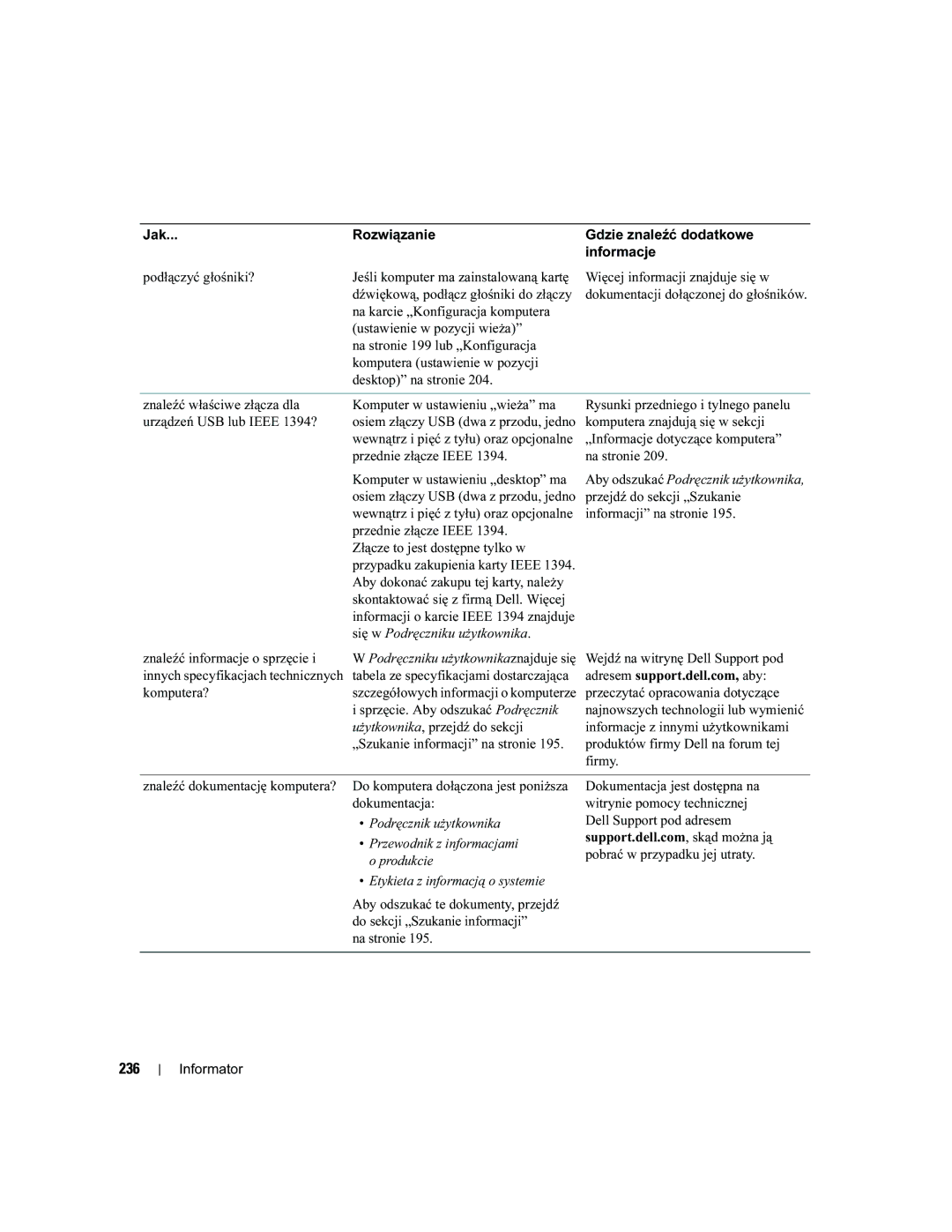
Najczęściej zadawane pytania
235
Używać dwóch monitorów? Wymaganą do obsługi konfiguracji
Podłącz je do kabli monitora
236
237
238
Краткий справочник
Примечания, предупреждения и важная информация
Сокращения и акронимы
241
242
Поиск информации
243
Компакт диск Drivers and Utilities
Также называемый Resource CD
244
Информационное руководство по продуктам Dell
Лицензионная метка Microsoft Windows
Руководство пользователя
245
Веб-сайт технической поддержки компании
Dell support.dell.com
Центр справки и поддержки Windows
246
Компакт-диск Operating System
Поддерживаемые компанией Dell сайты
Посвященные ОС Linux
Установка компьютера вертикальное положение корпуса
247
248
Примечание Для подключения монитора
249
VGA-адаптер с дуальным Y-кабелем
250
VGA-адаптером VGA-адаптерами
Или двух DVI-мониторов
Для подключения VGA-монитора
251
Мышь
Установка компьютера горизонтальное положение корпуса
252
Или сетевой кабель
Способ подключения монитора зависит от видеоплаты
253
254
255
Одному или двум мониторам DVI
Установите дополнительные программы и устройства
257
Компьютере
Вид спереди вертикальное положение корпуса
258
Вид сзади вертикальное положение корпуса
259
Разъемы задней
Панели Разъемам Краткий справочник
Разъемы задней панели
260
261
Вид спереди горизонтальное положение корпуса
262
Верхний отсек для
Дисковода FlexBay
263
Дополнительную информацию см. в Руководстве пользователя
Состояние компьютера
Ожидания и выходе из них см. в Руководстве пользователя
Вид сзади горизонтальное положение корпуса
264
Панели Разъему Гнезда для плат
Проводкой как для 4-канального и один PCI-слот
Блок питания Вращаемый отсек для
Вид изнутри
265
Вид изнутри повернутый отсек для жесткого диска
266
Блок питания Системная плата
Вентилятор платы
Элементы системной платы
267
Цвета кабелей
268
Снятие крышки корпуса компьютера
269
Корпуса Компьютера
270
Защелка крышки Крышка корпуса
Уход за компьютером
Решение проблем
Советы по устранению неполадок
Несовместимость программного и аппаратного обеспечения
Восстановление системы в Microsoft Windows XP
На стр
Использование последней работоспособной конфигурации
273
Программа Dell Diagnostics
275
Звуковые коды
Перед началом тестирования
Включите принтер, если он подключен к компьютеру
276
Сообщения об ошибках
277
278
Индикаторы диагностики
Коды индикаторов диагностики перед выполнением теста Post
279
Сигналы диагностических светодиодов во время процедуры Post
280
281
282
Часто задаваемые вопросы
283
284
285
Индекс
286
287
288
Lathund
Obs, anmärkningar och varningar
Förkortningar och akronymer
291
292
Hitta information
293
CDn Drivers and Utilities Drivrutiner och verktyg
Kallas även Resource CD
MicrosoftWindows XP Hjälp och supportcenter
294
Användarhandbok
Windows Hjälp och supportcenter
295
Webbplatsen Dell Support support.dell.com
296
Använda Linux
Ytterligare information om Linux- och Dell Precision-datorn
Linuxwebbplatser som stöds av Dell
Ställa in datorn tornvariant
297
298
299
300
En VGA-adapter Två VGA-adaptrar
301
Anslut nätsladdarna
Ställa in datorn bordsvariant
302
303
Anslut modemet eller 2 nätverkskabeln
304
305
306
307
Om datorn
Framifrån tornvariant
308
X8-uttag
Bakifrån tornvariant
309
Kontakter på bakpanelen
310
Linjeutgång
Den till en USB-port
311
Framifrån bordsvariant
312
Övre 5,25-tums
Enhetsuttag Undre 5,25-tums
Bakifrån bordsvariant
313
Från insidan
314
PCI-uttag
Nätkontakt Sätt i strömkabeln
Från insidan Hårddiskuttag roterat utåt
315
Strömförsörjning Systemkort
Främre fläkt Kortfläkt Lathund
Komponenter på systemkortet
316
Hitta användarhandboken
Kabelfärg
317
PCI-Express x16-kortuttag SLOT2PCIE
Ta bort datorkåpan
318
319
Frigöringsspärr för kåpa Datorkåpa
Lösa problem
Skötsel av datorn
Felsökningstips
Lösa program- och maskinvaruinkompatibilitet
Använda systemåterställning i Microsoft Windows XP
Skapa en återställningspunkt
Återställa datorn till ett tidigare driftsläge
321
Använda den senast fungerande konfigurationen
Ångra den senaste systemåterställningen
Aktivera systemåterställning
322
När ska Dell Diagnostics användas?
Dell Diagnostik
Starta Dell Diagnostik från hårddisken
323
Innan du börjar testa
324
325
Diagnostikindikatorer
Felmeddelanden
Diagnostikindikatorkoder före Post
326
327
Diagnostikindikatorkoder under Post
328
329
330
Indikatormönster Felbeskrivning Föreslagen åtgärd
Vanliga frågor och svar
331
På sida 297 eller Ställa in datorn
På sida Lathund
332
333
Sakregister
USB
תויוות
340 הרזע ץבוק 340 ,תוריש גת
367 ,תויושגנתה
הכימתהו הרזעה זכרמ
Dell 341 ,הכימת רתא 369 ,Dell Diagnostics
367 ,תויושגנתה ResourceCD 369 ,Dell Diagnostics
341 תויעב 369 ,Dell Diagnostics
357 ,םירבחמ תורונ 372 ,359 ,354 ,ןוחבא 372 ,בשחמה בג
?ילש בשחמל דועית שפחל
ריהמ סוחיי ךירדמ
תוצופנ תולאש
377 ריהמ סוחיי ךירדמ
תיתרגש תכרעמ תוליעפ ואדיו לוחתא המידקמה
375 ריהמ סוחיי ךירדמ
Post תקידב בע הלעפהה תרונ
Dell תרבחל הנפ ,תכשמנ היעבה
373 ריהמ סוחיי ךירדמ
עגונב תוצע תלבקל .היעבה המ תנייצמה לוחתאה שמתשמל
בשחמה תלועפ
הניש יבצמ תורונ היעבה תא תוהזל תעייסמ הלעפהה הניקת אל
האיגש תועדוה האר ,תויעב
371 ריהמ סוחיי ךירדמ
DMA
Drivers and Utilities רזע ילכו רוטילקתה תא סנכה
תינש הסנו בשחמה תא הבכ
Onboard or USB CD-ROM Drive תורשפאה תא
Enter לע
הקידבה תליחת ינפל הלא
תוקידב וא תוריהמ תוקידב עצבל
החלצהב ומלשוה תוקידבה
בשחמה תא שדחמ ליעפהל וא קילדהל
Performance and Maintenance הקוזחתו
Next אבה לו Undo my last restoration ילש Next אבה לע
OK רושיא לע שדחמ הלעפהה ירחא
ליעפהל הה תכרעמ תא
System Restore תכרעמה רוזחש לע
וא הנכותב ,הרמוחב ילבמ ק הלועפ בצמל ש בשחמה
תרחבש Next אבה לע
וזחשה בשחמה לש שדחמ הלעפה תעצבתמ OK רושיא לע
תואבה תוצלמהל
תקלוד
סוריו יטנאה תנכות תועצמאב תעל תעמ
עובק סיסב לע
יוסיכה רורחש ספת תא רוחאל
365 ריהמ סוחיי ךירדמ
בשחמה תודוא עדימ ליכמ שמתשמל
Tower תרוצתל desktop תרוצתמ בשחמה לש הרוצתה יוניש לע עדימ
חול לש בשחמה לע ימינפ טבמ בשחמה יוקינל תוארוה
בשחמב תויעב לש
363 ריהמ סוחיי ךירדמ
Pswd המסיס רשגמ
תכרעמה חול יביכר
361 ריהמ סוחיי ךירדמ
ימינפ טבמ
Desktop תרוצת ירוחא טבמ
359 ריהמ סוחיי ךירדמ
Desktop תרוצת יתיזח טבמ
357 ריהמ סוחיי ךירדמ
ירוחאה חולה ירבחמ
Tower תרוצת ירוחא טבמ
355 ריהמ סוחיי ךירדמ
תונמדזמ יתעל רבחמ הת אש רובע
בשחמה תודוא
353 ריהמ סוחיי ךירדמ
וא ,תה תא ארק בשחמה בשחמל וא הנכותהש אדוול ידכ קפסה
351 ריהמ סוחיי ךירדמ
דיחי רבחמ תועצמאב םיכסמ ינשבו דחא ךסמב םיכמותה םיסיטרכ רובע
תא רבחל לכות תונוש
349 ריהמ סוחיי ךירדמ
Desktop תרוצת בשחמה תנקתה
וא ,תה תא ארק בשחמה בשחמל קתהה וא הנכותהש אדוול ידכ קפסה
347 ריהמ סוחיי ךירדמ
תא רבחל נוצרב רשאכ
עבצ תועצמאב דדוקמ ילאודה מה לבכ
ידכ .ינשה רבחמהו ישארה רבחמה
ותלעפה תעב בשחמל ילאוד 345 ריהמ סוחיי ךירדמ
לכות תונוש
Tower תרוצת בשחמה תנקתה
343 ריהמ סוחיי ךירדמ
Dell לש םיכמתנ Linux ירתא
341 ריהמ סוחיי ךירדמ
DSS .USB
רוטילקתב
שמתשמל ךירדמ
עדימ שופיח
339 ריהמ סוחיי ךירדמ
םיניינעה ןכות
םיניינעה ןכות
337 םיניינעה ןכות
שמתשמל תובית ישארו הרדסמ הז
Dell לש n
ריהמ סוחיי ךירדמ