To enable or disable Call Timer
Enabling or disabling Call Timer
Setting the call indicator light
To turn the call indicator light on or off
Changing feature key labels
To rename the labels
To restore the default labels
To configure name display format
Configuring the name display format
Configuring Live Dialpad
First name, last name Last name, first name
To configure Live Dialpad
Using the Password Admin menu
Enable Password Protection
Choose one of the following context
To login as an agent
Call Center Agent/Supervisor Features
Agent login
Headset interface
Login with Agent ID and Multiple Queue Assignment MQA
To login with Agent ID and MQA
Call Center Agent/Supervisor Features
To use the default login feature
Default login
To correct errors during the login procedure
Example
Agent logout
To logout
Answer Call Center calls
Call Center Agent features
Use Activity Code
To capture activities
Call Forcing
Use Not Ready
When you have an emergency situation
Emergency Key
To be taken out of the queue
To activate Make Set Busy
Activate Make Set Busy
Making non-ACD calls
To deactivate Make Set Busy
To call your supervisor
Contact your supervisor
To answer a non-ACD call
To return to the ACD call
To Conference your Supervisor during a call in progress
To use the Walkaway feature
Use Walkaway and Return from Walkaway
To Transfer to a supervisor, during a call in progress
To return from Walkaway
Press the key next to the flashing indicator
Call Center Supervisor Features
Agent Keys
To disconnect an agent call
Answer Agent
Answer Emergency
To disconnect from the emergency call
To call an agent
Call Agent
Use the Supervisor Observe and Supervisor Headset Port
To leave Call Agent state
To mute the Supervisor headset
To use the Supervisor Talk/Listen feature
Observe Agent
To observe an agent
To talk to an agent you are observing
To leave the Observe state
Interflow
Night Service
To enter Night Service
To activate Interflow
To transition to Night Service
To exit Night Service
IP Phone 1150E non-ACD call features
Make a call
To make a call
Using Predial
To use Predial
To display the Auto Dial number
Using Auto Dial
To use Auto Dial
To store an Auto Dial number
Using Ring Again
To call a Ring Again party when you receive notification
To use Ring Again
To cancel Ring Again before notification
Using Last Number Redial
Using Speed Call
To use Last Number Redial
To store or change a Speed Call number
To make a Speed Call
Using System Speed Call
Press the Speed Call Controller Key or
To make a System Speed Call
To use Hot Line
Using Intercom calling
Using Hot Line
To make an Intercom call
Answering a call
To answer a call
While on an active call
To place a call on Hold
To retrieve a call on hold
To use the Transfer feature
Transferring a call
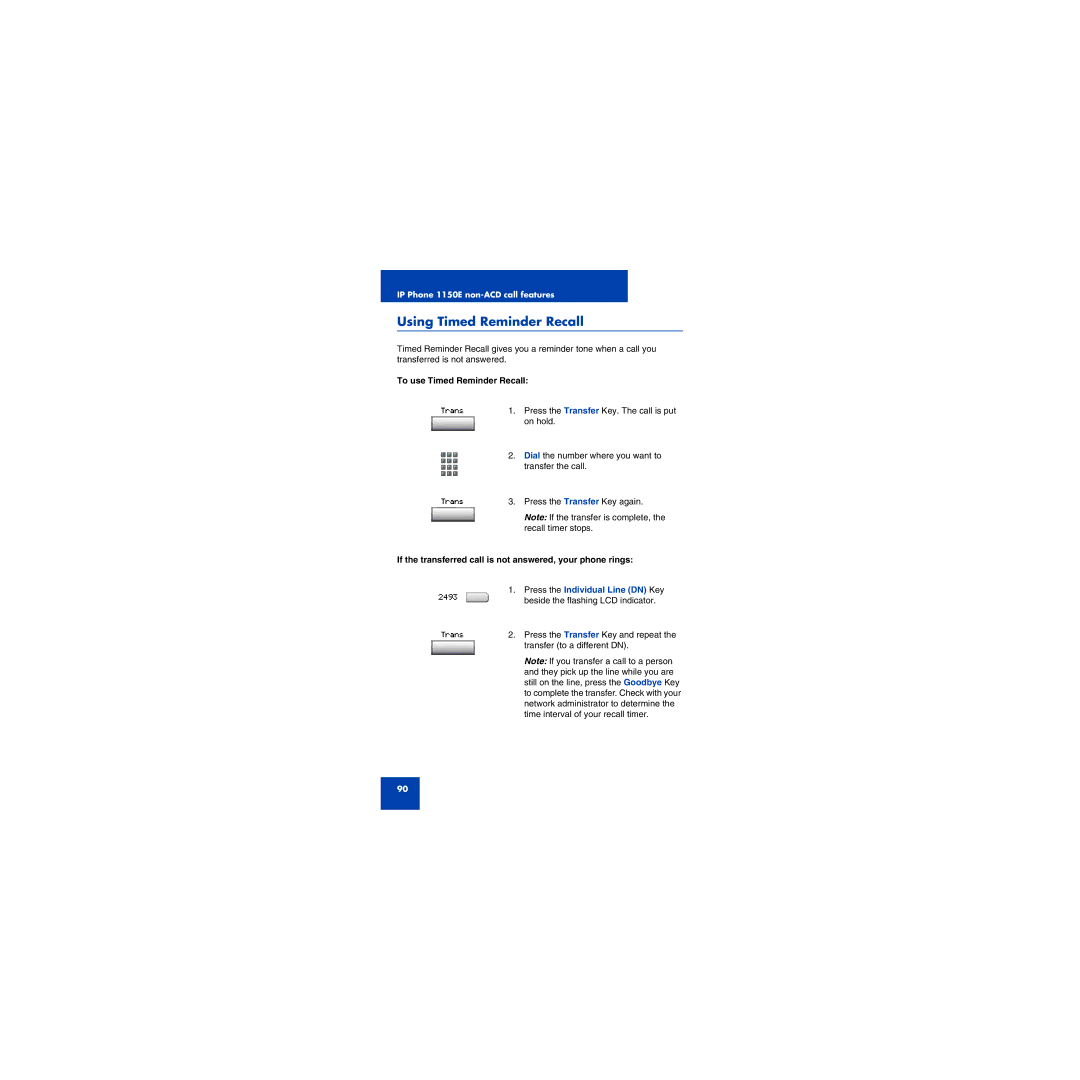
Using Timed Reminder Recall
To use Timed Reminder Recall
If the transferred call is not answered, your phone rings
To contact the attendant while on a call
Using Attendant Recall
Using Call Park
To park a call on a System Park DN
To park a call on a DN other than the System Park DN
To retrieve a parked call
Calling Party Number/Charge Account
Displaying incoming calls
To record the calling party number or charge account number
Tracing a Malicious call
To use Call Trace while you are on a call
To use Call Trace if you do not have a Call Trace Key
Conference Key
Press the Individual Line DN Key
Using Call Page Connect to make an announcement
Additional Call Features
Using the buzz signal
To buzz the phone linked to yours
Charging a call or charging a forced call
To disconnect from the paging system
To charge a call to an account when you transfer a call
To charge a call in progress
Dial the number of the phone where
Using Enhanced Override
To use Enhanced Override
To end the connection
Using Forced Camp-on
To use Forced Camp-on
Override Feature
To override a busy/engaged signal
To answer a camped-on call
To use Privacy Release while on an established call
Using Privacy Release
Using Radio
To use Automatic Pre-selectionMeet me
To use Automatic Post selection
Using Voice Call
To use the Special Radio Paging features
To make a voice call
Using the Voice Messaging control screens
To respond to a voice call
To use Voice Messaging controls
Play Stop Last Next Delete Skip Quit
Activate Automatic Answerback
Activate Call Pickup
Press the Automatic Answerback Key
Use Call Waiting
To answer an incoming call in another Call Pickup Group
To answer an incoming call while on another call
To return to your first phone call
If you do not have a Call Waiting Key
Forward calls
To forward your calls
To view the number that your calls are being forwarded to
Forward internal calls only
To cancel Call Forward
To cancel Internal Call Forward
To forward your internal calls
IntForward 1. Press the Internal Call Forward Key
Use Remote Call Forward
To reinstate Internal Call Forward to the same number
To activate Remote Call Forward
To cancel Remote Call Forward
Secure your phone
To lock your phone
To unlock your phone
Set up a Conference call
To change your password must be done from your phone
To set up a conference call
Join a call
Selectable Conferee Display and Disconnect
To view active conferees
To disconnect a conferee
Use Group Call
Press the Individual Line DN Key on
To call group members
To answer a Group Call
To end a Group Call
Additional phone features
Using the Personal Directory
To add an entry
To edit an entry
To delete an entry
To search for an entry
Using the Callers List
To dial an entry
Using the Redial List
To delete the entire Callers List
To delete the entire Redial List
Using Virtual Office
Using IP Phone Possible to log in to the 1150E?
Logging in to Virtual Office
Using Virtual Office on your Remote phone
Logged in to an IP Phone 1150E
Using Virtual Office on your Office phone
Logged in to an IP Phone 1150E using an IP Softphone
Office phone displays the message Logged Out
Logging out of Virtual Office
To log out from a Remote phone
Troubleshooting Virtual Office
Displayed Probable Cause Actions Message
Troubleshooting Virtual Office Part 2
Using Media Gateway 1000B
Normal Mode
Local Mode
Using Test Local Mode
Using Resume Normal Mode
Troubleshooting MG 1000B
Display Message Probable Cause Actions
Regulatory and safety information
Jurisdiction Standard Description
Vcci
DenAn regulatory notice for Japan Other
Terms you should know
Information display
147
148
Index
150