N G U L a R M a K E S B U S I N E S S R U N B E T T E R
Important Health Information and Safety Precautions
Please Read Before Proceeding
Use the correct external power source
Handle battery packs carefully
Safety Precautions for Acoustic Pressure Safety in Aircrafts
Heed service markings
Environment Restrictions
Avoid hot areas
Damage requiring service
Mounting Accessories
Avoid wet areas
Adjust the volume
Cleaning
Contents
Synchronizing Information Setting Up E-mail Security
Using Phone Features
Managing Your Pocket PC Phone
Mail and Messaging 117
Getting Connected
Experiencing Multimedia 153
Appendix 193
Using Other Applications 179
Index 205
Page
Chapter
Getting to Know Your Device and Its Accessories
13 14 15 16
No. Item
Button Trackwheel
Function
Enter
19 20 27 28 29 30 31
Connector Experience better reception quality
Car Antenna
Accessories
Accessory Function AC adapter
UMTS/HSDPA
To check the battery power
Charge the battery
Low battery
Alternatively, tap Start Settings Systems tab Power
Turn your device on and off
Tap Start Settings System tab Screen
Calibrate the device
Manage screen settings
Today Screen
Indicators
Icon Description
Settings Personal tab Menus
Start menu
Getting Started
Getting Started
Personal tab
System tab
Connections tab
Getting Started
Entering and Searching for Information
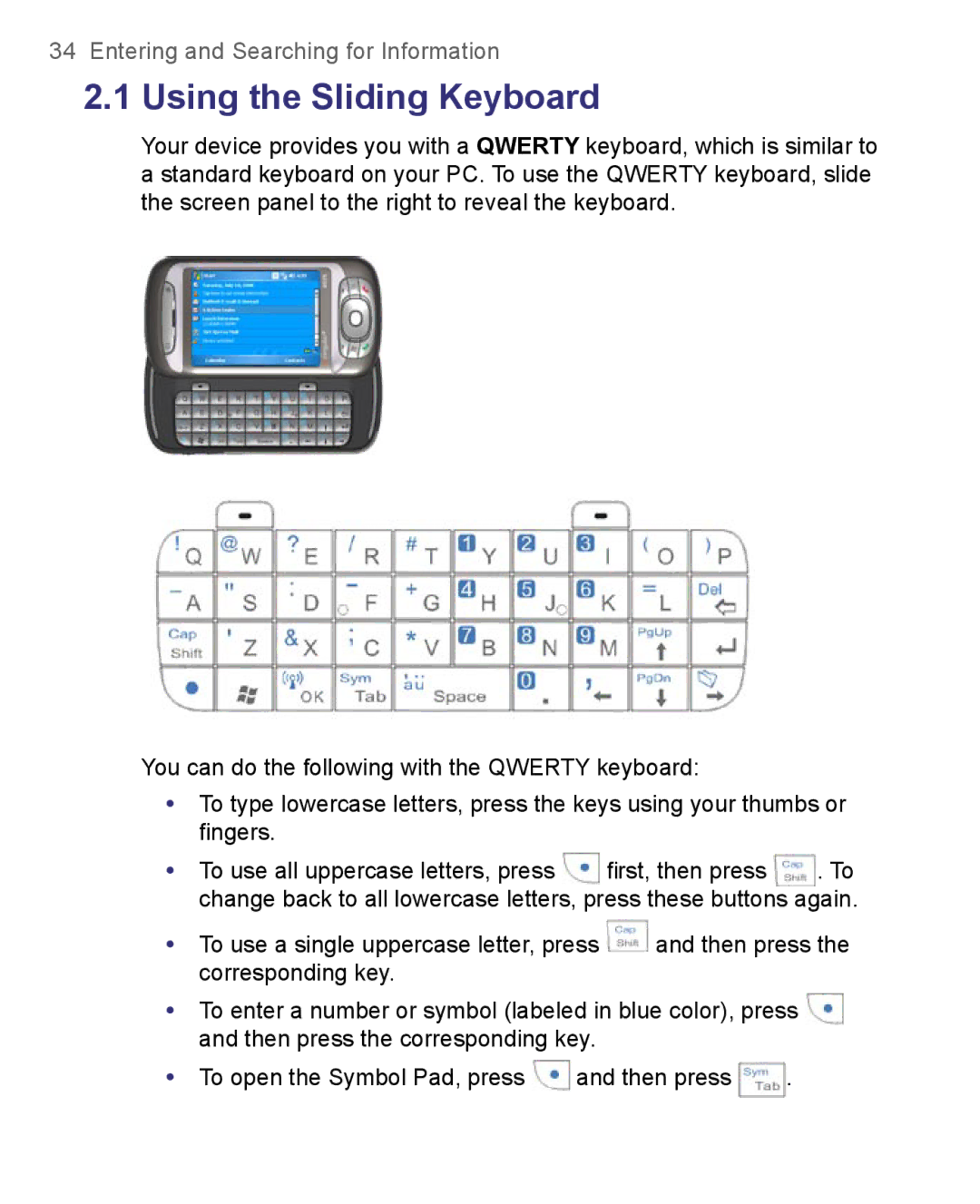
Using the Sliding Keyboard
Input Methods
To show or hide the Input Panel
Tap Large keys
To enter text using the on-screen Keyboard
To enlarge the on-screen Keyboard
To use Letter Recognizer
To use Block Recognizer
To start Transcriber
To write using Transcriber
To enter punctuation and symbols
To edit text
To open the Symbol Pad and select a symbol
To search for a file or an item
Tap Start Programs Search
Using Phone Features
Enter your PIN
Using the Phone
Phone screen
Turn the phone function on and off
Adjust the device volume
Volume adjustment
Make a call from Phone
Make a call from Contacts
To choose one of the numbers of a contact to dial
Make a call from Call History
Make a call from Speed Dial
To create a Speed Dial entry
To answer or reject an incoming call
Make a call from SIM Manager
To call a SIM contact
To end a call
Start Smart Dialing
To find a phone number
Tips on using Smart Dialing
To find a contact name
Make a call or send an SMS using Smart Dialing
Set up Smart Dialing
On the Phone screen, tap Menu Smart Dialing Options
To put a call on hold
To switch between two calls
To set up a conference call
Tap Conference
Make an international call
Make an emergency call
To mute a call
Tap Start Programs SAPSettings
Using Phone Features
Synchronizing Information and Setting Up E-mail Security
Setting Up ActiveSync
To install and set up ActiveSync on the computer
Synchronizing Information and Setting Up E-mail Security
Synchronizing Information and Setting Up E-mail Security
Information types on the PC and Exchange Server
Synchronize Outlook information with the computer
To manually start and stop synchronization
Location
Synchronize Outlook information with Exchange Server
To change which information is synchronized
New state
To synchronize directly with Exchange Server
Schedule synchronization with Exchange Server
Tap Finish
Using Comm Manager to Enable Direct Push
Using ActiveSync to Enable Direct Push
To synchronize with a computer via infrared
To synchronize with a computer via Bluetooth
To schedule synchronization at regular time intervals
On your device, tap Start Programs ActiveSync
Change Media synchronization settings
To set up a sync relationship with a storage card
Click Set up Sync
Digitally sign and encrypt all messages
Tap Start Programs ActiveSync Tap Menu Options
Synchronizing Information and Setting Up E-mail Security
Managing Your Pocket PC Phone
Customize the Today screen
Tap Start Settings Personal tab Today
Personalizing Your Pocket PC Phone
To customize the Today screen
Customize the Start menu
Why is the device name important?
Tap Start Settings Personal tab Menus
To set options for displaying tasks on the Today screen
To change the device name
To set an alarm
Set Date / Time / Language / Regional Options
To set the time and date
To set the time and date for a different location
Personal and system settings
To change language and regional settings
To reassign programs or shortcuts to program buttons
To increase or decrease the size of text on the screen
To choose how to be notified about events or actions
To adjust the speed for scrolling
To find the operating system version number
To adjust the brightness of the backlight
Phone settings
To make the battery last longer
To set the backlight to dim after a time delay
Networks
Phone services
To choose the services
To change the ring type
To set preferred networks
To change phone network settings
Tap Start Settings Personal tab Phone Network tab
Tap Set Networks
Tap Start Settings System tab Remove Programs
To remove programs
To see available storage card memory
Tap Start Settings System tab Memory
To see how much memory is available
To free up program memory
To close a program
Tap Start Settings System tab Memory Running Programs tab
To copy files to a storage card
To copy a file between your device and the PC
Tap Menu Edit Paste
To automatically save files on a storage card
Tap Start Settings Personal tab Lock
Tap Require PIN when phone is used
To protect your device with a password
To protect your SIM card with a PIN
To change your password
To display owner information on the ‘my info’ screen
To perform a soft reset
To perform a hard reset
Managing Your Pocket PC Phone
Getting Connected
Connecting to the Internet
Hsdpa
Tap Finish
Tap Start Settings Connections tab Connections
To set up a dial-up connection to your ISP
To connect to a private network
To set up a network card
To use MEdia Net from Cingular
To start Internet Explorer
To set a Home
To transfer favorites from your PC
To change the size of text on Web pages
To add a favorite
To delete a favorite or folder
To change how Web pages fill the screen
To save a picture from a Web
To set up Internet security settings
To delete temporary Internet files
Tap Start Settings Connections tab Comm Manager
To open Comm Manager
Bluetooth modes
To turn Bluetooth on and make your device discoverable
Bluetooth partnerships
To create a Bluetooth partnership
To rename a Bluetooth partnership
Connect a Bluetooth hands-free headset
To accept a Bluetooth partnership
To delete a Bluetooth partnership
To connect a Bluetooth hands-free headset
Beam information using Bluetooth
To beam information from your device to a computer
Use the device as a Bluetooth modem
Tap Beam type of item
Select Bluetooth as the Connection Type
Use another Bluetooth phone as a modem
To add the device as a Bluetooth modem
Select a modem list, tap Bluetooth
To connect to a Wi-Fi network
Open Comm Manager
To save battery power while connected to a Wi-Fi network
To check the Wireless LAN status
Getting Connected
To set up your device as an infrared or USB modem
On your device, tap Start Programs Wireless Modem
To add your device as an infrared modem to your notebook
Click Start Settings Control Panel
Tap Menu Start
To add your device as a USB modem to your computer
Double-clickPhone and Modem Options
To dial up and connect to the Internet
Select Connect using a dial-up modem then click Next
Getting Connected
To end the modem session
On your device, tap Start Programs Terminal Services Client
To navigate within Terminal Services Client
To connect to a Terminal Server
To disconnect after ending a session
To disconnect without ending a session
Tap Disconnect
Tap Log Off
Getting Connected
Mail and Messaging
Mail and Text Messages
Set up Outlook e-mail
Tap Start Programs ActiveSync
Set up a POP3/IMAP4 e-mail account
Tap Start Messaging Tap Menu Tools New Account
Setting Description
User name
Send and receive messages
Outgoing server settings
To compose and send a message
To reply to or forward a message
To exclude your e-mail address when replying to all
Tap Advanced
To receive attachments
To add an attachment to a message
Tap Start Messaging Tap Menu Tools Options
Download messages
To download messages from the server
To digitally sign and encrypt a new message
Individually sign and encrypt a message
Message list, tap Menu Go To Outlook E-mail
Manage folders
Tap Menu Check Certificate
Mail and Messaging
Personal Email Setup in 5 Clicks
Self Service Corporate Email Setup
To download Xpress Mail
Send and Receive Personal Email
To set up Xpress Mail, you will need
Corporate Email Setup
Self-Service Xpress Mail
Start On Your Desktop Or Laptop Computer
Mail and Messaging
Tap Get Xpress Mail on your Today screen
Complete the Setup Process on your
Tap Register
Send and Receive Corporate Email
Tap Start, then Messaging
To access MMS
Change MMS settings
Tap Start Messaging Tap Menu Go To MMS
To configure MMS settings
Connect via. Select The Internet from the list
Create and send MMS messages
To compose an MMS message
Tap Send to send the MMS message
To add an audio clip to an MMS message
To create an MMS message from a template
To add predefined text strings to an MMS message
Tap Insert an audio clip
To reply to an MMS message
View and Reply to MMS messages
To view an MMS message
To start MSN Messenger
To send an instant message
To sign in or out
To add or delete contacts
To schedule an appointment
To send a meeting request
To set a default reminder for all new appointments
Tap Menu New Appointment
Tap Attendees
To create a contact on your device
Select the Set reminders for new items check box
To create a contact on your SIM card
To copy SIM contacts to your device
To change contact information
To work with the contact list
Tap Start Programs SIM Manager
Tap Menu Contacts to SIM
To copy contacts to the SIM card
Tap Start Programs SIM Manager, then tap Menu Tools Options
To find a contact on your device
To find a contact online
Tap Start Contacts Menu View By Name
Mail and Messaging
Tap Start Programs Tasks
To set a default reminder for all new tasks
To create a task
To change the priority of a task
To show start and due dates in the task list
Enter information in Notes
To locate a task
To create a note
To set the default input mode for Notes
Tap Start Programs Notes
To draw in a note
Record a voice note
To create a voice note
Tap Start Settings Personal tab Input
To change recording formats
Using Camera Cingular 8525 only
Using Windows Media Player Mobile
To open the Camera screen
Capture modes
To exit the Camera
Current capture mode
Camera and Enter buttons
Camera controls
File formats supported
Navigation Control
Experiencing Multimedia
Night
MMS Video capture mode
Video capture mode
Still image capture modes
Review screen icons
Review screen
Assign to Contacts . Tap
Zooming
Capture Capture size setting Zoom range Mode
To change the display duration of the Review screen
Capture mode
MMS
Camera Settings screen
To navigate the Camera Settings screen
Sports Settings menu
Self-timer menu
Panorama Settings menu
Template menu
Flash Light menu
Capture Settings menu
Capture Mode menu
Ambience menu
Advanced menu
Experiencing Multimedia
Using Pictures & Videos
File Type File Extensions
Tap Start Programs Pictures & Videos
To view pictures
To play GIF animation files
To play videos with audio
To sort pictures and video clips
To view slide shows
To start Camera optional from Pictures & Videos
To set a picture as the Today screen background
To delete a picture or video clip
To edit a picture
Tap Menu Set as Today Background
Tap Menu Beam
To send pictures and video clips via e-mail
To beam a picture or video clip
To assign pictures to contacts
Video File Formats Supported File Extensions
To customize more image settings
Audio File Formats Supported File Extensions
Tap Start Programs Windows Media
Open Windows Media Player
About the controls
This control Does this
About the screens and menus
About licenses and protected files
To synchronize and copy content manually to your device
To synchronize content to your device automatically
Copy files to your device
Play media
To play items on your device
To play an item on a network
Troubleshooting
Tap Menu Open URL
Using Other Applications
Word Mobile
To create a Word file
To create an Excel file
To start a slide show presentation
Tap Start Programs PowerPoint Mobile
To stop a slide show
To install MIDlets from a PC
To install MIDlets from the Internet
To enlarge or reduce the display size
To view the MIDlets currently running
To install a MIDlet/MIDlet suite
To run MIDlets on your device
To stop running a MIDlet
Manage MIDlets/MIDlet suites
To configure MIDlet security
To select a type of connection
Security Option
Tap Start Programs ZIP
Start ZIP and Open .zip files
To start ZIP on your device
To open a ZIP file and extract files
Tap File New Archive
Tap Action Extract
To create a zip archive
Tap Action Add
Create a voice tag for a phone number
Tap File Close Archive
Using Other Applications
Create a voice tag for a program
Make a call or launch programs using a voice tag
Tap Start Settings Personal tab Voice Speed Dial
Tap Start Programs Voice Speed Dial
Using Other Applications
Appendix
European Union Notice
1Regulatory Notices
Regulatory Agency IDs
EN 60950-1 IEC
EN 301
Etsi EN 300
Federal Communications Commission Notice
This equipment may be operated
Modifications
Safety Precautions for RF Exposure
SAR Information
Other Medical Devices
Pacemakers
Hearing Aids
Other tips and cautions
Weee Notice
RoHS Compliance
2PC Requirement to Run ActiveSync
System Information
3Specifications
Power
Display
Camera Module optional
Physical
Controls and Lights
Connections
Audio
Expansion Slots
Appendix
Index
Index
Security
Index
MMS
Index
Index
ZIP

 and then press the corresponding key.
 and then press the corresponding key.
 and then press
  .
.