EX-A1
Important for Laser Products / 镭射产品的重要说明
Introduction/ 简介
注意 正确的通风方法
Table of contents
Supplied accessories
Special cautions
About discs
Playable disc types
Disc structure
DVD Audio
To select the color system
Menu according to the aspect ratio of your TV a
Display window
Description of parts
Front panel
Rear panel
Remote control operation
Using the remote control
Remote control
Putting the batteries
Release FTV For TV operation
Operating the TV using the remote control
Press Enter and release Press number buttons 1-9
Connecting FM antenna supplied
Connecting antennas
Connecting AM loop antenna supplied
Connection
There is no difference between the left and right speakers
Connecting speakers
Connecting up
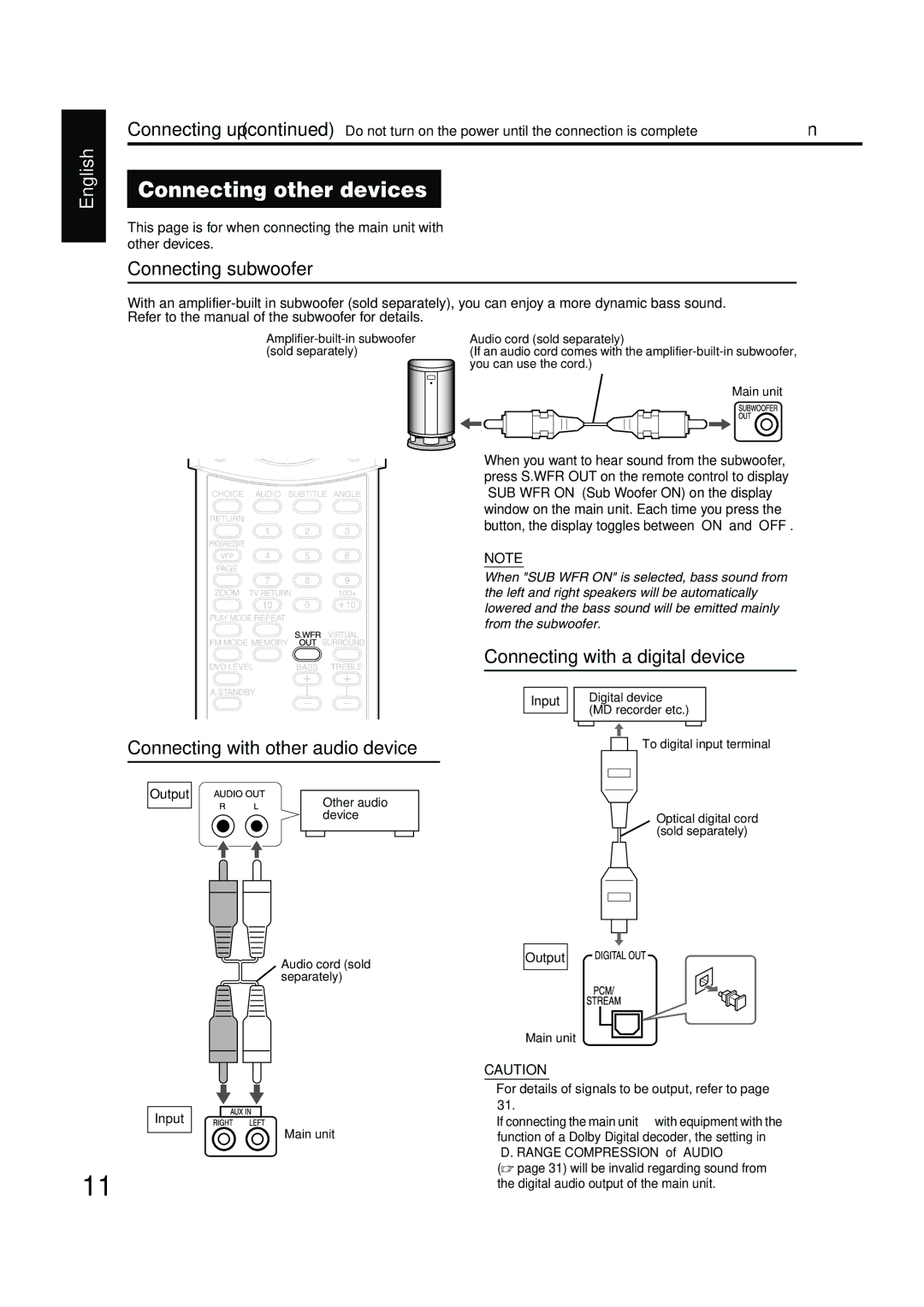
Connecting with other audio device
Connecting other devices
Connecting subwoofer
Connecting with a digital device
Connecting the power cord
Connecting with TV
When a clearer picture is desired
Connecting by using the component video cord
Press Faudio
Playing discs
Playback
Example When a Jpeg disc is played
To switch the display
Example When an MP3 disc is played
Example When a DVD Video or DVD Audio is played
To pause playback
Select what you want to play by using the number buttons
To stop playback
To advance picture frame-by-frame
Skip to the beginning of the selection
One Touch Replay
Slow Motion Playback
To change the brightness of the display window Dimmer
Adjusting the volume
Adjusting sound quality
Turning off the sound temporarily Muting
Press Repeat while the disc is stopped
Repeat playback
Load a disc
Press cursor 5// to select a track Press 3play or Enter
To start playback from the stored position
How to suspend playback
Resume Playback
Press 3play
Designate the time Time search
Select the scene to be played
Select from the menu
Press on Screen twice during playback*2
Create a program following the description on the TV screen
Program Playback/Random Playback
Play the disc in the desired order Program Playback
Prgm is an abbreviation for PROGRAM. Example For DVD Video
Playing the disc in a random order Random Playback
Random will also be displayed on the TV screen
Repeat Playback during Program or Random Playback
Repeat Playback
Press Repeat during playback
Press cursor2/3to select
Playing the designated part repeatedly Repeat Playback
Press on Screen twice during playback
Press cursor5//to display
Selecting the audio language
Other convenient functions
Selecting the subtitles
Selecting a view angle
Adjusting the picture quality VFP
Enlarging the picture
Enjoying better pictures
Adjusting playback level DVD Level
Creating realistic sound
Browsable Still Pictures B.S.P
Functions specific to DVD Audio
Playing the Bonus Group
Press the number buttons to enter a pin code 4 digits
Press cursor2/3to select an item to be operated Press Enter
Using the menu bar
Press on Screen twice
Functions list
Preferences
Basic operations
Audio
Preferences
Country/Area codes
Listening to a radio broadcast
Setting the AM tuner interval spacing
Press Tuning or Tuning to select the station frequency
Selecting a station
Presetting stations
Tuning in to a preset station
Tuning in to a preset station
Press Memory or Enter while the selected number is blinking
Other audio device
Adjust the sound input level of the audio device
Listening to the sound
Sleep Timer
Tray Lock
Operations
Using AV Compu Link
Connection and setting
Troubleshooting
Disc does not contain 2 or more languages
Troubleshooting Others
Disc, switching to another language is impossible. a
Tray Lock is set → a
Specifications
General
EX-A1 Compact Component System
Instructions Manual DE Instrucciones Instruções
Precaution
Precaución Ventilación apropiada
Além disso, mantenha a melhor circulação de ar possível
Table of contents
Special cautions
DVD Ntsc ALL Video PAL Audio