Page
Contents
87-148
Main features of the F6
Supplied accessories
Introduction
Body cap
Using your camera correctly
Take test shots
Have Nikon spot-check your camera regularly
Marks used in this manual
Nomenclature/Controls
Camera body
Sub-Command Dial 12-13 Depth-of-field preview button
Metering system selector
Camera strap eyelet Exposure compensation button
22, 45, 82
Top LCD panel
Viewfinder display
152
Shutter speed 66, 70
138
Rear LCD panel shooting data displays
Rear LCD panel menu displays
Command Dials and operating buttons
Setting ISO film speed x
Film
Exposure
Flash
Multi-selector
Focus area selection
Menu operation
Shooting data display
Basic Operation
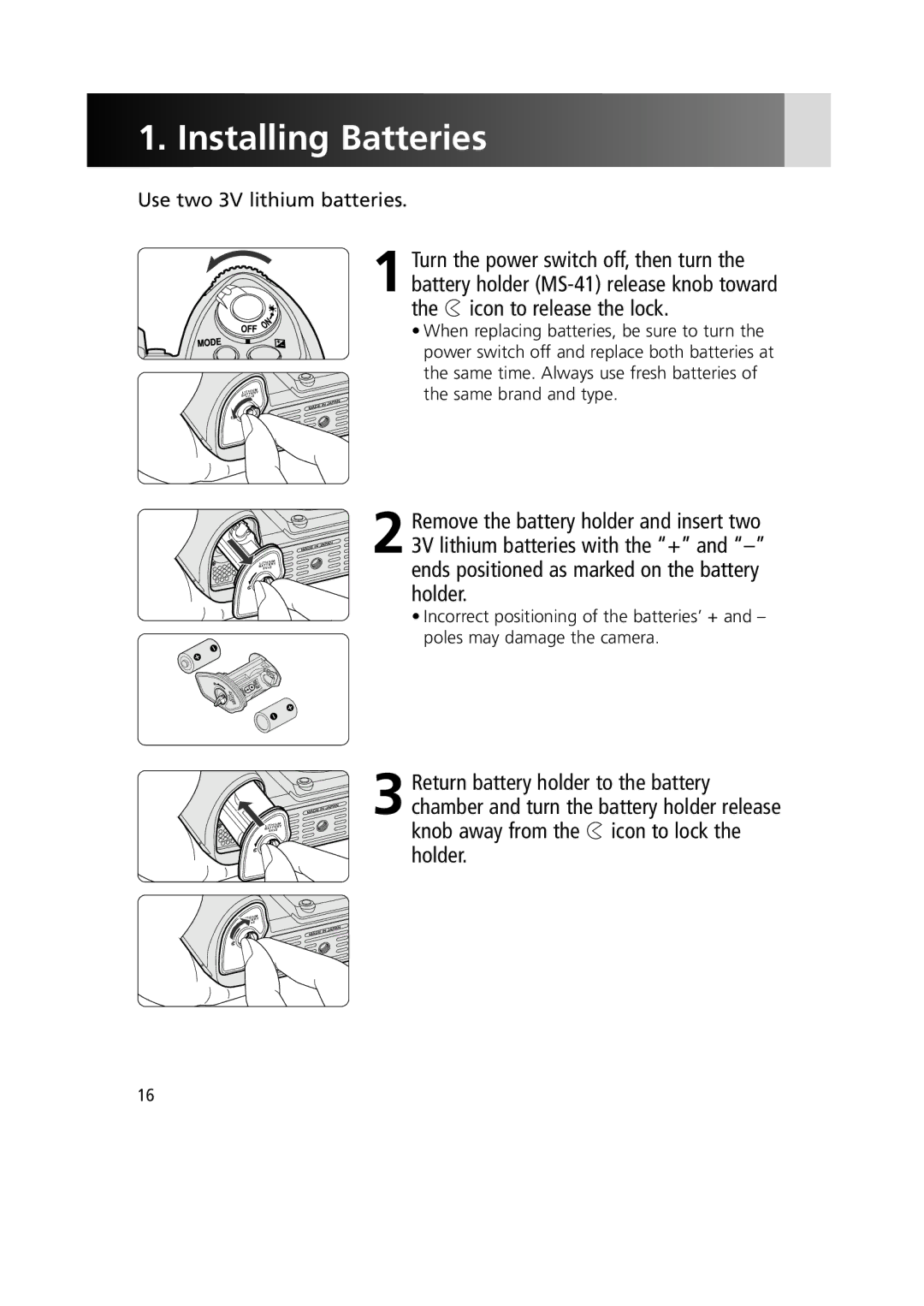
Installing Batteries
When camera’s built-in clock has been reset
Backup battery
Power source other than 3V lithium batteries
Checking Battery Power
Shutter release button operation and exposure meter
Indications when the camera power is off
Indications and battery status
For setting language and date, see pages 34
Turn the power switch off
Lock aperture at the minimum setting
Mounting a Lens
Mount the lens to the camera body
When camera is left unattended without a lens
Attaching/detaching the lens
Non-CPU Nikkor lens
For details on lens compatibility, see
Loading Film and Setting Film Advance Mode
Loading/removing film
Film slack
DX-coded film
Film rewind knob
Set the AF Area mode selector to g
Set the focus mode selector to S Single Servo AF
Normal display
Characteristics of AF Area modes
Focus mode set to S or C
AF Area mode Characteristic
Setting Metering System and Exposure Mode
Symbol Exposure mode Shooting situations
Characteristics of exposure modes
Metering Systems
Holding the Camera and Focusing
Hold the camera properly
Compose your shot
Keep your elbow propped against your body for support
Multi Power Battery Pack MB-40
Camera shake
Composing frame
Focus indications
Page
Focus Tracking
For self-timer operation, x For remote control operation, x
Imprinting/recording shooting data
Rewinding the Film
Film rewind knob
Setting Language and Date/Time
Setting language
Display Language menu
Select a language
Setting date/time
Set date and time
Complete the procedure
Select date display order
Set date display order
Internal clock
Detailed Operation
Lens Compatibility
CPU Nikkor
Mode Lens/accessories AI-S or AI type Nikkor, Series-E
Non-CPU Nikkor
Using a non-CPU Nikkor lens
Accessories that can be attached under certain conditions
Lenses that cannot be attached to the TC-16A Teleconverter
Limitations of non-CPU Nikkor lenses
Using a non-AI lens
AI lens and non-AI lens
AI lens
Non-AI lens
Lens Compatibility
Aligning frame counter and number of frame on the film
Film
Confirming film advance status
Setting and confirming film speed
Film
Selecting film advance mode
Recommended
When rewinding film, make sure the film rewind knob is down
When battery power is very low, or at low
Film rewinding with button operation
Number will blink in the top LCD panel and viewfinder
Film rewind R1 button
Rewinding film using the film rewind crank
Frame counter
Priority. Focus is not locked when / appears
Autofocus
Selecting AF Servo
Single Servo AF with Focus-Priority AF-S
AF start button
Manual focus
Autofocus operation on lens
Set the AF Area mode selector to a position other than j
Selecting focus area
Selected focus area is highlighted. f Group Dynamic AF Mode
Selecting AF Area mode
Rotate AF Area mode selector to select AF Area mode
Pattern 1 Center default
Pattern 1 Closest
Pattern 2 Center
Pattern 2 Closest
Combinations of AF functions Single Servo AF AF-S
AF Servo AF Area Mode Rear LCD Focus area Panel
Manual
Focusing operation
Suitable shooting situation
Combinations of AF functions Continuous Servo AF AF-C
Focusing operation
Confirm focus indicator / and lock focus
Focus lock
Single Servo AF
Continuous Servo AF
Recompose while focus is locked and shoot
Subject is dominated by regular geometric patterns
Focus zone contains areas of extreme contrast
Subject appears smaller than the focus area
Subject contains many detailed elements
Manual focus using Electronic Rangefinder
Manual Focus
Selecting exposure metering system
Exposure Metering System
3D Color Matrix Metering
Spot Metering
Center-Weighted Metering
Filters that require filter factor
¡ Programmed Auto
Shooting in Each Exposure Mode
Flexible Program
Program chart
Aperture F4
Shutter-Priority Auto
Changing from Manual to Shutter-Priority Auto
Locking shutter speed
Disappears in the LCD panel and viewfinder
£ Aperture-Priority Auto
Locking aperture
¢ Manual
Locking shutter speed/aperture
Electronic analog exposure display
Exposure factor with AF Micro-Nikkor lens
Lens aperture ring
Non-CPU lens
Auto Exposure Lock
Locked exposure area in each metering system
Auto Exposure Lock in autofocus operation
Exposure Compensation
Auto Exposure Bracketing
Combination of number of shots and compensated EV value
Indication
Number Bracketing indicator
If the end of the film roll is reached during Bracketing
Canceling Auto Exposure Bracketing
Auto Exposure Bracketing and other functions
Bracketing indicator during shooting
Setting done 1st shot taken 2nd shot taken 3rd shot taken
Bracketing indicator in exposure compensation
Status EV steps, 3 shots, and +
Power source
Long Time Exposure
Diopter Adjustment/LCD Illuminator
Diopter adjustment
Using the diopter adjustment knob
LCD illuminator
Self-Timer Operation
Close the viewfinder eyepiece shutter
Depth-of-field preview
Film plane indicator
With the given aperture can be confirmed
Canceling mirror up mode
Mirror Up Photography
Focusing screen compensation
Changing Focusing Screens
Make sure the screen is set properly
Self-Diagnostic Shutter System
Custom Setting menu x
Setup menu x
Shooting menu x
Non-CPU lens x
Operation in Menu all menus
Display desired menu
Display desired item
4Display the desired function
Return to the Shooting data display
Set the function
Menu display
Custom Setting options
Custom Setting Menu
Custom setting option
Default setting in bold type Bank select
Details on Custom Setting options
Renaming bank
Reset CSM
Default settings of each option Custom setting option
Custom setting option Default setting
Timers/Lock AE Lock AE-L/AF-L button
Default
AE/AF lock
A2 AF-S priority
A1 AF-C priority
A3 Group dynamic AF
A5-2 Continuous mode
A4 AF activation
A5 Area illum
A5-1 Manual focus
A8 M/A mode
A5-3 When selected
A6 Area select
A7 Vert. AF-ON 166
B2 Exp. comp. EV
B1 EV step 64, 66, 68
B3 Exposure comp
B5 Extend Shtr. Spd
B4 Center weight
B6 Screen comp
Setting compensation value
C1 AE Lock
C2 AE-L/AF-L
Press P/ to select compensation value and to set
C5 Self-timer
C3 AF-ON/AE-L 49, 58
C4 Auto meter-off
10 s
When Film leader is set to Leave leader out
D1 Film loading
D2 Film rewind
D3 Film leader
D5 MB-40 CH fps
D4 Last frame
D6 DX warning
Darkness of data imprint can be adjusted in five levels
D9 MB-40 Battery
D7 Rear panel
D8 Imprint density 136
Setting flash sync speed
Setting shutter speed
E1 Flash sync speed 162
E2 Slowest speed 162
E4 Modeling flash 151
E3 AA flash mode 155
E5 Auto BKT set
E7 Bkting order
E6 M mode bkting
E8 Auto BKT select
F1 Center button
F2 Multi selector
F3 FUNC. button
F4-1 Rotate direction
F4 Command dials
F4-2 Change Main/Sub
F5 Buttons & dials
F4-3 Aperture setting
F4-4 Menus status
Setup Menu
Details on setup menu options
Default setting in bold type Shooting data 112
Date
Recording mode and recording data
Recording data items
113
Setup Menu Recording Shooting Data
Aperture and focal length
Recording only data
115
Setting shooting data recording
Select Store settings in the Shooting data menu
Display Shooting data menu in SET-UP menu
Menu
4Complete the procedure
Sample of shooting data displays
Film data
Data is recorded at first exposure in multiple exposure x
Deleting shooting data
When shooting data is copied onto a CF Memory card
Select Delete all data
Memory full setting
Select Memory full setting
Overwrite data default setting
Memory full options
Setup Menu Recording Shooting Data
Select Film number in the Shooting data menu
Resetting ID number or film number
Press P/ on multi-selector to select Film number and press
Displaying shooting data
Details on shooting data display
Copying shooting data to CompactFlash memory card
Table of shooting data created using Microsoft Excel 124
Example application of shooting data
Interval timer 140
Shooting Menu
Details on shooting menu options
Data imprint 126
Imprinting data in-frame
Imprinted data
Position of imprinted data and example
Imprinted data Imprint example Date
Sequential No
For notes on imprinting shooting data, see
Setting imprinting data in-frame
Display Data imprint menu in Shooting Menu
Select In-frame imprint in the Data imprint menu
4Select data to be imprinted
When a user index number is selected
When a sequential number is selected
Complete the operation
129
Imprinting data between frames
Time Time of shooting is imprinted
Imprinted shooting data
Following combinations of shooting data can be imprinted
131
User Index No. + User Index No
Aperture This position
132
Setting imprint data between frames
Select Between frames imprint in the Data imprint menu
Select data to be imprinted
4Complete the operation
Between frames ID number Film number
Imprinting data on frame number
134
Setting imprint data for frame number
Select Data in frame 0 imprint from the Data imprint menu
To display the Data imprint menu, see steps 1 and 2 in on
135
Darkness of imprinted data
Special purpose film
Imprinting data at low temperatures
Film advance speed in data imprint shooting
Processing film with between-frame imprint
137
Shooting Menu Multiple Exposure
Select number of exposures
4Compose picture, confirm focus indicator / and shoot
Canceling multiple exposure
Exposure compensation according to number of exposures
139
Example of interval timer photograph
Available options and range
Setting interval timer
Select Interval timer display in the Shooting Menu
Set start day/time and interval
141
4Set repeating time and number of shots per operation
Start interval timer
Shots are taken
Camera status/control during interval timer operation
Combining interval timer with other functions
Imprinting data in interval timer photography
143
Non-CPU Lens
Available non-CPU lens
Available focal lengths and apertures
Zooming with zoom lenses
Specifying lens data
Specify non-CPU lens data
Selecting lens number with button and dial operation
Set FV Lock and Lens data in the f3 FUNC. Button x
Two-Button Reset
Option Default
Combination of compensation Exposure
Flash Photography
149
Creative Lighting System
Creative Lighting System
TTL Flash Control
TTL Balanced Fill-Flash
Advanced Wireless Lighting
Modeling flash
FV Lock
151
To use FV Lock
Shooting situation Flash mode Exposure area
Exposure area in FV Lock
Auto FP High-Speed Sync
AF-Assist for Multi-Area AF
Available flash mode with non-CLS supporting Speedlight
Non-CLS supporting Speedlight
Non-TTL flash modes
Sync terminal
Accessory shoe
Ready-light
Flash sync mode
Setting flash sync mode
Red-Eye Reduction with
Studio flash system
∞ Front-Curtain Sync
¤ Slow Sync
‹ Rear-Curtain Sync
› Red-Eye Reduction
Lens Mode
Usable optional Speedlights
Usable optional Speedlights
Speedlights compatible with the Creative Lighting System
TTL Rear
Flash units made by manufacturers other than Nikon
161
Using Speedlight
Exposure mode
Attach the Speedlight and set the metering system
Available aperture
Set the flash sync mode Set TTL-BL
Check the display in the LCD panel
Confirm the flash shooting distance range and shoot
163
Depth of field
Large aperture f/2.8
Miscellaneous
165
Optional Accessories
Eyepiece correction lens/Eyepiece correction lens DK-17C
Rubber Eyecup DK-19
Right-Angle Viewing Attachment DR-5
Eyepiece Magnifier DG-2/Eyepiece Adapter DK-7
Focusing Screens
Type M focusing screen
Filters
169
Speedlight SB-800
Speedlight SB-600
Accessories connected to 10-pin remote terminal
Camera Care
Remove the batteries and store the camera with a desiccant
173
Turn the camera power off when changing batteries
Use fresh batteries at low temperatures
Keep batteries out of reach of children
Use two lithium batteries
175
Viewfinder
Troubleshooting
Cause
Focus manually
Remedy
177
Shutter speed is set to buLb in S Mode
Selected in S or M mode
When a Speedlight without Red
Underexposure may have Occurred
104 162 156 163 120 159 160
179
Microcomputer of the camera
About the LCD
LCD illuminator panel
180
Specifications
Lens aperture
Autofocus
Lens servo
Focus lock
Flash sync mode
Accessory shoe
Self-timer
Shutter speeds
Interval timer
Film advance
Film rewind
Rear LCD panel
Power switch
Battery power
Exposure meter
Confirmation
Hours of Long Time Bulb
Duration
Exposure
Custom Setting
Dimensions
H x D Weight
Accessories
Index
24, 48
26, 62, 150
188
24, 38, 48
189
20, 68
150, 152
39, 40
190
104, 153
191
Nikon Corporation