What information is Numbers
Needed?
ESN
Legal Information
Table of contents
Browse phone menus Menu and menu shortcuts Phone book menu
En3570.book Page iii Wednesday, September 11, 2002 308 PM
En3570.book Page iv Wednesday, September 11, 2002 308 PM
Organizer
Message from the FDA Index
For your safety
Connecting to Other Devices
Qualified Service
Accessories and Batteries
Backup Copies
Quick Guide
Settings
Menu Shortcuts
Normal Silent Meeting Outdoor Pager
Welcome
GET the Most OUT of this Guide
Understand the terms
Bold
Observe text conventions
Follow graphic clues
Convention What it means
Look for updates
Understand Wireless Network Services
Sign up with a service provider
Learn about Accessibility Solutions
Accessible features
Alternate format user guides
Contact Nokia
LPS-4 mobile inductive loopset
Canada
Your phone’s label
Have the right information available
Customer Interaction Centre
Have the phone or accessory available
Contact Your Service Provider
Register Your Phone Newsletters
About your phone
About your phone
About the Antennas
Install the battery
About the Battery
Charge the battery
Remove the battery
Important battery information
Take out the battery
Check the Start Screen
Prolong battery life
Switch Your Phone on or OFF
Top of the phone for two seconds Power key
Element Description
Learn about the Keys
Key Description
End Press
Through
Task Instructions
Make and Answer Calls
Symbol Description
Review Phone Symbols
Memory USE
Selection
USE the Selection Keys
View Your PHONE’S Help System
Left
ENABLE/DISABLE Help System
Check the menu number, header line, and scroll bar
Header line
USE a Shortcut
Scroll through menus
Learn about menu shortcuts
Scrolling Tips
Menu and Menu Shortcuts
Messages
Listen to voice messages
Call LOG
Settings
Profiles
Normal
Touch dialing -1-3 Auto-update of service1
En3570.book Page 30 Wednesday, September 11, 2002 308 PM
Voice
Restore factory settings
System
Games
En3570.book Page 32 Wednesday, September 11, 2002 308 PM
Minibrowser Organizer
Application
Menu Menu cont’d
Phone Book Menu
Connect the headset
Phone setup
Adjust the volume
Learn about Your Headset
Adjust screen brightness
Mode Phone shows Use for
Text entry
Enter Letters and Numbers
Write Using ABC and 123 Modes
Enter letters
Key Characters
For example to enter the name Albert Press
Other Options
To start a new line Press three times
Enter Punctuation or Special Characters
Enter numbers
Write with Predictive Text
Use special characters in phone numbers
Onli
Example To write Nokia
What you press What you see
Onl
Keys and Tools for Predictive Text
Spell
Clear
Turn off predictive text input
Enable Predictive Text Quick Method
Enable Predictive Text and Select Dictionary
Turn on predictive text input
Insert Numbers and Symbols
ADD a Word to the Dictionary
Write Compound Words
Each entry may affect the total number of entries available
Save a Number and Name Using Phone Book Menu
Phone book
Saving Names and Numbers
Recall Names and Numbers
USE Phone Book Menus
Option Description of function
Touch
Displaying the phone book
Change phone book view
Edit a Name or Number
By recalling the name
ADD a Number to a Phone Book Entry
From the phone book
From the Start screen
Change the number type
Learn about primary number
Change Primary Number
Delete Entire Phone Book Entry
Delete Stored Names and Numbers
ADD Other Information to a Phone Book Entry
Delete a Number
Edit caller group options
Setting a Ringing Tone and Graphic for a Caller Group
USE Caller Groups
Assign phone number to a caller group
Check Memory Status
Requirements
Call log
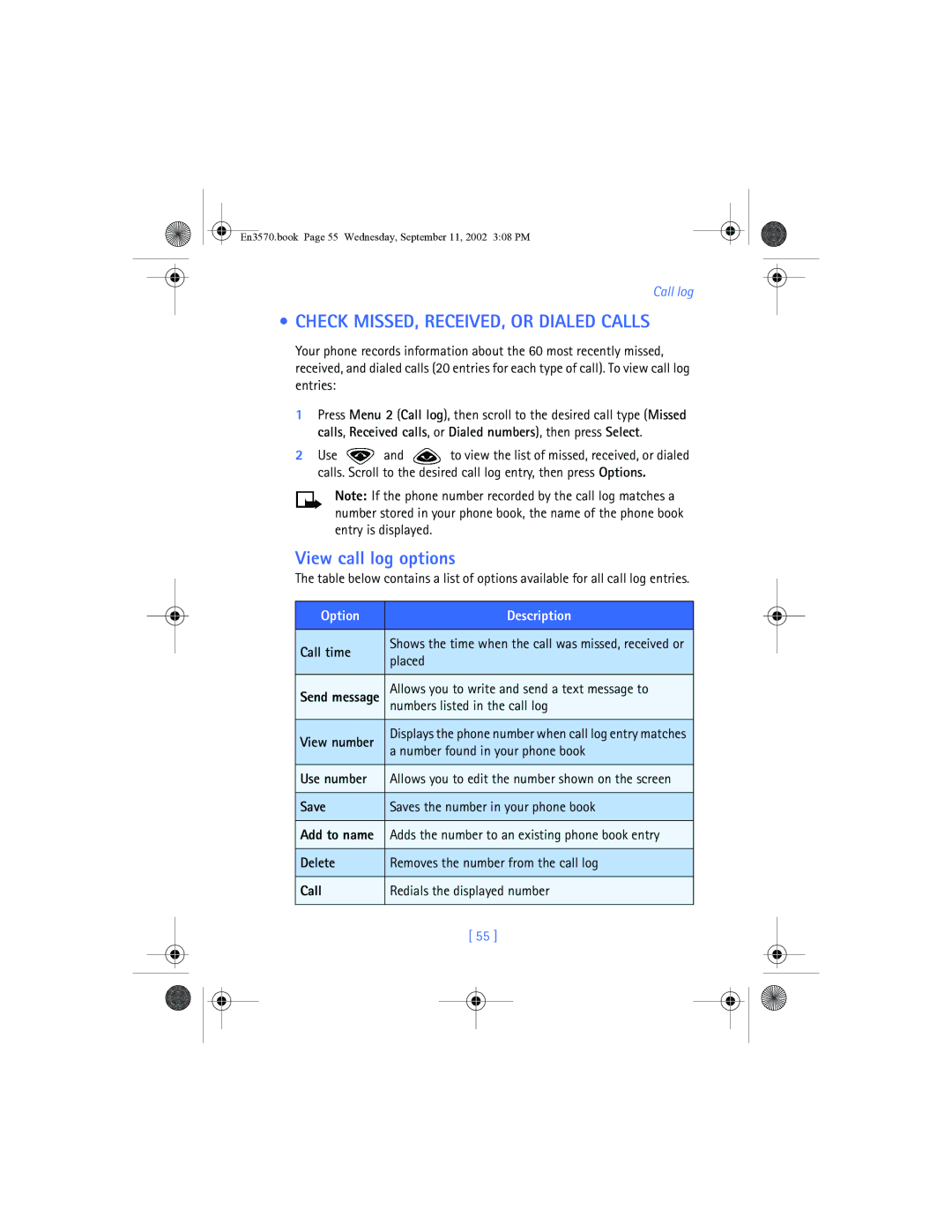
Check MISSED, RECEIVED, or Dialed Calls
View call log options
Option Description
Dialed Numbers
Use call log shortcuts
Clear Call Lists
Missed Calls
All calls Life timer
USE Call Timers
Access the Various Call Timers
Press Menu 2-5 Call log Call timers
Access data-related call timer
Turn on a Current Call Timer
Clear Call Timers
Data Timers DATA/FAX and Minibrowser
Minibrowser calls
Data-related call timer options
Minibrowser timer options
Clear all data/fax logs clears all timers and data logs
Store Your Voice Mailbox Number
Voice mailbox
Listen to Messages Later
Listen to Messages When Notified
SET Greetings
Listen to Your Voice Messages
Write a Text Message
Text messages
USE Other Options
Create and send a text message
From the Start screen, press Menu, then press Select
Select Text messages, then select Write message
View message options
USE Message Templates
Sorry, I can’t help you on this
Press Menu 01-1-5 Messages Text messages Templates
Learn about E-MAIL Text Messages
Create and send an e-mail message
Messages to phones in other networks
Read Messages Later
Receive Text Messages
Respond to a Text Message
Standard answer templates including See you in, See you at
Reply to a Message
Replying via SMS
Replying to an e-mail message
Erasing individual text messages
Delete Messages
Learn about delete options
Erasing messages in the message folders
View a message’s settings
Forward a message
Assign Message Options
Message Settings
Organize Text Messages Using Folders
Learn about message memory
Scroll to Send, then press Select to send the message
Work with Messages Saved in the Outbox
Quick Method
Personalization
Learn about Profiles
Select a Different Profile
Customize a Profile
Set ringing options
Set a ringing tone
Set ringing volume
About polyphonic sound Midi
Set a vibrating alert
Set message alert tone
Set keypad tones
Set warning and game tones
Handsfree Headset Loopset TTY
Select and customize an accessory profile
Press Menu 4-4 Settings Accessory settings
Rename Profiles
If YOU Selected TTY/TDD
Download a Ringing Tone
If YOU Selected Headset
If YOU Selected Loopset
Receive ringing tones from Minibrowser
Press Menu 4-2-1 Settings Phone settings Language
Play, save, or delete a ringing tone
Use PC Composer
Selecting time format
Manually setting the clock
Press Menu 4-3-1 Settings Time settings Clock
SET the Clock
Create a startup message
Press Menu 4-2-3 Settings Phone settings Welcome note
Displaying or hiding the clock
Customize the Welcome Screen
Profiles
Learn about Voice Commands
Press Menu 7-2 Voice Voice commands
Create a voice tag for a menu option
Work with voice tags
Use a voice command
Mute
Advanced features
View IN-CALL Options
Mute/End
Menu
Learn about call forwarding feature codes
USE Call Forwarding
Names
Store a feature code
USE Call Waiting
Activate/cancel call forwarding
Switch between the two calls
Press Menu 4-6-2 Settings Network services Call forwarding
Disconnect second party
End the active call
Make a Conference Call
End calls
Select No to assign the activation code
Send OWN Caller ID When Calling
Store the feature codes
Disconnect first party
Calling Card
Press Menu 4-1-2 Settings Call settings Automatic redial
Place a call without sending your number
USE Automatic Redial
Saving calling card information
Press Menu 4-1-6 Settings Call settings Calling card
Choosing a calling card to use
Making calling card calls
Voice Dialing
Assign a voice tag to a phone number
ADD a Voice TAG to a Phone Book Entry
Important Notes about Voice Tags
Deleting a phone number deletes any associated voice tags
Dialing a number using voice dialing
Set up 1-touch dialing
Touch Dialing
Scroll to 1-touch dialing and press Select
Learn about Caller Groups
Touch dialing options
Group ringing
ADD a Number to a Caller Group
Select a Ringing Tone and Graphic for a Caller Group
Used to rename the selected caller group
USE Touch Tones
Set manual touch tone options
SET Touch Tone Type
Save Touch Tones AS a Phone Book Entry
Send touch tone string manually
Send touch tone string from phone book
SET Fixed Touch Tone Length
101
Store touch tone string with phone number
Link Phone Book Entries
Save this phone book entry as you normally would
Press Menu 7-3-1 Voice Voice recorder Record
Learn about Voice Recorder
Record a memo
USE Linking Options
Work with recorded memos
Press Menu 7-3-2 Voice Voice recorder Recordings list
103
Unlock Keypad
Security and System settings
Lock Keypad Keyguard
Activate/deactivate Keyguard
105
Correct entry errors
Security Code
Change your security code
Phone Lock
Learn about the lock code
106
Change Your Lock Code
Allowed number when phone locked
Activating and deactivating phone lock
Answer a call with phone lock on
Learn about restriction options
Store the unlocked phone number
Calling the allowed phone number
Call Restrictions
Adding a call restriction
Enter the security code and press OK
109
110
Automatic Update of Service
Edit call restrictions
Erasing call restrictions
111
View Roaming options
Organizer
USE the Alarm Clock
Set the alarm
Respond to an alarm
113
Alarm when phone power is off
Alarm clock notes
Calendar
114
Calendar Options menu
Learn about Calendar views
Week List
115
Options list for note view include
Select Make a note
When the Alarm Sounds for a Note
Add a calendar note
Calculator
Use the calculator
Stopwatch
117
118
Time an event using split timing
View timing options
Following
Time an event using lap timing
Choose other stopwatch options
119
120
Press Menu 9-5-1 Organizer Stopwatch Continue
121
Applications
Launching AN Application
Other Options Available for Applications
Press Menu 10-2 Applications Memory
Download a NEW Application
Check memory status
Allows you to view memory available for Applications
Game control
Your phone offers you four games from which to choose
123
124
Game settings
Start a new game
Learn about Game Options
125
Your phone and other devices
PC Connectivity
Nokia PC Suite
Modem setup
Download software
126
Understand Browsing Sessions and Indicators
Minibrowser
127
Home News Yahoo Weather Finance
Launching the Minibrowser
Press Menu, scroll to Minibrowser, then press Connect
END a Browsing Session
About WEB page Content
Minibrowser Menu
129
Navigate in the Minibrowser
Bookmark a
Links
Bookmarks
ACTIVATE/SELECT a Link
132
Receive Messages VIA the Minibrowser
Notification of new minibrowser messages
Web links in minibrowser messages
Disable Minibrowser Confirmations
END the Minibrowser Session
133
USE Accessories Safely
Reference information
134
Electronic devices
Important Safety Information
Traffic Safety
Operating environment
Hearing Aids
Other medical devices
Vehicles
Pacemakers
Potentially explosive atmospheres
Posted Facilities
137
138
If the phone is not on, switch it on
Emergency calls
Make an Emergency Call
139
Certification Information SAR
140
141
Care and Maintenance
142
Accessories
Battery Information
FEW Practical Rules for Accessory Operation
Charging and Discharging
Battery option
Charging Times
Standby and Talk Times
144
Chargers and Other Accessories
145
Learn about chargers and other accessories
Standard Charger ACP-7U
Rapid Travel Charger ACP-8U
146
Travel Charger ACP-12U
Rapid Mobile Charger LCH-9
Headset HDB-4
Loopset LPS-4
Spare battery charger DDC-1
Data Cable DKU-5
DCV-15 Desktop charger
Car Kit Cark-142
BHF-1 Basic Car Kit
148
Lift the keypad from the inside of the front cover
Remove the Back Cover
Remove the Front Cover
Remove and Replace the Keypad
How do I lock my phone?
Frequently Asked Questions FAQ
Replace the Front Cover
Replace the Back Cover
How do I unlock the keypad?
What is my lock code?
What is my security code?
How do I lock the keypad?
How do I assign a key to 1-touch dialing?
How do I find my phone’s model number?
How do I redial the last-dialed number
Press twice
153
How do I find out how many memory locations the phone has?
How do I find my phone’s ESN electronic serial number?
How can I change the brightness of my phone’s display?
154
How do I clear my call timers?
Glossary
Term Definition
155
156
Voice call services Non-home type
158
159
Phone’s games
Possible
From a mobile phone
Technical Information
Calls
Troubleshooting
Problem Possible cause Possible solution
My phone isn’t
Delivered
Command
Voice command
Are not being
163
Nokia One Year Limited Warranty
164
165
Melbourne, FL
166
167
168
To all users of mobile phones
Appendix a Message from the Ctia
169
170
Guide to Safe and Responsible Wireless Phone Use
171
172
173
Appendix B Message from the FDA
174
What is FDAs role concerning the safety of wireless phones?
175
What kinds of phones are the subject of this update?
176
177
What about children using wireless phones?
En3570.book Page 178 Wednesday, September 11, 2002 308 PM
178
Calendar Way scrolling
Automatic redial Automatic update of service
Cable Connecting to a PC
Index
180
181
Entering letters and numbers 38 Entering text
Erase mistakes
Receiving messages via
Subscribing
PC Suite application 125 PC Sync PC Suite 126 phone
182
183
184

 and
and  to view the list of missed, received, or dialed calls. Scroll to the desired call log entry, then press Options.