User Guide
Nokia User Guide
What information is Numbers Where is the number? Needed?
Legal Information
4868846 4945633 5001372 5053928 5083240
Design patents pending
Contents
Contacts
Mobile Internet
Enhancements
Index
Copyright 2004 Nokia
Nokia 6010 phone at a glance
Power key Earpiece
Left
Talk key Down scroll key
Action Description
Quick Guide
Select Answer call
Select Contacts Find
Only qualified personnel may install or repair this product
For your safety
About Your Device
Network Services
Your phone is not water-resistant. Keep it dry
Shared Memory
Register Your Phone
Welcome
Newsletters
Copyright Protection
Have the phone or enhancement available
Find information about your phone
Phone type Phone model
FCC ID number
SIM Card Installation
SIM card and battery
Remove the back cover and battery
Install the SIM card
SIM card installed
Install the Battery
SIM card slot
Corner
Replace the back cover
Charge the Battery
Remove the SIM Card
SET UP Your Headset
Connect the headset
Use the headset
About your phone
Switch on Your Phone
Back cover
Antenna area
Start Screen
Antenna
Your phone has an internal antenna
Menu
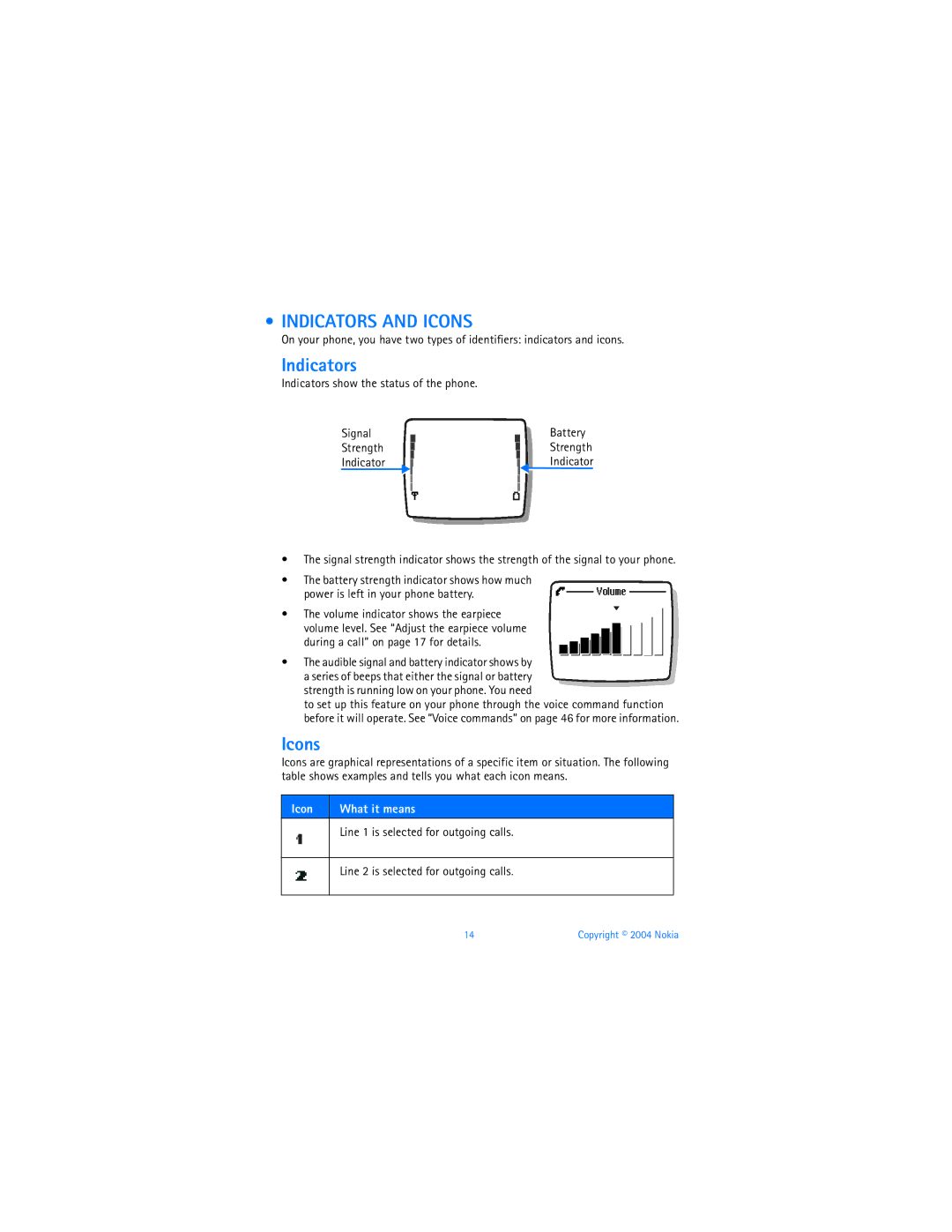
Indicators
Indicators and Icons
Indicator
Icons
You have an active call
Alarm clock is set
You have a call on hold
You have one or more new voice mail messages
There is a voice tag attached to a name in Contacts
Phone is ready for you to enter a response
Indicates an e-mail address in Contacts
You have assigned the name and number to a caller group
Make a Call
Make and answer calls
END a Call
Reject a Call
Answer a Call
Redial
Scroll BAR
Menu
List of Main Menus and Submenus
Outbox Sent items Saved items Delete messages
Copyright 2004 Nokia
Menu
Headset
Color schemes
Sky Diver Backgammon
Automatic connection Go to address Clear the cache
Following Menu Items MAY Vary Contact Your Service Provider
12 IM
Login Saved convers IM provider Settings
Text entry
Standard Mode
Activate
Predictive Text
Enter text
Compound words
Keep these factors in mind when adding words
Punctuation and Special Characters In ABC mode
Scroll to the character you want and select Insert
123 mode
Save NAMES, NUMBERS, and E-MAIL Addresses Quick save
Contacts
Number only
Name and number while in a call
Find Names in Contacts
ADD Text Entries
Use scroll keys
Edit Names and Numbers Names
Phone Memory
Numbers
Phone and SIM memory
Select Details Options Edit number
Entire Contacts contents
Switch between memory types
Check Contacts memory status
Delete Names and Numbers Number
Check MISSED, RECEIVED, or Dialed Calls
Call history
Call Lists Options
Clear Call Lists
Call Timers
Show call timer after call
Show call timer during a call
While in a call, select Options Menu Call log Call timers
Message Counter
Data Calls
Connection timer
Data counter
Check
Switch Between TWO Calls in Progress
Advanced calling features
IN-CALL Options
New call
Touch Dialing
Automatic Redial
Anykey Answer
Delete
Outgoing line
Own number in caller ID
Select Menu Settings Network services Call forwarding
Cancel
Select the call forwarding option you want and Cancel
Activate
Call waiting
Select a system
Transfer calls
Conference calls
Make
Talk Privately
Voice Mail
Voice features
Voice mailbox number
Select Menu Messages Voice messages Voice mailbox number
Listen to your voice messages
Voice mail indicators
Voice Dialing
Voice tags
Add
Voice Commands
Make a call
Listen
Audible Alerts
Existing voice command
Play Back
Change
Profiles
Personalize your phone
Select
Customize
Default profile
Accessory Settings
Set timed
Car profile
TTY/TDD profile
Loopset profile
Automatic Answer
Lights
Receive
TTY/TDD Calls
END
Display Language
Polyphonic Sound Midi
You can select the phone display language
Help Text
Welcome Note
Time and Date
Set date format
Set automatic update of date and time
Set date
Display or hide date
Folders
Gallery
View
ADD
Screen saver
Color schemes
Rename
Select
Caller Groups
Group graphic
Restore Factory Settings
XPRESS-ON Color Covers
Deactivate
Remove the phone from the front cover
Remove the back cover
Change the keypad
Lift the keypad from inside the old front cover
Place the keypad into the new front cover New front cover
Replace the new front cover
To replace the front cover, align
Replace the back cover
Phone security
Select Menu Settings Phone settings Automatic keyguard On
Lock the Keypad Keyguard
Automatic keyguard
Security
PIN Codes
Code
PIN code
PIN code request
Select Menu Settings Security settings PIN code request
PUK Codes
Security Code
Fixed Dialing
Change the security code
Add numbers to list
Restrict Calls
Enter your current password and select OK
Change your restriction password
Turn on call restrictions
Closed User Groups
Set the message mode
Message Settings
Mobile messages
Save your message center number
Other message settings
Adjust font size
Text Messages
Send to multiple recipients
Send
Read
Read a new text message later
Text message options
Read linked messages
Delete-Allows you to delete the message
Define an e-mail sending profile
Mail Messages
From the Messages Menu
From Contacts
Receive
Preset folders
Store Messages
My folders
Delete Messages
Move a message to a folder
Single
All messages in folders
Read later
Attach a picture to a text message
Save
Save picture messages with edited text
Multimedia Messages
Define settings
Message receiving limitations
Allow Multimedia Messages
Write and send
Connection Settings
Block Multimedia Messages
Advertisements
Service Command Editor
Info Message Service
Options
To read the message later, select Exit
Mobile Internet
Service provider
Gprs
Connect
SET UP for Browsing
Browser Options
Navigate
Bookmarks
Examples of mobile Internet sites
Active link appears as a highlighted word
Add while browsing
Security Issues
Empty the cache
Authority certificates
Set up the connection
Make a call while online
Receive a call while online
Make an emergency call while online
Disconnect
Instant messaging IM
IM Service Provider Icons
IM Menus
Register with AN IM Service
Offline
Online
After first time login
First time login
SET Your Availability
IM Conversations
Receive and reply
Write and send to contact
View
Rename
IM Contacts
End
During IM Session
ADD from Conversation Menu
Block
Remove
Unblock
View blocked list
Group Chat Sessions
IM Settings
Create private chat group
Members
LOG OFF Service
Calendar
Your personal digital assistant
Navigate
Make a note
View notes
Alarm Clock
Call
Birthday
Set
Alarm
Turn off
Business Cards
Basic calculations
Calculator
Convert currency
SET the Exchange Rate
Stopwatch
TO-DO List
Save times
Lap time
View times
Delete times
Reset-Allows you to reset the stopwatch
Automatic configuration
Stopwatch options
Synchronize Contacts and Calendar
Start
Fun and games
Adjust settings
Games
Control
SKY Diver
Downloads
Backgammon
Select Menu Games Select game
Launch an application
Java Applications
Check available memory
Download an application
Choose other application options
Temperature Currency Weight Length Area Volume
Converter
Enhancements
Power
Audio
CAR
Enhancements
Reference information
ENHANCEMENTS, BATTERIES, and Chargers
Care and Maintenance
Operating environment
Additional Safety Information
Medical devices
Vehicles
Emergency Calls
Potentially explosive environments
To make an emergency call
Nokia 6010 User Guide 109
Certification Information SAR
Nokia 6010 User Guide 111
Charging times
Batteries
Standby and talk times
GSM
Technical information
My phone is not
Troubleshooting
Charging
Voice messages
Nokia One-Year Limited Warranty
West Nasa Blvd. Melbourne, FL
Nokia 6010 User Guide 117
118 Copyright 2004 Nokia
Appendix a
Wireless Phone Safety Tips
Guide to Safe and Responsible Wireless Phone Use
For more information, please call 1-888-901-SAFE
122 Copyright 2004 Nokia
Appendix B
What is FDAs role concerning the safety of wireless phones?
What are the results of the research done already?
What kinds of phones are the subject of this update?
126 Copyright 2004 Nokia
What about children using wireless phones?
Where can I find additional information?
Active call options
Numerics
File size 77 file type 77 fixed dialing Gallery
Service provider icons 84 settings Indicators
Games
Memory
Make Call
PUK code Quick guide
Voice mail
Update date and time Voice commands 46 voice dialing
Check level on screen 14 earpiece Keypad tones
Nokia 6010 User Guide 133
Nokia 6010 User Guide 9311233