Selecting the Character Pitch
Press CHARACTER PITCH to select the width of characters in characters per inch:
10 cpi
•Recommended for standard text
•Not available for SSD
12 cpi
•Recommended for standard text.
•Yields more text per page.
17.1 cpi, 20 cpi
•Smallest print
•Recommended for spreadsheets
•Not available for SSD.
PROP
•Proportional spacing
•Recommended for documents where you want a more polished appearance.
•Available only for NLQ.
Menu Mode: Control Panel |
|
|
|
|
|
|
|
|
| |||||||||||
|
|
|
|
| ➊ | ➋ | ➌ | ➍ | ||||||||||||
| SEL |
|
|
|
|
|
|
|
|
|
|
|
|
|
|
|
|
|
| |
|
|
| LF |
| FF/LOAD |
|
| TEAR |
| PARK QUIET | ||||||||||
| SEL |
|
|
| ||||||||||||||||
| MENU |
| SHIFT |
| Micro Feed |
| Micro Feed |
|
|
|
|
|
|
|
|
| TOF | |||
| Down | Up |
|
|
|
|
|
|
| |||||||||||
|
|
|
|
|
|
|
|
|
|
|
|
|
| |||||||
| EXIT |
|
| GROUP | ITEM | SET | ||||||||||||||
| POWER | ALARM |
|
|
|
| MENU |
|
|
|
|
|
|
|
|
| ||||
➎
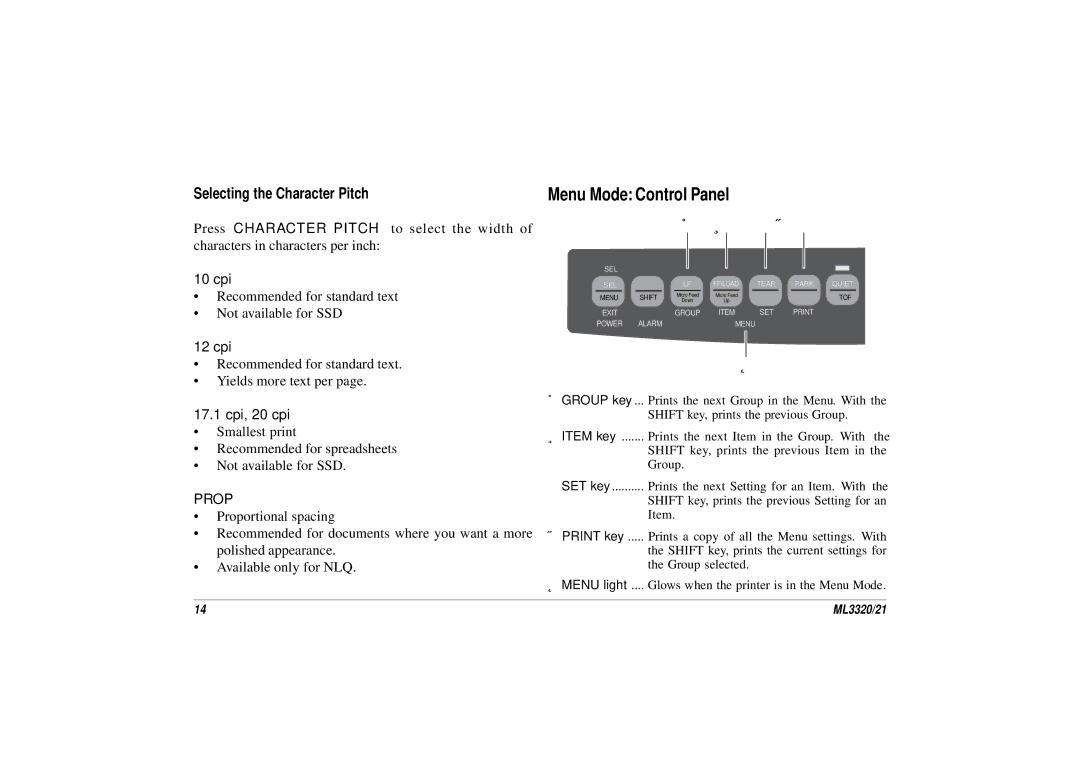
➊GROUP key ... Prints the next Group in the Menu. With the SHIFT key, prints the previous Group.
➋ITEM key ....... Prints the next Item in the Group. With the SHIFT key, prints the previous Item in the Group.
➌SET key .......... Prints the next Setting for an Item. With the SHIFT key, prints the previous Setting for an Item.
➍PRINT key ..... Prints a copy of all the Menu settings. With the SHIFT key, prints the current settings for the Group selected.
➎MENU light .... Glows when the printer is in the Menu Mode.
14 | ML3320/21 |