PDP-TELEVISION
Warranty
Screen Image retention
Cell Defect
Height
Owner’s Instructions
Power Cord
Sold Separately
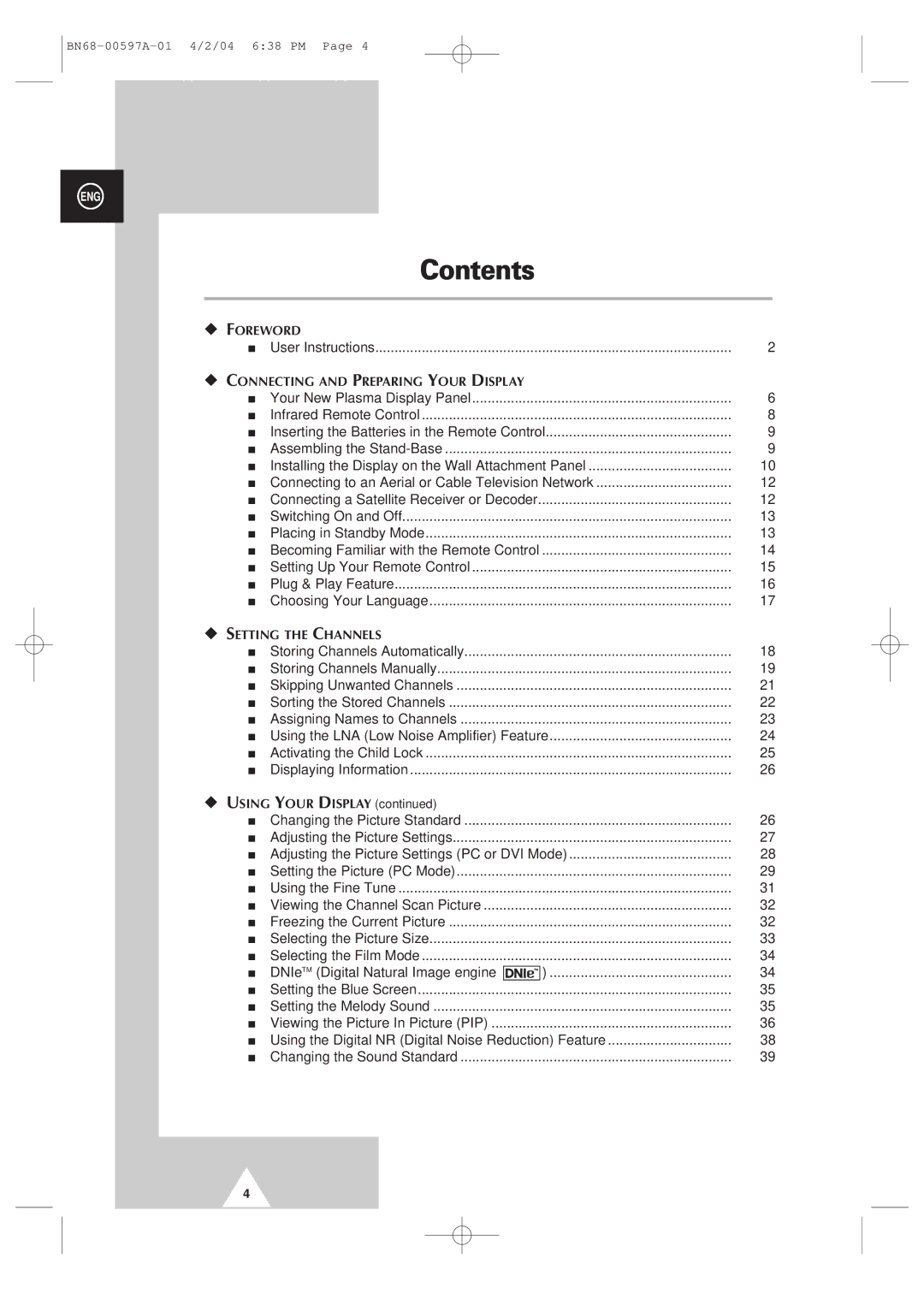
Contents
Symbols
Actual configuration on your PDP may be different
Depending on your model
Depending on your model
For further details about connection, refer to pages 55~59
Infrared Remote Control
Inserting the Batteries in the Remote Control
Angle of the PDP can be up to 20 degrees left/right
Installing the Display on the Wall Attachment Panel
Wall Mount Bracket Plastic Hanger
Connecting External Devices to the PDP
Connecting to an Aerial or Cable Television Network
Connecting a Satellite Receiver or Decoder
Rear of the PDP
Use the 3M/5M/7M cable supplied by Samsung
Switching On and Off
Mains lead is attached to the rear of your PDP
Becoming Familiar with the Remote Control
Remote control is used mainly to
Change channels and adjust the volume
Display the on-screen menu system
Setting Up Your Remote Control
Plug & Play Feature
To start the search, press the Enter button
If you want to reset this feature
Choosing Your Language
Storing Channels Automatically
See
Auto PAL Secam or Auto NT3.58 NT4.43 PAL60
Storing ChannelsManually
BG DK I L
Channel mode
Skipping Unwanted Channels
Skipping unwanted channels
Sorting the Stored Channels
Assigning Names to Channels
Using the LNA Low Noise Amplifier Feature
Activating the Child Lock
Activating the child lock
Changing the Picture Standard
Displaying Information
Dynamic Standard Movie Custom High Middle Low Custom
Adjusting the Picture Settings
Custom Options available in PC, DVI Mode Contrast
Brightness, Sharpness
Colour Tone Cool2, Cool1, Normal, Warm1, Warm2
Adjusting the Picture Settings PC or DVI Mode
Custom PC mode only Colour1 Colour2 Colour3
Setting the Picture PC Mode
Preset to the PC mode by using the Source button
Setting the Picture PC Mode
Colour System and Sound System settings are correct
Using the Fine Tune
If reception is weak, you can fine tune a channel manually
Viewing the Channel Scan Picture
Freezing the Current Picture
Result Main menu is displayed
Result Options available in the Channel group are
PC to DVI Mode
Positioning and Sizing the screen using Zoom
Selecting the Picture Size
Selecting the Film Mode
DNIeTM Digital Natural Image engine
Setting the Melody Sound
Setting the Blue Screen
Select the option Off or On
Table of PIP Settings
Viewing the Picture In Picture PIP
Easy functions of remote control
Buttons Feature
Picture
Button after changing the sub
Using the Digital NR Digital Noise Reduction Feature
Changing the Sound Standard
Standard Music Movie Speech Custom
Adjusting the Sound Settings
Adjusting the Volume Automatically
Selecting the Internal Mute
Setting the TruSurround XT
Stereo
Selecting the Sound Mode depending on the model
Setting the Sleep Timer
Setting and Displaying the Current Time
Switching the Television On and Off Automatically
Absent Power Off
AV1, AV2, AV3, S-Video1,S-Video2,Component1
Viewing an External Signal Source
Satellite STB, AV Receiver, DVD Receiver, Game
Redirecting an Input to the External Output
Teletext Feature
Contents
Displaying the Teletext Information
Press the TTX/MIX button again
Selecting Display Options
To display Press
Selecting a Teletext
TeleWeb Feature Option
Using the TeleWeb Menu after Displaying the TeleWeb
Bookmarking the current
Entering the bookmarked URL
Opening the Home
Easy Accessing the TeleWeb Service via the Remote Control
TeleWeb
Connecting to the External Devices
Input/Output Specification
Rear of the TV
Input
Connecting to the S-Video Input
Rear of the TV Side of the TV
Connecting to the DVI Input
Connecting to the PC Input
Connecting to the Component Input
Connecting Additional Speakers
Connecting the Home Theater System
Connecting and Using the Home Theater System
To Display the DVD Home Theater
Installing the Speakers
This speaker installation guide is for the 4240 Model
How to Assemble the Speakers Wall Mount
Bit colour
Shown at left is a typical screen for Display dialog box
Video Signal Dot x Line Vertical Horizontal
NVidia chipset
Scart Connector AV1/AV2/AV3
PC Input Connector
DVI Input Connector
15Pin
Power button
Check the picture contrast and brightness settings
Check the volume
Normal picture but no sound Check the volume
Programming the Remote Control for Other Components
003, 024
019, 023
Wamer amex
NEC
040, 047, 050, 052, 060, 063, 065, 066, 067
After Sales Service