VP-D351i/D352i D353i/D354i D355i
Digital Video Camcorder
Contents
Contents
USB
103
100
101
102
Recording with the LCD screen closed
For example
You are not operating it
Samsung service centre
Brand new Battery pack is not charged
Record
Tiny dots red, blue or green in colour
Servicing
Precaution regarding the Lithium Battery
Replacement Parts
Features
Optional Accessories
Accessories Supplied with Camcorder
Basic Accessories
Front & Left View
Speaker
Mode switch
Left Side View
Viewfinder
Right & Top View
VP-D353i VP-D354i/355i
Rear & Bottom View
Slow Still Stop 11. F. ADV
Remote Control VP-D353i/D354i/D355i only
REW Play Direction
Zoom
Close the Hand strap
Adjusting the Hand Strap
When You carry Your Camcorder
Hand Strap
Removed
Lithium Battery Installation
Close the Lithium battery cover
Preparation
Connecting a Power Source
To Select the Camcorder Mode VP-D353i/D354i/D355i only
Amount of continuous recording time available depends on
Using the Lithium Ion Battery Pack
Charging the Lithium Ion Battery Pack
Connect the AC Power adapter to an AC Cord
Cand 104 F 40 C
Automatically
Actual recording time depends on usage
Continuous recording time
Recording time shortens dramatically in a cold environment
Battery Level Display
Completely used Blinking
Time
OSD On Screen Display in Camera/Player Modes
OSD in Camera Mode
OSD in Player Mode
On/Off
OSD On Screen Display in M.Cam/M.Player Modes
VP-D353i/D354i/D355i only
Turning the OSD On Screen Display
Language , then press the Menu selector
System Menu Setting
Selecting the OSD Language
System , then press the Menu selector
Clock Set, then press the Menu selector
Setting the Clock
System, then press the Menu selector
VP-D353i/D354i/D355i
To exit, press the Menu button
Setting the Beep Sound
Setting the Shutter Sound VP-D353i/D354i/D355i only
Viewing the Demonstration
Playing back directly
Display Menu Setting
Adjusting the LCD Screen
Display type of the Date/Time Off, Date, Time
Displaying the Date/Time
Date/Time, then press the Menu selector
Selector
Setting the TV Display
Closed or rotated counterclockwise
Using the Viewfinder
Adjusting the Focus
Basic Recording
Removing the tape protection
How to store a tape
Inserting and Ejecting a Cassette
Protecting a tape
Recording with the Viewfinder
Hints for Stable Image Recording
Recording with the LCD Screen
Self recording
Various Recording Techniques
General recording Downward recording
Upward recording
Making your First Recording
Connect a power source to Camcorder. see
Has been previously set. see
Using EASY.Q Mode for Beginners
Record Search REC Search
Setting the Zero Memory VP-D353i/D354i/D355i only
VP-D353i/D354i/D355i
Zooming In and Out
Using the Tele Macro
Fade Out
Using the Fade In and Out
To Start Recording
To Stop Recording Use Fade In/Fade Out
BLC off BLC on
Using Back Light Compensation Mode BLC
√ Color N /25 , Color N /13 and off
Using the Color Nite Shutter
Color Nite Shutter function works only in Camera mode
Press the Color Nite Shutter button
Appears on the display
Set the Power switch to Camera Set the Mode switch to Tape
Press the Color NITE/LED Light button until Color N
Green
Nite Pix 0 lux recording
Than the Nite Pix function
Power Nite Pix
Power Nite Pix function works only in Camera Mode
Use Set the Power switch to Camera
Advanced Recording
VP-D353i/D354i/D355i only $ VP-D352i/D353i/D354i/D355i only
Function availability in each Mode
Advanced Recording
Selecting the Record Mode
Press the Menu button Menu list will appear
Selecting Audio Mode
Track
Wind Cut , then press the Menu selector
Cutting Off Wind Noise Wind Cut
Quick menu list will appear
Setting the Shutter Speed & Exposure
Menu selector Set the Power switch to Camera
Press the Menu selector
Focus, then press the Menu selector
Auto Focusing
Manual Focusing
Auto Focus/Manual Focus
White Balance function works in both Camera and M.Cam modes
Setting the White Balance
Press the Menu selector
Using Quick Menu White Balance
Icon is displayed on the LCD screen
Setting the Digital Image Stabiliser DIS
Menu to Off To exit, press the Menu button
Selector
Using Quick Menu Digital Image Stabiliser DIS
EASY.Q mode automatically sets the DIS to On
Spotlight mode
Auto mode a
Sports mode
Portrait mode
Program AE, then press the Menu selector
Setting the Program AE
Using Quick Menu Program AE
Camera, then press the Menu selector
Applying Digital Effects
Digital Effect, then press the Menu selector
Selecting the Digital Effects
Selecting the Digital Zoom
Zooming In and Out with Digital Zoom
Photo Search, then press the Menu selector
Photo Image Recording
Searching for a Photo Image
Playing Back a Tape You have recorded on the LCD Screen
Adjusting the LCD Bright/Colour during Playback
Playback
Controlling Sound from the Speaker
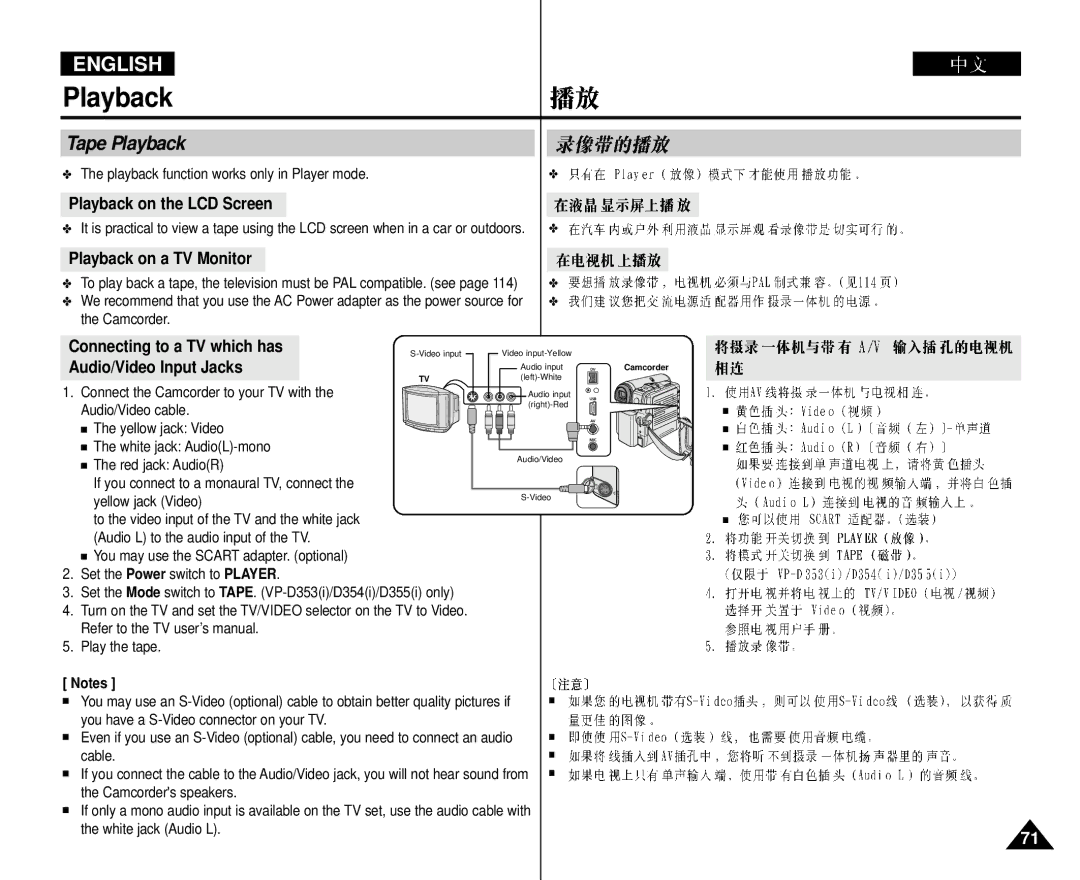
Playback on a TV Monitor
Connecting to a TV which has
Tape Playback
Playback on the LCD Screen
Playback
Connecting to a TV which has no Audio and Video Input Jacks
VP-D353i/D354i/D355i only
Various Functions while in Player Mode
Playback Pause
X2 Playback Forward/Reverse VP-D353i/D354i/D355i only
Reverse Playback VP-D353i/D354i/D355i only
Frame Advance To play back frame by frame
Reverse frame advance Press
Being operated
Playback Zoom function works in Player mode
Still image Set the Power switch to Player
Zooming during Playback PB Zoom
AV In/Out, then press the Menu selector
REC Pause mode
AV In/Out VP-D351i/D352i/D353i/D354i/D355i only
Record, then press the Menu selector
Dubbing Sound
Audio Dubbing VP-D353i/D354i/D355i only
Audio Select, then press the Menu selector
Dubbed Audio Playback
It may not operate properly
Card into the PC. not supplied
Functions may not work
Again
Mentioned above
Press the Start/Stop button to begin REC Pause mode
Ieee 1394 Data Transfer
System Requirements
USB Streaming requires Video Codec, DV Driver and DirectX
Windows 98SE/ME Full Speed USB
PC Camera, USB Stream or removable disk
USB Select function works only in M.Player mode
USB Connect , then press the Menu selector
USB Version to USB
USB Version , then press the Menu selector
By both PC and its OS Operating System
Programme Installation
Installing DV Media Pro 1.0 Programme
PC Camera
Using the PC Camera Function
Using the USB Streaming Function
Disconnecting the USB Cable
Terminal Protection tab
Memory Stick Optional Accessory
Memory Stick Functions
Memory Stick Memory Stick PRO
Inserting and Ejecting the Memory Card
VP-D353i only
VP-D354i/D355i only
Image Format
Selecting the Camcorder Mode
Memory Type, then press the Menu selector
Using Quick Menu Memory Type
Memory, then press the Menu selector
16MB
Selecting the Image Quality
Select the Image Quality
Number of Images on the Memory Card
To exit, press the Menu button
Using Quick Menu Photo Quality
Menu list will appear
File number setting works only in M.Cam mode
Memory File Number
Press the Menu button
Taking Photos
To view a Slide Show
Viewing Still Images
To view a Single Image
To view the Multi Display
Protection from accidental Erasure
Using Quick Menu Protect
Without using the Menu button Press the Menu selector
Message Do you want to delete all? appears
Deleting Still Images and Moving Images
Message Do you want to delete? appears
Deleting All image at once
Press the Menu selector
Using Quick Menu Delete
Functions by simply using the Menu selector
All files are deleted ! Do you want to format ? appears
Format function works only in M.Player mode
Formatting the Memory Card
Screen format of the moving picture to be recorded is
Following functions are not allowed in M.Cam Mode
Mpeg Recording
Saving Moving Picture Files onto a Memory Card
Mpeg Playback
Digital Still Camera Mode VP-D353i/D354i/D355i only
Select M.Play Select, then press the Menu selector
Using Quick Menu M.Play Select
Still image is recorded on the Memory card
Recording an Image from a Cassette as a Still Image
Rewind the tape to the point which you wants
Photo copy function works only in Player mode
Cassette onto a Memory card
You can copy still images recorded with photo function on a
Copying… is displayed on the screen
Then press Menu selector
Copying starts
Removing the Print Mark
Marking Images for Printing
Use the USB cable provided with the Camcorder
Using Quick Menu Print Mark
Move the Menu selector to left or right to select
Print Mark, then press the Menu selector
Selecting Images
Printing Your Pictures Using the PictBridgeTM
Connecting To a Printer
Setting the Number of Prints
Check with your printer manufacturer
Select Date/Time, then press the Menu
Selector
Printing Images
After Finishing a Recording
Maintenance
Power source
Samsung dealer or Authorised Service Centre
Cleaning and Maintaining the Camcorder
Cleaning the Video Heads
Cleaning cassette’s instructions for detailed information
PAL-compatible Countries/Regions
Using Your Camcorder Abroad
Power sources
Colour system
Moisture Condensation
Troubleshooting
Troubleshooting
Following simple checks
116
Symptom Explanation/Solution
Nearest Samsung authorised service centre
General
Specifications
Connectors
System
113
Index
Samsung Electronics’ Internet Home
This Camcorder is Manufactured by