00732M SCL901 SEA
ENGLISH
Getting to Know Your Camcorder
OSD (On Screen Display)
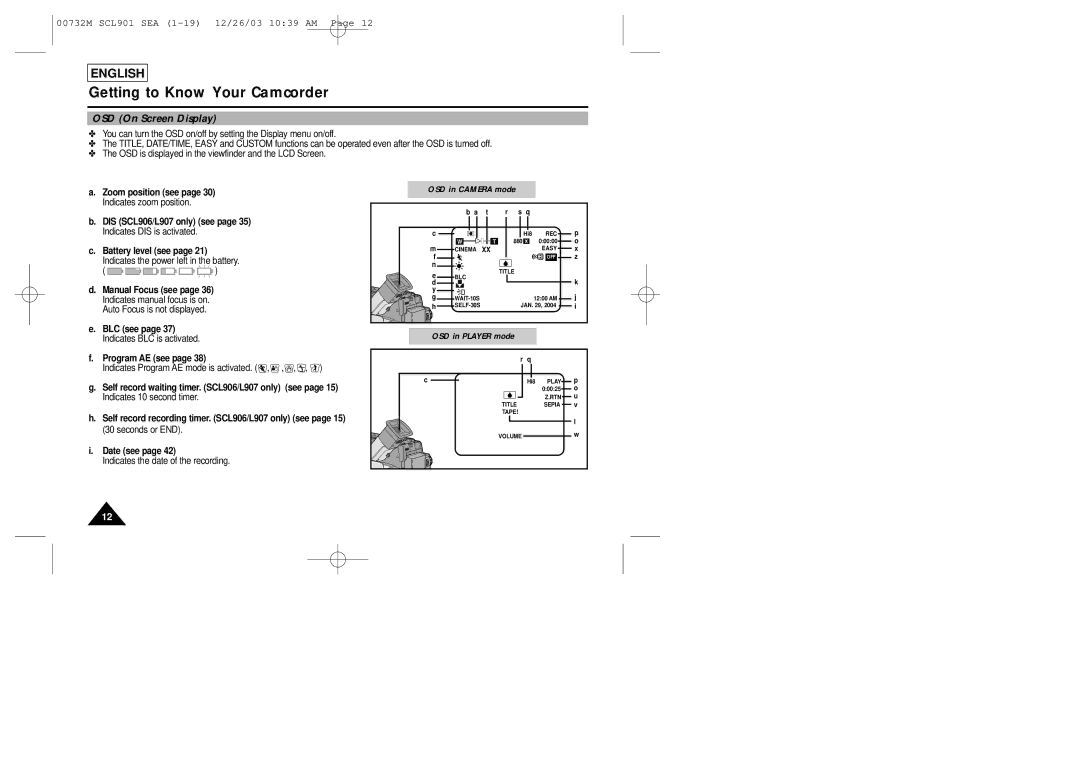
✤You can turn the OSD on/off by setting the Display menu on/off.
✤The TITLE, DATE/TIME, EASY and CUSTOM functions can be operated even after the OSD is turned off.
✤The OSD is displayed in the viewfinder and the LCD Screen.
a. | Zoom position (see page 30) |
|
|
|
| OSD in CAMERA mode |
|
|
|
| ||||
| Indicates zoom position. |
|
|
|
|
|
|
|
| r | s | q |
|
|
b. DIS (SCL906/L907 only) (see page 35) |
|
|
|
|
| b a | t |
|
| |||||
|
|
|
|
|
|
|
|
|
|
|
| |||
| Indicates DIS is activated. |
|
|
|
|
| c |
|
|
|
| Hi8 | REC | p |
|
|
|
|
|
|
|
| W | T | 880 x | 0:00:00 | o | ||
c. | Battery level (see page 21) |
|
|
|
|
| m | CINEMA | XX |
|
|
| EASY | x |
|
|
|
|
|
|
|
|
| ||||||
| Indicates the power left in the battery. |
|
|
|
| f |
|
|
|
|
| OFF | z | |
|
|
|
|
| n |
|
|
|
|
|
|
| ||
| ( | ) |
|
|
|
|
|
| TITLE |
|
|
|
| |
|
|
|
|
| e | BLC |
|
|
|
|
| |||
|
|
|
|
|
|
|
|
|
|
|
| k | ||
d. Manual Focus (see page 36) |
|
|
|
|
| d |
|
|
|
|
|
| ||
|
|
|
|
| y |
|
|
|
|
|
|
| ||
| Indicates manual focus is on. |
|
|
|
|
| g |
|
|
| 12:00 AM | j | ||
| Auto Focus is not displayed. |
|
|
|
|
| h |
|
| JAN. 29, 2004 | i | |||
|
|
|
|
|
|
|
|
|
|
|
| |||
e. BLC (see page 37) |
|
|
|
|
| OSD in PLAYER mode |
|
|
|
| ||||
| Indicates BLC is activated. |
|
|
|
|
|
|
|
|
| ||||
f. | Program AE (see page 38) |
|
|
|
|
|
|
|
|
| r | q |
|
|
| Indicates Program AE mode is activated. ( | , | , | , | , | ) |
|
|
|
|
|
|
| |
g. Self record waiting timer. (SCL906/L907 only) |
|
|
| c |
|
|
|
| Hi8 | PLAY | p | |||
| (see page 15) |
|
|
|
|
| 0:00:25 | o | ||||||
| Indicates 10 second timer. |
|
|
|
|
|
|
|
|
|
|
| Z.RTN | u |
|
|
|
|
|
|
|
|
|
| TITLE |
|
| SEPIA | v |
h. Self record recording timer. (SCL906/L907 only) (see page 15) |
|
| TAPE! |
|
|
|
| |||||||
|
|
|
|
|
| l | ||||||||
| (30 seconds or END). |
|
|
|
|
|
|
|
|
|
|
|
| |
|
|
|
|
|
|
|
|
| VOLUME |
|
| w | ||
|
|
|
|
|
|
|
|
|
|
|
| |||
i. | Date (see page 42) |
|
|
|
|
|
|
|
|
|
|
|
|
|
| Indicates the date of the recording. |
|
|
|
|
|
|
|
|
|
|
|
| |
12